
You are here:
Calculated Insights in Activation
Use Data 360 Calculated Insights to enable activation journey decisions and message personalization.
Calculated Insights metrics can help drive content personalization in Marketing Cloud Engagement.
Drag your completed Calculated Insights metrics onto any new or existing activation. Add dimension filters to your Calculated Insights metric for more granular insights on an activation.
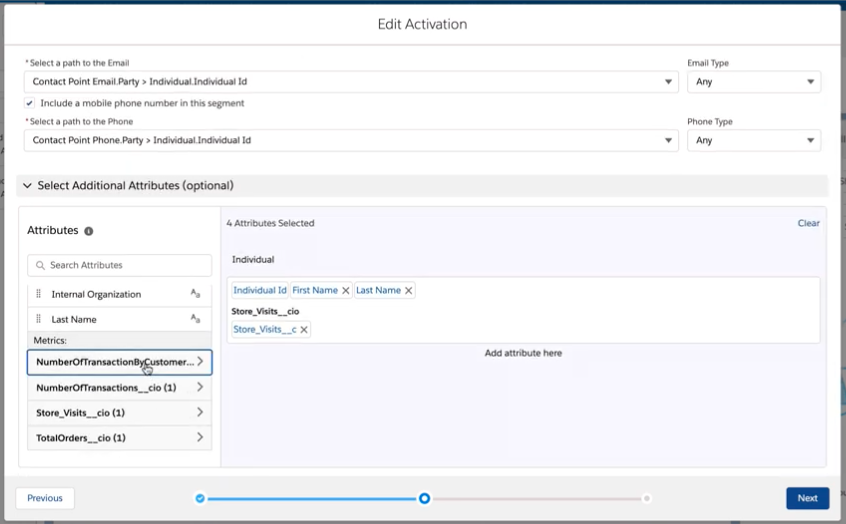
Calculated Insights includes two different categories when creating metrics: aggregatable and non-aggregatable.
Aggregatable Metrics
Dimension filters are optional for aggregatable metrics and you can still aggregate on the insight.
| Metric | Measure | Example |
|---|---|---|
| DateTime | Total Purchases | Min = The first purchase ever made, and Max = Most recent purchase made |
| Numeric | Total Purchases | Sum = The number of total purchases made |
Non-Aggregatable Metrics
At least one dimension filter is required for non-aggregatable metrics in order to narrow down the attribute to one specific value.
- Text
- Numeric

If the ‘Purchase Rank’ measure = 1, the ‘Product’ dimension = Pizza, and the ‘Date’ dimension = January, you can find one specific value since you added dimensions to the attribute. If you just had the ‘Purchase Rank’ measure, that itself is non-aggregatable and there would be no value.

If a dimension filter is a Date or DateTime for non-aggregatable metrics, the insight appears but the non-aggregatable metric is hidden. All aggregate metrics are available to be added as attributes still.
