
You are here:
Connect Salesforce CRM Orgs to Data 360
Connect your Salesforce orgs to Data 360 to ingest data from Salesforce objects for processing and unification in Data 360. Depending on the type of connection that you select, you can send back only data actions or harmonized Data 360 data. To access Data 360 data and features in your Salesforce CRM orgs, you must set up a Salesforce companion connection. Platform components, such as Flow, Apex, CRM, and data enrichment, can also access Data 360 data across companion orgs.
You can connect some orgs using standard CRM connections and others using Data Cloud One companion connections in the same architecture. Select the type of connection that best suits your company’s needs for profile unification and unified data sharing.
Example
NTO Sales provisioned Data 360 on their org. The NTO Customer
Service org and NTO Sporting Goods Retail org are connected to Data 360 via companion
connections, enabling bidirectional data sharing of selected data spaces between these orgs
and Data 360. They can set up features powered by Data 360 for their users and access to the
Data Cloud One app. NTO Materials Research is connected via a standard Salesforce CRM
connection. Its data is ingested into Data 360 and unified along with data from NTO's service
and retail orgs, but the materials research org can only receive data actions back.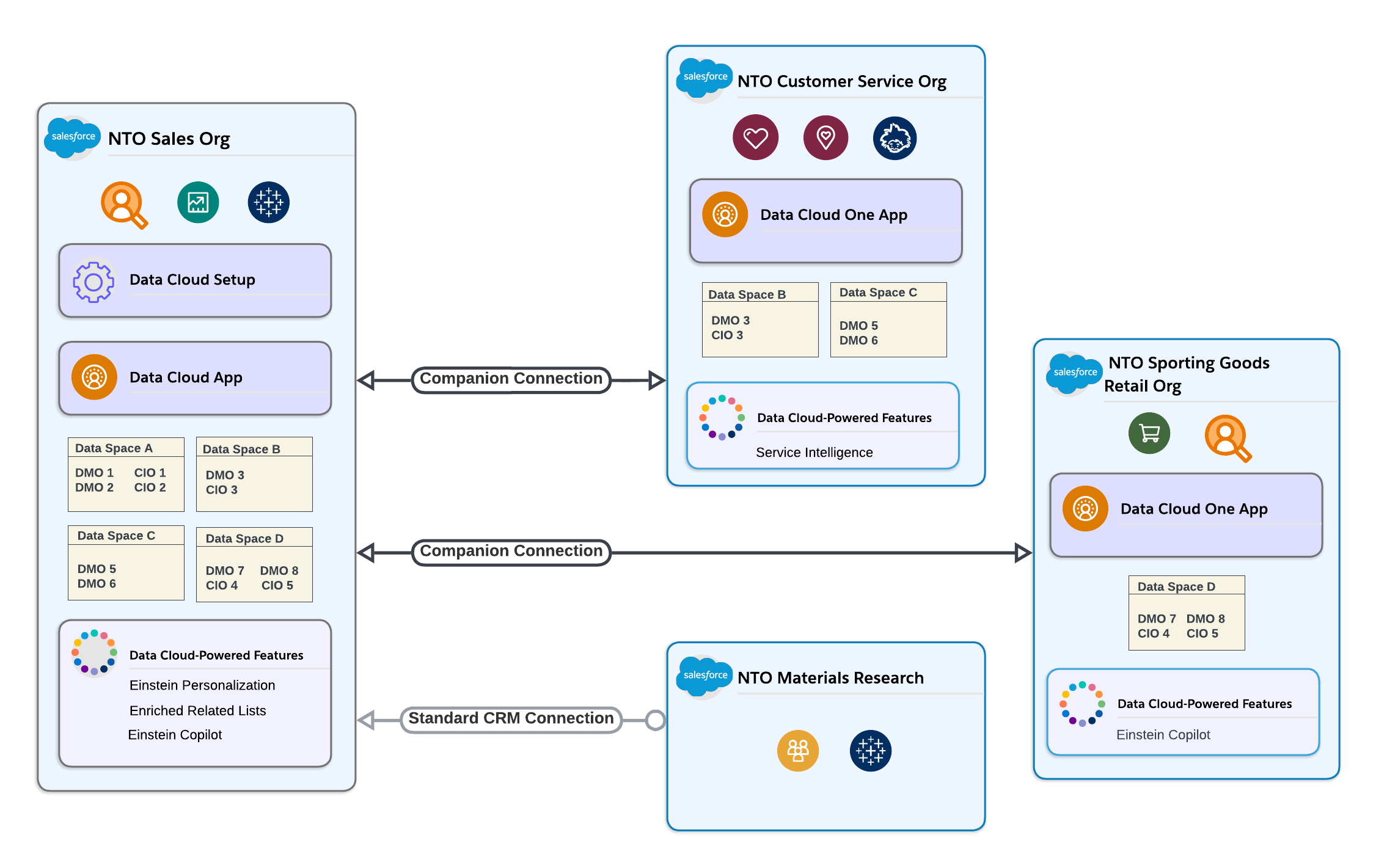
Home Org
The home org is the Salesforce org that Data 360 is provisioned on. It's automatically connected to Data 360 for you.
Companion Org
A companion org is any org that is connected to Data 360 via a Data 360 companion connection. Your home org can't be a companion org because it's connected by default. Users in companion orgs have access to a subset of Data 360 functionality in the Data Cloud One app. Data 360 data is available in companion orgs to power platform features like Flow and Enrichments.
Standard Salesforce CRM Connector
A standard Salesforce CRM connection from Data 360 to a Salesforce org enables Data 360 to ingest data and send back data actions. Standard connections don't sync metadata back to connected orgs and don't give connected orgs access to Data 360 features or data. You can't set up features powered by Data 360 if your org is connected to Data 360 only via a standard connection.
Data 360 Companion Connection
Use a Data 360 companion connection to create a bidirectional connection between a single Data 360 and one or more Salesforce orgs. A companion connection builds on the capabilities of a standard Salesforce CRM connection by syncing unified metadata back to the companion org. You can set up features powered by Data 360 when your org is connected to Data 360 via a companion connection.
Data Cloud One App
The Data Cloud One app is available on any companion org. The Data Cloud One app gives users on the companion org access to some Data 360 features. Not all Data 360 features are accessible in Data Cloud One.
- Compare Standard Salesforce CRM and Data Cloud One Companion Connections
You can connect a Salesforce org to Data 360 using a standard Salesforce CRM connection or a Data Cloud One companion connection paired with a standard connection. The table lists some of the differences between these types of connections.
