
You are here:
Considerations for Selecting Related Attributes in Data 360 Activations
Related attributes are data fields that belong to data model objects (DMO) connected to your primary or activation DMO. These attributes help you access information from other objects that are linked through a defined relationship path. There’s a direct relationship with the DMO, related attributes, and the filters you can apply.

When selecting related attributes, consider these guidelines:
- You can activate up to 25 values per related attribute.
- You can select up to 300 related attributes per activation.
- You can use up to 8 DMOs per activation.
- You can use up to 10,000 activations with related attributes. After reaching that limit, you can choose to delete related attributes from existing activations, delete unused activations, or create activations with only direct attributes.
- The segment size is checked at the time of activation. If the segment has more than 150 million records and contains related attributes when you publish, the segment doesn’t activate.
- A single customer (or Individual) can have multiple Sales Orders, each tied to different order details. You can select attributes from different DMOs across multiple paths from your activation DMO. For example:
- When applying filters on DMOs, you can use attributes from the filtered DMO itself or any of its related child DMOs. Attributes from unselected or inactive DMOs can also be used for filtering. Filters are optional. If no filter is applied, the activation considers all data from the selected DMO.
- The segmentation and activation attribute libraries achieve different purposes so they behave differently. In segmentation, the entire DMO hierarchy is displayed. In activation, the DMOs that are one hop away from the object are displayed. To get to other DMOs, click through the hierarchy.
- Activation doesn’t automatically acquire segmentation filters. To activate specific values for your attribute, apply filters to your activation. Use segmentation filters to find users who qualify for the segment. Use activation filters to find attributes for message personalization.
Related Attributes Filtering
Related Attributes filtering allows users to include only relevant data in the activation payload, by applying specific filter conditions. This makes sure that the activated data aligns with the campaign’s intent.
For example, a marketer wants to send an email to customers about their orders currently in the Shipping In Progress state. They’ll select attributes like Order ID and Order Details for activation, and apply a filter where Order Status = "Shipping In Progress". This ensures that only orders matching this status are included in the output.
Here's an example:
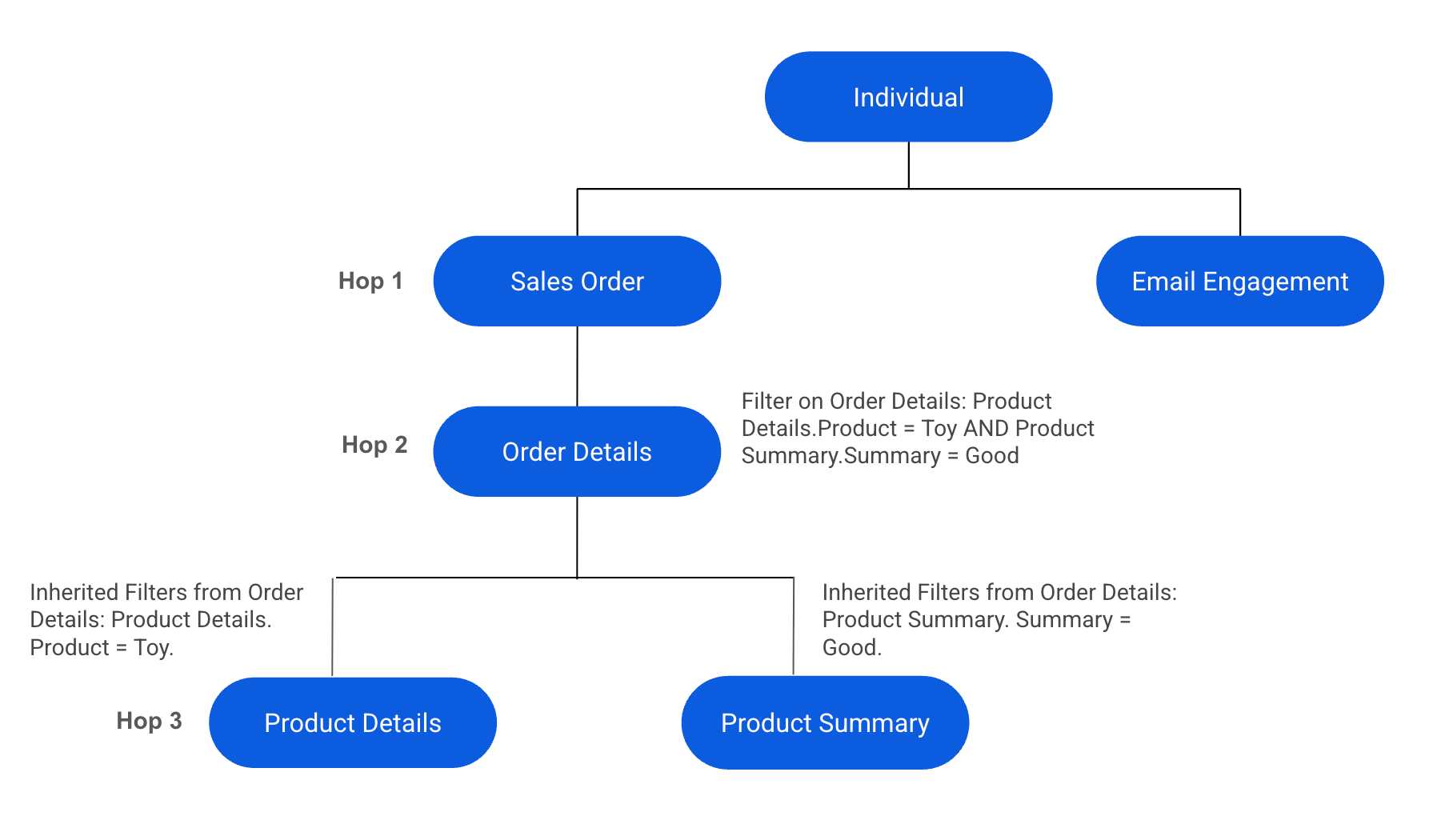
| DMO Name | Attributes Selected | Notes |
|---|---|---|
| Individual DMO | First Name, Last Name | |
| Sales Order DMO | Sales Order ID, Order | |
| Order Details DMO | Total Purchase Amount | Filters applied on Order details: Product Details.Product = Toy AND Product Summary.Summary = Good |
| Product Detail DMO | Product Name | Filters inherited from Order Details: Product Details. Product = Toy. |
| Product Summary DMO | Summary | Filters inherited from Order Details: Product Summary. Summary = Good. |
To retrieve all Sales Order IDs where the order includes the Product Name Toy and has a Product Summary marked as Good, you need to apply the filters on the Sales Order DMO.
As a result, only those sales order IDs that match the filter criteria are included. The filtering logic flows downstream from the DMOs where the filters are applied. This means that if you are activating attributes from Order Details, Product Detail, and Product Summary, they will all inherit the upstream filters applied on Sales Order. These filters affect the Order Details and Sales Order DMOs.
Filters aren't applied upstream, so any DMO upstream of Sales Order, such as the Individual DMO, remains unaffected. Consequently, the inherited filter also makes sure that all attributes downstream of Sales Order are implicitly filtered to show only details related to Toy and summaries marked as Good.
