
You are here:
How a Data 360 Clean Room Works
A clean room provides a secure environment for parties to collaborate on data without exposing personal information. You specify which data you want to share and under which terms. All data is encrypted and never leaves the clean room. Data Cloud uses robust privacy and security measures to prevent your collaborators from viewing sensitive data while giving you full transparency into how your metadata is accessed and queried.
You can collaborate in a clean room as a provider or as a consumer. To collaborate, both parties map their data to the clean room with the guidance of a collaboration template. The required and optional data fields are predefined in the template, along with the collaboration terms, such as the permitted queries, which party runs the queries, and which party receives the query results.
Data 360 clean rooms use data sharing between Data 360 orgs to securely associate metadata and allow federated querying of configured datasets. If you don’t have your data in Data 360, you can either ingest your data or use Zero-copy to associate your metadata to a clean room. When a query is run in a clean room, the required privacy measures are applied to the data. The query results, which are aggregated to preserve privacy, are stored in data model objects (DMOs), and you can create reports from them.
Collaborating in a Clean Room
Here’s the sequence of events for a clean room collaboration.
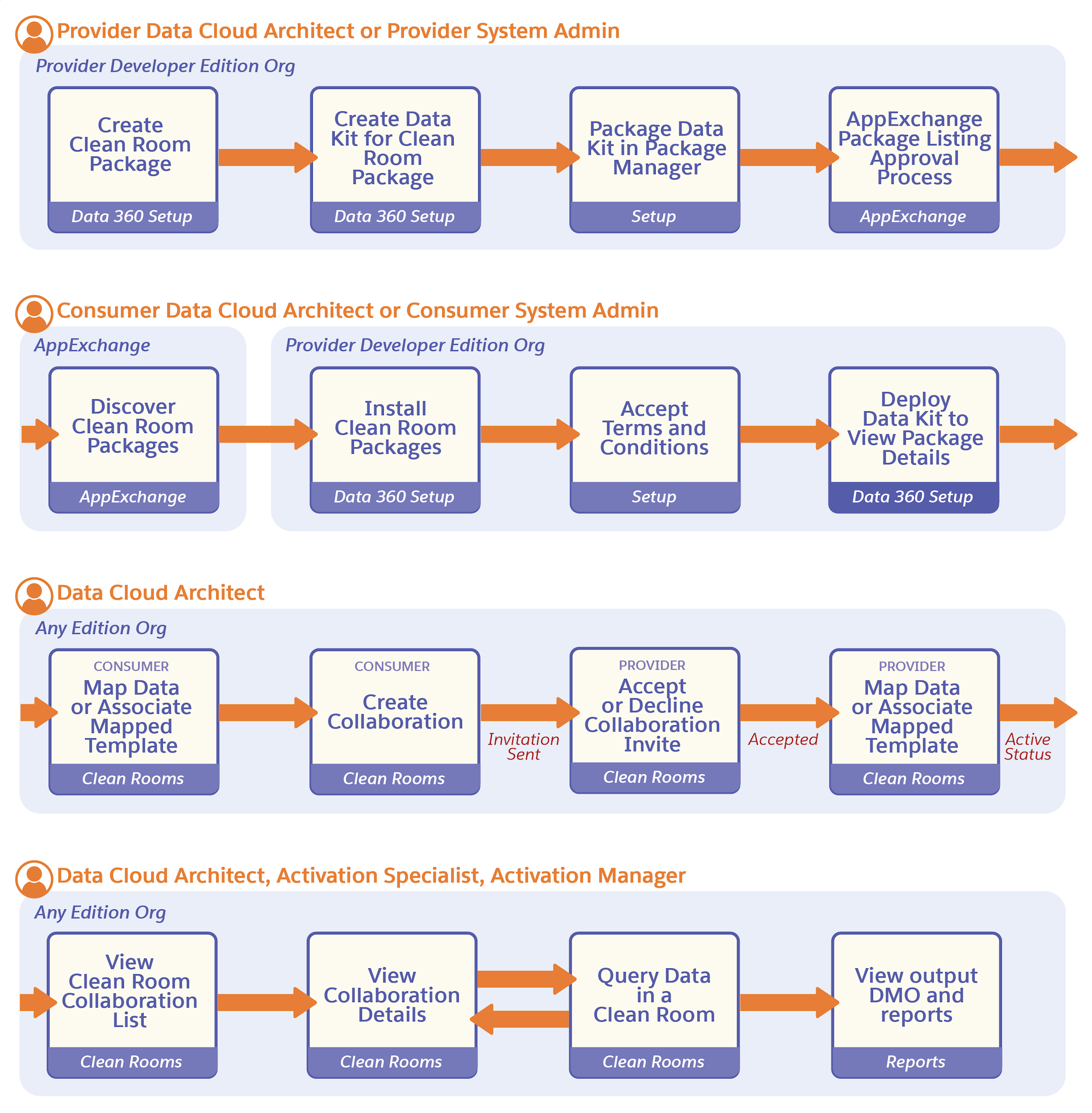
- The provider creates a clean room package in a Data 360 Developer org. The package can contain a custom or Salesforce-provided collaboration template. A custom template can support multiple use cases.
- The provider offers the clean room package to the consumer.
- The consumer deploys the clean room package.
- The consumer and provider create mappings between the attributes needed for a use case and the corresponding attributes from their dataset. You can also create mappings while initiating a collaboration.
- The consumer creates a collaboration for a specific use case and collaboration query.
- When the consumer saves the collaboration, the provider automatically receives an invitation for the collaboration.
- The provider accepts the collaboration invitation.
- The collaboration is now ready. The provider or consumer runs queries on the combined dataset according to the roles and permissions defined for the use case in the collaboration template.
- The collaboration results are stored in a DMO. Permitted parties can view the results and create reports based on them.
- Clean Room Providers
Providers are publishers or companies that own a platform and can offer access to data or advertising space to other companies. Data 360 Clean Rooms enable providers to collaborate using Salesforce Data 360 clean rooms or AWS clean rooms. - Clean Room Consumers
Consumers are advertisers seeking insights from providers’ data to find appropriate audiences for their products. Consumers can initiate a clean room by deploying a clean room package from AppExchange or by allowlisting a provider. If you allowlist a partner, you don’t need the clean room package to initiate a clean room collaboration. Use the Salesforce-provided collaboration template to initiate the collaboration.
