
You are here:
Data 360 Architecture Strategy
As you plan your multi-org architecture, consider these data tenancy, residency details, and administrative management details. In some cases, you need more than one Data 360 instance to fulfill legal or business requirements.
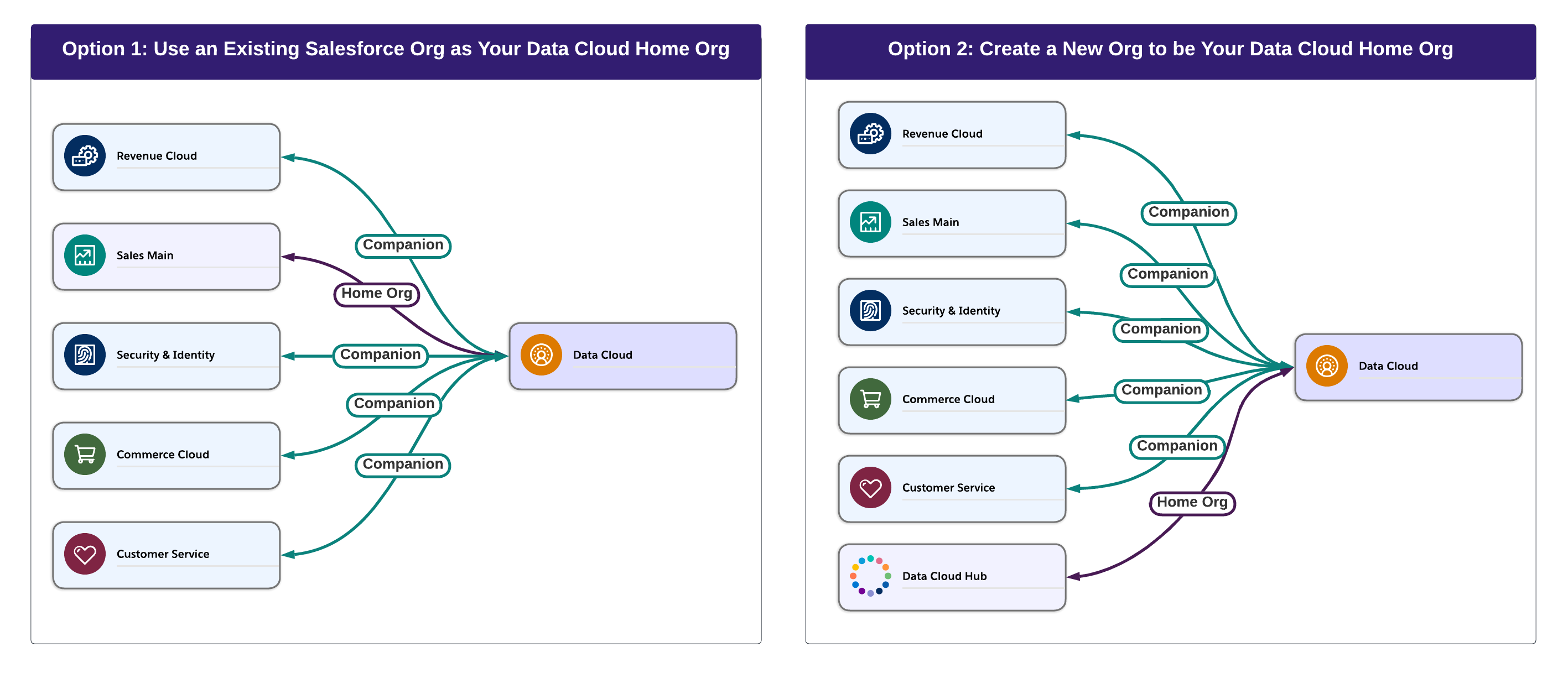
You can enable Data 360 on an existing Salesforce org or set up a new one as your Data 360 hub to keep Data 360 functionality separate from your existing Salesforce ecosystem.
Data 360 Data Residency Considerations
You can host your Data 360 org in a region that differs from other Salesforce clouds or external source systems. Data 360 can ingest data from multiple regions, but consult with your legal counsel and review your organization’s policies for data residency before doing so. You can also create one Data 360 per region and use Data 360 to unify and enrich data from multiple orgs in that region. For information on Salesforce’s data transfer mechanisms and related topics, see Salesforce’s privacy resources.
Data Processing Considerations
Data is processed when users view and update records, create objects that are shared between orgs, or generate reports. Connecting orgs with a standard CRM org or a Data Cloud One companion connection changes where data is processed, which could have legal implications. Review all applicable laws with your legal counsel and consult your business policies for data residency requirements.
Establishing a connection between data spaces in a home org and companion orgs causes data to be processed across all connected orgs. These orgs might be located in different territories. Consult the infrastructure and subprocesses doc to understand the applicable processing locations for your home and companion orgs. Configuring a new companion org doesn’t change the storage location of data in the home org.
Billing and Credit Consumption Considerations
Ingesting data from Salesforce orgs can have billing implications. Consumption of the credits still occurs on the home org.
Administration Considerations
When enabled on a Salesforce org, Data 360 can connect to and unify data from multiple sources. Enterprise-level data modelers and data architects can use Data 360 to establish a single source of truth for all business units across one or more Salesforce orgs. Where to set up Data 360 and how many instances of Data 360 to set up depends on your data architecture and data residency requirements.
Data 360 Architecture Considerations
Data needs—Access your organization’s data requirements, including data modeling, testing, and the need for separate environments.

Future growth—Identify your long-term growth objectives to confirm the decision to implement a single Data 360 instance.
Control vs Centralization—Assess whether all orgs require complete control over their data and Data 360 configurations. If so, creating multiple Data 360 orgs is advisable. However, if you want to centralize control across orgs, connect multiple orgs to a single Data 360.
Separation of functionality—If you enable Data 360 on a new Salesforce org, you can use that org exclusively for Data 360 tasks. For example, to set up separate administrative teams, set up Data 360 on a new org.
Shared functionality—If you enable Data 360 on an existing Salesforce org, all Data 360 features are available to users in the existing org. System admins in the existing org can access Data Cloud Setup.
- Multi-Brand Management in Data 360
To manage multiple brands, set up Data 360 across different location tenants. - Connect Salesforce CRM Orgs to Data 360
Connect your Salesforce orgs to Data 360 to ingest data from Salesforce objects for processing and unification in Data 360. Depending on the type of connection that you select, you can send back only data actions or harmonized Data 360 data. To access Data 360 data and features in your Salesforce CRM orgs, you must set up a Salesforce companion connection. Platform components, such as Flow, Apex, CRM, and data enrichment, can also access Data 360 data across companion orgs.
