
You are here:
About Data Spaces
A data space is a logical partition to organize your data for profile unification, insights, and marketing in Data 360. You can segregate your data, metadata, and processes into categories, such as brand, region, or department, and then enable users to see and work on data only in the context of their category. You can also merge and analyze data in data spaces.
Required Editions
| Available in: All Editions supported by Data 360. See Data 360 edition availability. |
| Available with add-on license: Data Spaces |
To learn more about Data Spaces, watch this short video.
As an example, your business has multiple brands and departments. You’re currently using multiple Data Cloud instances to ingest and segregate data for the various brands and departments. But by using data spaces, you don’t need to have multiple Data Cloud instances. Instead, you use the data spaces to segregate your data within a single Data Cloud instance. You can ingest data from any source at the same time to Data Cloud and then segregate it into multiple data spaces.
Your users can view and work on data only in the context of their data space. You can personalize the user experience and control user access through permission sets.
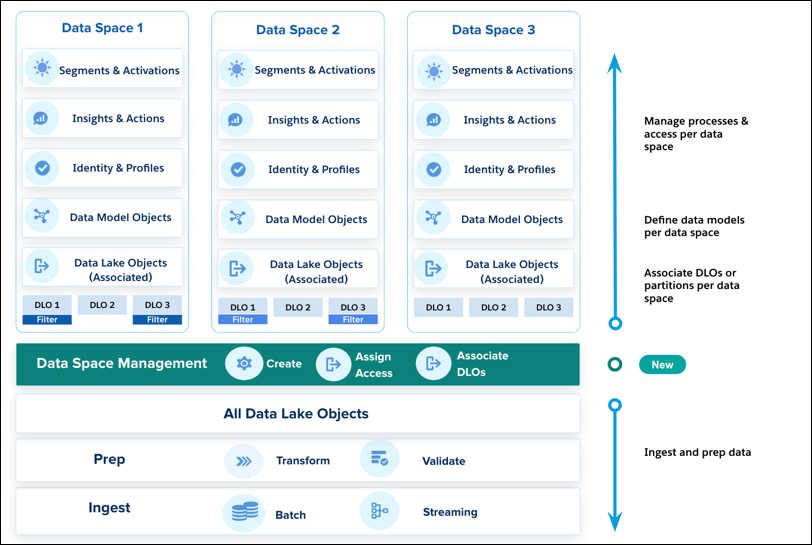
When you bring in data from any source to Data Cloud, you associate the data lake objects (DLOs) to the relevant data space with or without filters. After the DLO mapping, you can use the data space for creating relevant data models, calculated insights, identity resolution, data insights and actions, segmentation, activation, and so on.
- Create a Data Space
Every Data Cloud org is created with a default data space. Until you create other data spaces, all Data Cloud objects are mapped to the default data space. To segregate your brand, region, or department data and services, create more data spaces. - Edit or Delete a Data Space in Data Cloud
You can change a data space’s name and description, but you can’t modify its prefix. You can delete a data space that you no longer need. However, you can’t delete the default data space. - Add Data to a Data Space Using Data Lake Objects
You can associate a data lake object (DLO) to a data space with or without filters when you bring in data from any source to Data Cloud. You can add data by assigning the DLOs to specific data spaces. You can add a DLO to more than one data space. - Deploy a Marketing Cloud Engagement Bundle to a Data Space
Add Marketing Cloud Engagement data to a Data 360 data space based on the mapping. - Deploy a Salesforce CRM Bundle to a Data Space
Add Salesforce CRM data to a Data 360 data space based on the mapping. You can deploy only a standard data bundle to a data space. - Map Data Model Objects in a Data Space
Create connections between data lake objects (DLOs) in a data space and data model objects (DMOs). You can use only mapped fields and objects with relationships for segmentation and activation. - Data Space Aware Objects and Features
User access to data space-aware objects and features is controlled by setting the object permissions and feature permissions in the user's permission sets. Not all objects and features are data space aware. - Manage Feature Access Across Multiple Data Spaces
Learn to manage feature access across multiple data spaces. - Use Data Cloud APIs with Data Spaces
To use Salesforce Data Cloud APIs, you must be authenticated. Create an external client app or connected app to authenticate and request access to the Data 360 APIs. - Secure Your Data with Data Spaces
Logically segregate your data using Data Spaces so that different brands, regions, or business units can operate independently within the same Salesforce Data 360 instance. This segregation ensures that users access only the data that belongs to the Data Space they’re assigned to. Control access to data spaces with permission sets. By default, users with standard permission sets are granted access to the default data space. Create additional permission sets and customize which data spaces they’re associated with to change how users can view, update, or manipulate data in your org’s data spaces. - Replicate Metadata Across Data Spaces Using Local Data Kit Deployment
Use a local data kit deployment to replicate Data Cloud metadata and process definitions across multiple data spaces within the same sandbox org. Packaging configurations into a local data kit reduces manual effort, ensures consistency, and accelerates time to value when your data space strategy requires standardized definitions across different spaces. Standardization is especially important for deployments across geographies or brands where processes are defined centrally.
