
You are here:
Date and Datetime Formats
Data 360 supports date and datetime data types.

A field with a date or datetime data type must be accompanied by a date and time format. Data 360 references this format while parsing the data and writing it into a data lake object (DLO).

The system suggests a date or datetime format based on a small sample of your source data, and it is your responsibility to verify the suggestion. If you accept an incorrect suggested format without reviewing it, your data can be corrupted without failures.
For example, if your source data uses MM/DD/YYYY but the system suggests DD/MM/YYYY, a date like 03/07/2024 will be interpreted as July 3, 2024, instead of March 7, 2024.
To avoid data corruption, manually verify that the suggested format matches your source data exactly before proceeding. Review multiple rows of your source file or data stream to confirm the correct format. If the system's suggestion doesn’t match your data, edit the format manually.
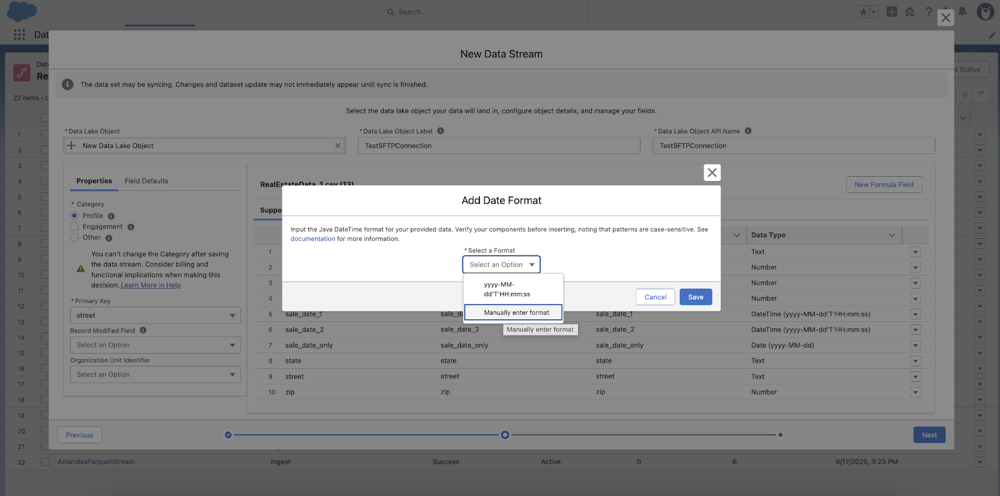
Data 360 recommends the applicable data type by reviewing the incoming raw data. It also suggests the format. If you choose to override a date type to a datetime or a datetime to a date type, make sure that the format stays the same so that it still reflects the format in the raw data.
Overrides are only available for file-based connectors (Amazon S3 Storage, Google Cloud Storage, Azure Storage, and SFTP).
The table samples the overriding behavior between date and datetime data types for these scenarios.
- Raw Data: Incoming data from the data source.
- Recommended Data Type: Data type auto-detected by Data 360.
- Recommended Date and Time Format: Date format suggested by Data 360 based on the raw data.
- Overridden Data Type: User specified data type.
- Overridden Date and Time Format: The date and time format that applies when overriding the data type.
- Stored Format: Format of the data stored in the DLO.
| Raw Data | Recommended Data Type | Recommended Date and Time Format | Overridden Data Type | Overridden Date and Time Format | Stored Format |
|---|---|---|---|---|---|
| 06/14/2022 | Date | MM/dd/yyyy | DateTime | MM/dd/yyyy | 06/14/2022 00:00:00 UTC |
| 06/14/2022 22:00:00 PST | DateTime | MM/dd/yyyy HH:mm:ss ZZZ | Date | MM/dd/yyyy HH:mm:ss ZZZ | 06/14/2022 |
| 06/14/2022 02:00:00 | DateTime | MM/dd/yyyy HH:mm:ss | Date | MM/dd/yyyy HH:mm:ss | 06/14/2022 |
The table shows the date and time pattern strings and their definitions. Use this table when validating the date and time format suggested for each field. The patterns are case-sensitive and failure to differentiate between cases can produce vastly different results. For example, “MM” is used to represent the month while “mm” represents the minute.
| Letter | Date or Time Component | Examples |
|---|---|---|
| G | Era designator | AD |
| y | Year | 1996, 96 |
| Y | Week-based year | December 31, 2019 Output is 2020, as December 31 falls in the first week of 2020. |
| M | Month in year | July, Jul, 07 |
| w | Week in year | 27 |
| W | Week in month | 2 |
| D | Day in year | 189 |
| d | Day in month | 10 |
| F | Day of week in month | 2 |
| E | Day name in week | Tuesday, Tue |
| U | Day number of week (1 equals Monday, 7 equals Sunday) | 1 |
| a | AM or PM marker | PM |
| H | Hour in day (0-23) | 0 |
| k | Hour in day (1-24) | 24 |
| K | Hour in AM or PM (0-11) | 0 |
| h | Hour in AM or PM (1-12) | 12 |
| m | Minute in hour | 30 |
| s | Second in minute | 55 |
| S | Millisecond | 978 |
| z | Time zone | Pacific Standard Time, PST, GMT-08:00 |
| Z | Time zone | -0800 |
| X | Time zone | -08, -0800, -08:00 |

- 2001 is the year 2001, represented as yyyy
- 07 is the month July, represented as MM
- 04 is the day in month, represented as dd
- T is a literal to separate the date from the time
- 12 is the hour in the day on a (0–23 hour clock), represented as HH
- 08 is the minute in the hour, represented as mm
- 56 is the seconds in the minute, represented as ss
- 235 is the milliseconds, represented as SSS
- -700 is the time zone, represented as Z
Ambiguous Date Formats
You might need to override a date format if the incoming values are ambiguous. For example, if all the sampled values have month and day parts like 01-02, Data 360 arbitrarily interprets it as either January 2 or February 1. However, if you apply the necessary context with the date and time pattern, the ambiguity is rectified.
If the month and day positions are reversed, the system may interpret the date as being years ahead, resulting in unexpected or future-dated records.
We don’t recommend using time zones represented by alphabetic abbreviations, such as EST, WST, or CST, because they can result in ambiguous interpretation. For example, CST can mean China Standard Time (UTC+8), Cuba Standard Time (UTC-5), and North American Central Standard Time (UTC-6).
Time zone abbreviations aren’t supported.
