You are here:
Fully Qualified Keys in Data Objects
Data 360 adds key qualifier fields to data lake objects (DLOs) and data model objects (DMOs). Key qualifier fields can also be added when you create object relationships and object mappings between DLOs and DMOs.
Key Qualifier Fields in DLOs
Data 360 adds key qualifier fields to DLO fields that contain either a primary key or a foreign key. The default value stored in a key qualifier field is null. You must create and configure key qualifiers for each DLO field that contains either a primary or foreign key.
A DLO’s primary key field is determined when the DLO is created. Data 360 determines that a DLO field is a foreign key field when the field is mapped to a DMO field and the DMO field is included in an object relationship.
Data 360 also adds field mappings between DLO and DMO key qualifier fields. These mappings are internally managed and aren’t listed on the field-mapping page.
Key Qualifier Fields in DMOs
Data 360 adds a key qualifier field for each primary key field in a DMO and for each DMO field that’s participating in an object relationship. However, regardless of how many relationships a specific DMO field is part of, the field has only one key qualifier field.
When a new DMO is created, a key qualifier field is automatically added to the DMO’s primary key field. When a new object relationship is activated, key qualifier fields can be added to the DMOs that are linked in the object relationship if those DMO fields don’t have corresponding key qualifier fields. Key qualifier fields and their associated DMO fields are listed in the Key Qualifier column on the DMO record home page.
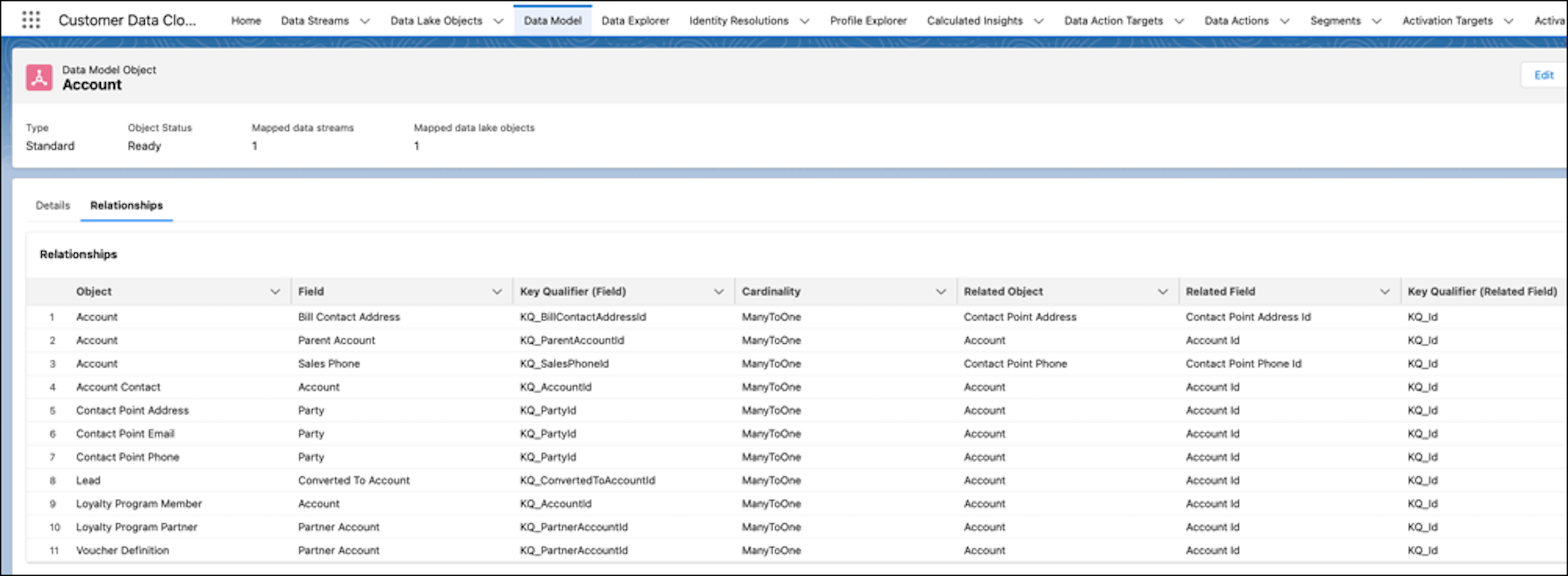
Because a fully qualified key is composed of a source provided key and a key qualifier, a DMO relationship also uses a composite key consisting of a key field and a key qualifier field. On the DMO record home page, the object relationship summary view shows the key qualifier fields that are part of each object relationship.