You are here:
Unify Individuals or Accounts Based on Party Identifier
Party identifier refers to the exact match of the Identification Number, Identification Name, and Party Identification Type fields in the Party Identification object. This type of match is useful for matching unique identifiers, such as government ID, first-party cookies, external MDM systems, and vendor-specific IDs.
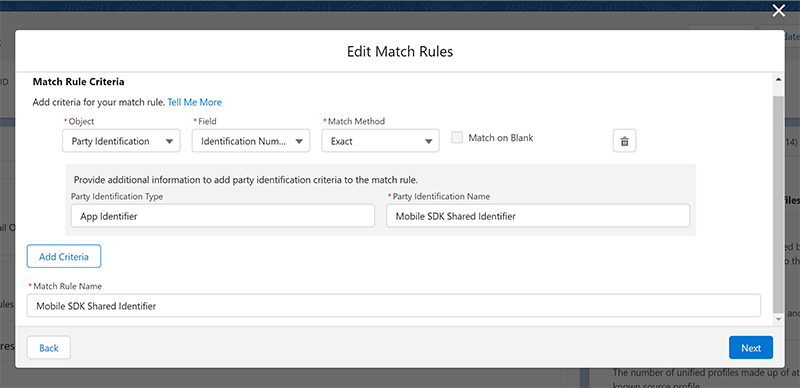
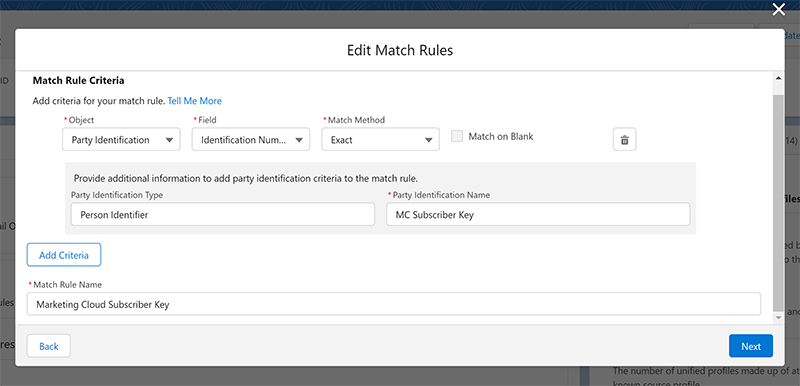
When integrating Salesforce CRM and Marketing Cloud Engagement, use the MC Subscriber Key as a party identifier. When using MobilePush, create an additional custom match rule to match the Mobile SDK Shared Identifier.
You can't use the Match on Blank matching option in match rules based on party identifier.
These fields must be mapped before you can use the party identification object in identity resolution.
- Party Identification ID
- The party identification ID is the primary key or the primary identifier from your customer data. It can be any unique ID.
- Party
- This ID field is a foreign key to an account or individual. A relationship must exist between account ID or individual ID and this field.
- Party Identification Type
- This field provides additional information about the identifier, for example, Social or Account Identifier. Be descriptive because it’s used to set up your match rules.
- Identification Number
- The ID used for identity resolution comparison. For example, a driver’s license number, subscriber ID number or external MDM ID number. You can't match identification numbers on blanks.
- Identification Name
- Similar to party identification type, this field specifies the name of the ID space. For example, Mobile ID, D-U-N-S number, or LinkedIn ID. This name is also used in match rule setup.

Suppose you ingest data from multiple sources that all contain driver license information. In this example, three data sources contain information about an individual with the California driver’s license ID number D1469256. If you set up matching on party identifier, these three individual records (10016-00001, 10017-00001, and 10018-00001) are resolved into a single unified individual.
| Identification Number | Identification Name | Party Identification Type | Party | Party Identification ID |
|---|---|---|---|---|
| D1469256 | CA License Number | CA Driver License | 10016-00001 | 100 |
| D1469256 | CA License Number | CA Driver License | 10017-00001 | 101 |
| D1469256 | CA License Number | CA Driver License | 10018-00001 | 102 |
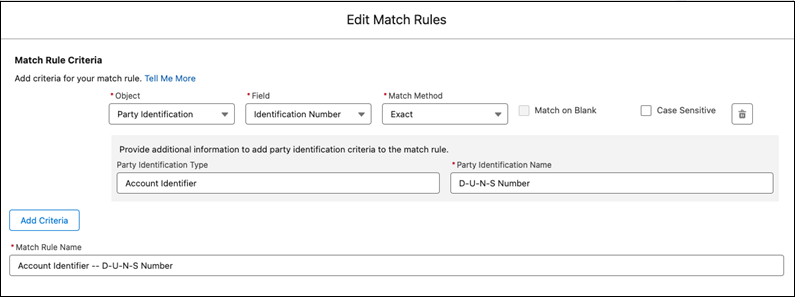
Identifiers can be an effective match method for accounts. To ensure that these records are appropriately joined in Data 360 as a single, unified account, add these custom match rules based on the Party Identification object. If your data includes more than one type of account identifier, set up separate match rules for each identifier.
- Match on D-U-N-S Number
- To match accounts from any data sources that include the D-U-N-S number, create a
custom match rule with this criteria.
- Object—Party Identification
- Field—Identification Number
- Match Method—Exact
- Party Identification Type—Account Identifier
- Party Identification Name—D-U-N-S Number
-
Engagement data bundles represent subscriber data across Email Studio, MobileConnect, and MobilePush. To ensure that these records are appropriately joined in the Data 360 as a single, unified individual, add these custom match rules based on the Party Identification object.
- Match on MC Subscriber Key
- To match to any other existing data sources that share the MC subscriber key, create a
custom match rule with this criteria.
- Object—Party Identification
- Field—Identification Number
- Match Method—Exact
- Party Identification Name—MC Subscriber Key
- Party Identification Type—Person Identifier
-
- Match on Mobile SDK Shared Identifier
- Engagement data can include both known and unknown records with different subscriber
keys for the same individual. In orgs using Mobile SDK to track app usage, unify known
and unknown records with a custom match rule based on the Mobile SDK Shared Identifier.
- Object—Party Identification
- Field—Identification Number
- Match Method—Exact
- Party Identification Number—Mobile SDK Shared Identifier
- Party Identification Type—App Identifier
-