
You are here:
Join Data in a Streaming Transform
Joins enable data augmentation by combining data from two separate streams based on a primary key. In streaming data transformations, `INNER JOIN` and `LEFT JOIN` clauses in SQL statements are used to combine data from two distinct streams. A join expression consists of two objects: one identifies the object that triggers the streaming transform on update, and the other specifies the object used to evaluate the join.
Required Editions
| Available in: All Editions supported by Data 360. See Data 360 edition availability. |
| User Permissions Needed | |
|---|---|
| To edit a streaming transform | Permission set:
|
- The join condition must include the
ONclause. TheONclause has the formcolumn = column - Each side of the
ONclause can only reference one column from one side of the join, and the other side references the other side of the join. - Columns used in the ON clause must have the same data type.
- Multiple joins can be combined using additional
INNER JOINorLEFT JOINclauses. Up to 5 objects can be joined in one SQL statement. - Any object that can be used as a source object in a streaming transform can be used in a join.
- The event time field column must be used for non-streaming ‘engagement’ inputs. All other joins must include a primary key from either object in the join.
- Create a target DLO or DMO for the data of the joined records.
- Create a new streaming transform by clicking New on the Data Transforms tab.
- On the Target Data Lake Object or Target Data Model Object page, select the DLO or DMO you created.
- In the Expression field, enter a SQL statement to define the join.
- Click Next.
-
From the Review section, you can select a streaming source object if multiple streaming
sources are available.
When new records are added to the chosen streaming source object, changes in the streaming transform source will cause the transform to run.
- Click Save.

This example demonstrates an inner join of two tables: a sessions table and a customer table. The sessions table logs every customer engagement event, recording the customer's ID and the timestamp of their page access. The customer table stores customer information such as age, gender, and ID. Joining this data allows for analysis such as determining the number of customers from a specific state who visited a page on a given date.
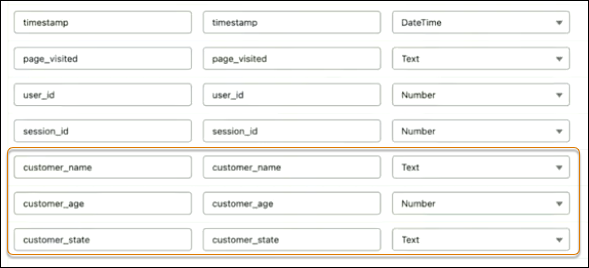
Target DLO
Create a new DLO by cloning the existing DLO for the sessions table. Include columns that are required for the join from the customers table.
SQL Expression
SELECT
sessions__dll.page_visited__c as page_visited__c,
sessions__dll.sesson_id__c as session_id__c,
sessions__dll.timestamp__c as timestamp__c,
sessions__dll.user_id__c as user_id__c,
customers_dll.age__c as age__c,
ustomers_dll.state__c as state__c,
customers_dll.customer_name__c as customer_name__c
FROM session__dll INNER JOIN customer__dll
ON customers__dll.customer_id__c = sessions__dll.user_id__c| SQL | Description |
|---|---|
FROM session__dll INNER JOIN customer__dll |
The tables to join. |
ON customers__dll.customer_id__c = sessions__dll.user_id__c |
The condition from which the records are matched. |
|
The condition from which the records are matched. |
Results
If sessions__dll is selected as the stream source object when saving the data
stream, the transform is only triggered when new records are added to the sessions__dll
streaming object. New customer__dll records don't trigger the
streaming transform.
