
You are here:
Activate an Audience with Contact Points and Attributes
Cumulus activates an audience with contact points and attributes for their journey.
- In Data 360, click the Activations tab.
- From the list, select the Omni-Channel Credit Limit Alert segment.
- Select Marketing Cloud Engagement-Cumulus BU as the activation target or the destination of the segment data.
- Confirm activation membership on the Unified Individual profile and click Continue.
- Select Email and SMS as the contact points for the campaign.
- Confirm the email address, phone number paths, and source priority orders.
- Click Next.
 Note Because multiple Individuals can relate to a Unified Individual, the Unified Individual can have more than one contact point for a given channel. Based on the source priority configuration, Data 360 selects a single contact point from the Unified Profile for both Email and SMS and then selects its corresponding email SubscriberKey. However, Data 360 doesn’t filter Individuals or contact points as part of activation. This action can bypass the consent or preference controls that your company has in place. Review Considerations and Best Practices for more information.
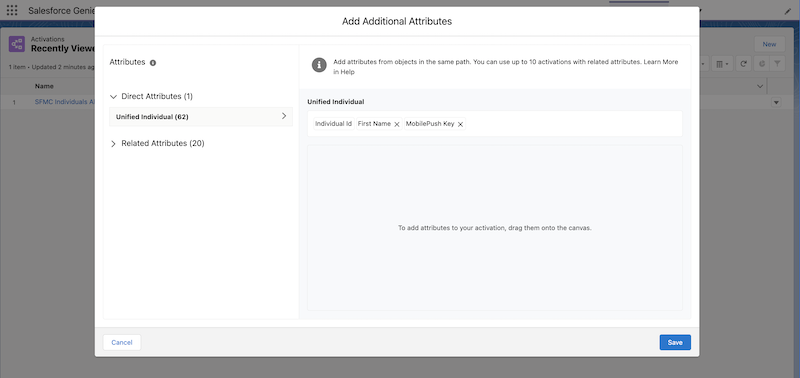
 - Click Add Attributes.
- Add the MobilePush Key attribute from the direct attribute list.
- Add other applicable attributes, and click Save.
- Name the activation Omnichannel Credit Alert.
- Click Save.
The resulting data extension contains all the required information to execute an Omni-Channel journey, including contact point addresses from various Individuals related to the given Unified Individual. The resulting data extension would look like this example.
| Sourced from Unified Individual Profile of John Smith | |||||
|---|---|---|---|---|---|
| Individual ID | EmailAddress | FullName | PhoneNumber | Country | MobilePushSubscriberKey |
| John.Smith.Email | john.smith@example.com | John Smith | 555-123-1234 | United States | John.Smith.MobilePush |
| Selected from the Individual profile of John.Smith.Email | Selected from the Individual profile of John.Smith.SMS | Selected from the Individual profile of John.Smith.MobilePush | |||
Did this article solve your issue?
Let us know so we can improve!
