
You are here:
Configure Omnichannel Journey Settings
Next, Cumulus configures their omnichannel settings. When a journey uses the Omnichannel Credit Limit Alert data extension Entry Source, Journey Builder defaults all orchestration, personalization, and sending lookups based on the value of the MobilePush Key. This Key is represented by the MobilePush SubscriberKey selected from the Calculated Insight. This action enables you to natively send messages using MobilePush activities.
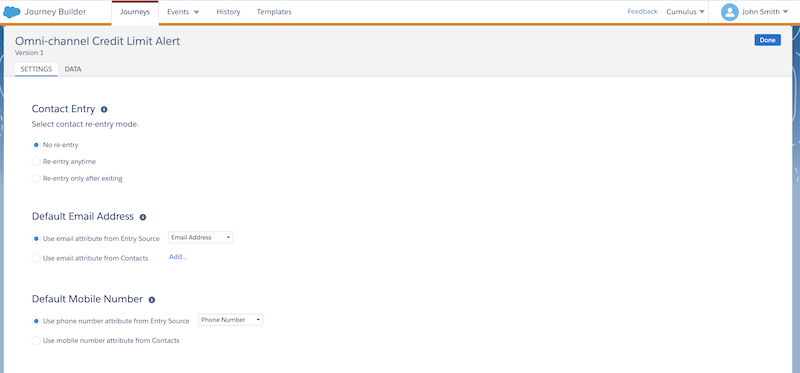
However, the MobilePush Key doesn't natively have an email address or phone number saved to it. To send messages to Email and SMS activities, use the Journey Settings feature to tell Journey Builder which addresses in the data extension to use for those send activities.
- In Journey Builder, select Settings and click Journey Settings.
- For Contact Entry, select Re-entry only after exiting.
- For Default Email Address, select Use attributes from Entry Source
and then select the Email Address attribute from the dropdown.
 Note To use an email address from another data extension, select Use attributes from Contacts and then choose an attribute from the Contact Model.
 - For Default Mobile Number, select Use attributes from Entry Source and then select the Phone Number attribute from the dropdown.
- Click Done.
Did this article solve your issue?
Let us know so we can improve!
