
You are here:
Define Reconciliation Rules to Prioritize Values for the Unified Individual
Reconciliation rules specify how to select the best value for a Unified field when that field can store only one value, such as a person’s first name.
In our example, Cumulus imported data from three different systems. Some fields, such as FirstName, can have different values within each system. For Data 360 to prioritize a value when activating an audience to Marketing Cloud Engagement, Cumulus must define reconciliation rules.
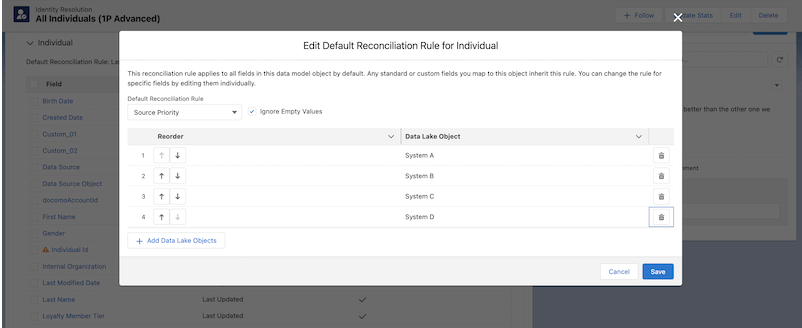
Cumulus chooses the Source Priority rule for most of their fields. Because their primary external database (System A) is its most trusted and up-to-date system, they intend to prioritize the values that come from this database.
- In the Identity Resolution ruleset that you created, scroll to the Reconciliation Rules section.
- To expand the fields, click Individual.
- Select the fields to update.
- Click the edit icon.
- Select Source Priority.
- Choose whether to Ignore Empty Fields.
- Click Save.
- Match on Mobile SDK
Shared Identifier.
 Note Customers must implement Mobile SDK to include both Data 360 and MobilePush modules.
 - Enter a name for the Match Rule and click Next.
- Read the overview and click Save.
Did this article solve your issue?
Let us know so we can improve!
