
Loading
Feature Degradation | Agentforce Voice Read More
About Salesforce Data 360
Table of Contents
Select Filters

          No results
          No results
          Here are some search tips

          Check the spelling of your keywords.
          Use more general search terms.
          Select fewer filters to broaden your search.

          Search all of Salesforce Help
          Publish a Segment in Data 360

          Publish a Segment in Data 360

          After defining your segment in Data 360, you can publish it to your activation targets whenever you want or based on a schedule when the segment was created. The standard publish schedule is 12 or 24 hours. You can also change the segment schedule by editing its properties. When you’ve reached the segment publish concurrency limit, Data 360 defers the publish of other segments. This deferral continues until the number of simultaneously running segments falls below the limit. This means that a segment scheduled at a specific time sometimes doesn’t start publishing at its scheduled time.
          Required Editions

          Available in: All Editions supported by Data 360. See Data 360 edition availability.
          Permission Sets Needed
          To publish a segment:

          One of these permission sets:

          • Data Cloud Architect
          • Data Cloud Activation Manager
          • Data Cloud Activation Specialist
          1. In Data 360, go to Segments.
          2. Select your segment from the list.
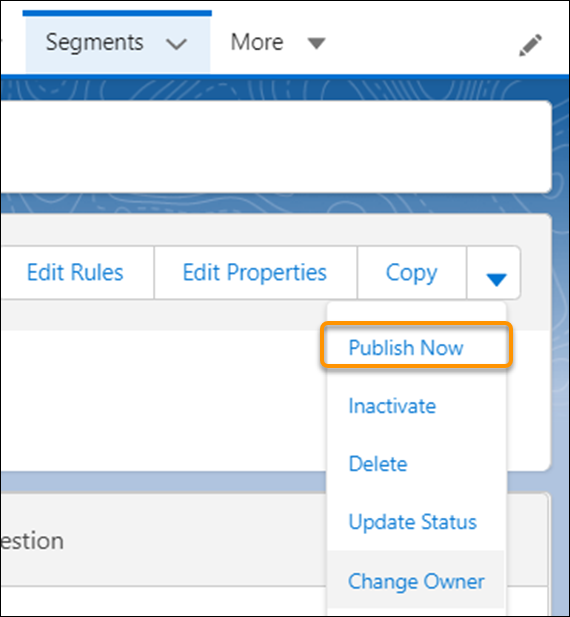
          3. On the segment details page, to have the activation target pick up the segment, click the dropdown menu and select Publish Now.
            Publish now option from Segment details
            The amount of time it takes to publish the segment depends on your volume and activation target. To see when the segment was published, check the Publish History page. To schedule publishing, edit the segment’s properties.
          • Increase Segment Refresh from Data 360 to the Activation Targets
            Increase the frequency of segment refresh and shorten publishing time for activations from Data 360 to the activation targets using rapid segment publish. When you create a segment, choose a 1-hour or 4-hour schedule to send activation data, as compared to a standard 12-hour or 24-hour schedule. Each segment filters only the past 7 days of engagement data. Any records outside this window aren’t considered when selecting your output values.
          • Segment Types and Statuses
            Learn more about the values provided about each segment. View details in the Segments section of Data 360, or in Publish History for a specific segment. Depending on how you create the segment, the type can be UI (created via the Segment Builder) or DBT (created via the API).
           
          Loading
          Salesforce Help | Article