
You are here:
Chunking Strategies
Data 360 supports several chunking strategies. Data 360 automatically chooses the optimal chunking strategy based on the content type you're working with.
For example, consider the fields that provide the most relevant context and semantic meaning, how to break those fields up, and how you expect the retrieved results to be used in your Einstein Gen AI, automation, analytics application. For example, chunk the custom text fields of a Knowledge Article DMO using the Passage Extraction strategy to make it easier to return semantically similar results when you search across Knowledge objects.
- Section-Aware Chunking
- Semantic-based passage extraction
- Conversation-based chunking
- Prepend field chunking
Section-Aware Chunking
Section-aware chunking uses title and heading elements to chunk documents. All text under a section title or heading element is chunked together until Data 360 encounters a new section title or heading element. This allows you to chunk content in coherent sections based on the structure of a document.
Sections are never split arbitrarily—chunks always respect natural content boundaries, preserving readability and context. Sometimes short paragraphs or list items are misidentified as standalone sections This can lead to overly small chunks. To avoid this, use these settings when creating a search index.
- Max Token: Combine adjacent small sections into a larger chunk, optimizing for chunk size without sacrificing coherence. See How the Max Token Setting Affects Chunking.
- Overlap Tokens: Only used when multiple chunks are created from a single section. Specify the number of tokens to add from the end of each chunk to the beginning of the next chunk. This creates contextual overlap between consecutive chunks, ensuring smooth transitions and better performance in tasks such as search and retrieval.
You can group multiple paragraphs into a single chunk if the combined content stays within the configured token limit.
When the token limit is reached, the chunking logic ensures clean breaks—it doesn’t split in the middle of a sentence or paragraph. Instead, it extends to the end of the paragraph, maintaining semantic and structural integrity across chunks.
For example, this text is divided into sections based on its title and following section headings.
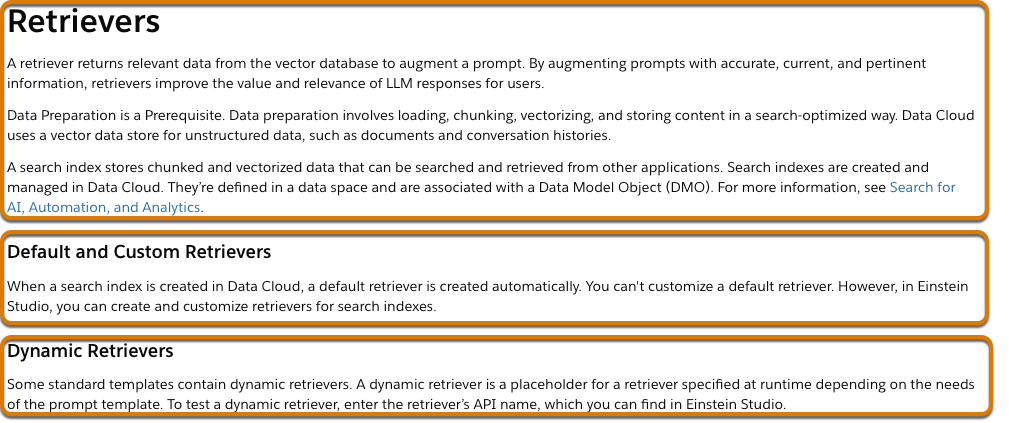
An example portion of the resulting chunk data model object contains these records.
| Chunk Sequence Number | Chunk | Chunk DaTAsource Object | Datasource |
|---|---|---|---|
| 1 | Retrievers A retriever returns relevant data from the vector database
to augment a prompt. By augmenting prompts with accurate, current, and pertinent
information, retrievers improve the value and relevance of LLM responses for
users. . . |
DataSourceObject__c |
DataSource__c |
| 2 | Default and Custom Retrievers When a search index is created in Data
Cloud, a default retriever is created automatically. You can't customize a default
retriever. However, in AI Models, you can create and customize retrievers for
search indexes. |
DataSourceObject__c |
DataSource__c |
| 3 | Dynamic Retrievers Some standard templates contain dynamic retrievers.
A dynamic retriever is a placeholder for a retriever specified at runtime
depending on the needs of the prompt template. To test a dynamic retriever, enter
the retriever’s API name, which you can find in AI Models. |
DataSourceObject__c |
DataSource__c |
When you create a search index configuration in the Data 360 advanced builder, section-aware chunking is the default chunking strategy for HTML and PDF files.

Semantic-based Passage Extraction
Semantic-based passage extraction uses the semantic meaning inherent in HTML tags to chunk a document into passages. These HTML elements are considered logical boundaries for chunks.
- Heading levels 1-6
<h1-h6> - Thematic breaks
<hr> - Bold
<b>–Used when the tagged text is on its own line, or if it is used on text in a paragraph where thefont_weightis set to 700 or higher or thefont_weightis set tobold - Strong
<strong>—Used when the tagged text is on its own line, or if it is used on text in a paragraph where thefont_weightis set to 700 or higher or thefont_weightis set to bold - Paragraph
<p>—Used when the tagged text is on its own line - Line break
<br>—Used when current chunk exceeds the token limit
For example, this text includes several HTML elements.
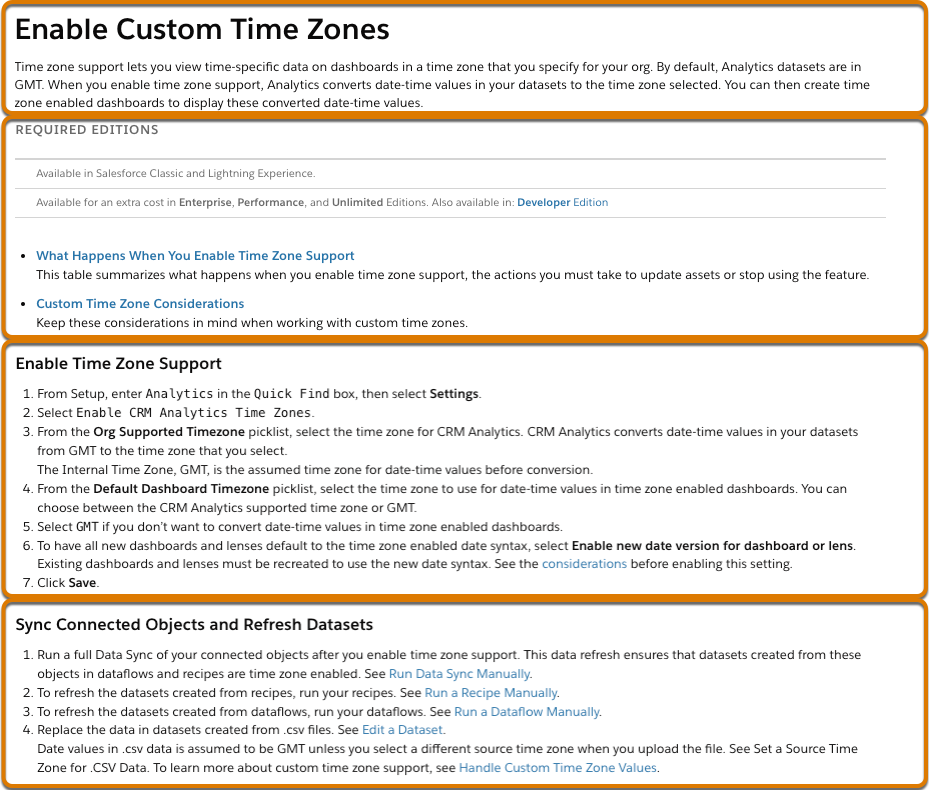
Here’s its HTML equivalent
<h1>Enable Custom Time Zones</h1>
<p>Time zone support lets you view time-specific data...</p>

<h4>REQUIRED EDITIONS</h4>
<p>Available in Salesforce Classic and Lightning Experience</p>
<p>...</p>

<h2>Enable Time Zone Support</h2>
<ul>...</ul>
An example portion of the resulting chunk data model object contains these records.
| ChunkSequenceNumber | Chunk | Datasource Object | Datasource |
|---|---|---|---|
1 |
Enable Custom Time Zones Time zone support lets you view time-specific
data.... |
DataSourceObject__c |
DataSource__c |
2 |
REQUIRED EDITIONS Available in Salesforce Classic... |
DataSourceObject__c |
DataSource__c |
3 |
Enable Time Zone Support From Setup, enter
Analytics... |
DataSourceObject__c |
DataSource__c |
4 |
Sync Connected Objects and Refresh Datasets Run a full Data Sync of
your connected objects... |
DataSourceObject__c |
DataSource__c |
If there is no content between two heading tags, those tags and subsequent content will appear in one chunk instead of two. Data 360 combines as many header tags as can fit into a single chunk if there is no content between the headings.
By default, Data 360 first uses the semantic-based method, but if some resulting passages
are too long, they’re processed further using window-based passage extraction. Window-based
extraction uses block-level elements such as <div> and
<p> tags, or raw text separated by line breaks
<br>, to chunk documents into passages. If a paragraph doesn’t contain
HTML, the aggregation is done at the sentence level.
Conversation-based Chunking
Conversation-based chunking segments transcribed data from audio and video files into chunks, typically separated when the voice changes.
During transcription, if there are multiple speakers, each chunk represents the speech of an individual speaker.
Here’s the first few lines of a transcript.
"Hello? Hi Alex, it's Sam from Bullseye. I didn't hear from you yesterday, so I wanted to check in. Hi Sam, sorry about that."A portion of the resulting chunk data model object contains these records.
| ChunkSequenceNumber | Chunk | Start Timestamp | End Timestamp | Speaker |
|---|---|---|---|---|
1
|
Hello?
|
1.051
|
1.253
|
SPEAKER_00
|
2
|
Hi Alex, it 's Sam from Bullseye. I didn't hear from you yesterday, so I
                  wanted to check in.
|
3.203
|
8.418
|
SPEAKER_01
|
3
|
Hi Sam, sorry about that.
|
10.263
|
11.546
|
SPEAKER_00
|
Prepend Field Chunking
When you need to add additional metadata to provide context for chunks generated from DMOs or
UDMOs, prepend fields to chunks. For example, the Description field in a
Knowledge article could exceed the optimal chunk size for prompt-based retrieval. By
prepending the Title field to the chunk, you can provide more context in
the prompt results.
This table provides some examples of useful metadata fields.
| Type | Metadata Field Examples |
|---|---|
| DMO (Knowledge Articles) |
|
| UDMO (External blob store connectors) | File Path |
| UDMO (Webcrawler or Sitemap connectors) |
|
Configure fields to prepend to chunks from DMOs or UDMOs in the search index advanced setup for vector or hybrid search.
The max token limit for a chunk is 512 so ensure that any fields you choose for prepending have values within that limit. Data 360 skips prepending fields if the length of the prepended fields is greater than 512 tokens.
