In Data 360, you can create searchable semantic vector embeddings from your
unstructured and structured data. Vector search helps your generative AI, automation, and
analytics applications understand semantic similarities and context between
embeddings.
Vectorization is the process of embedding your unstructured data into numerical
representations of data that machines can read. Vector embeddings are used to measure the
semantic closeness of different pieces of text to create accurate and relevant results in your
RAG and agent queries.
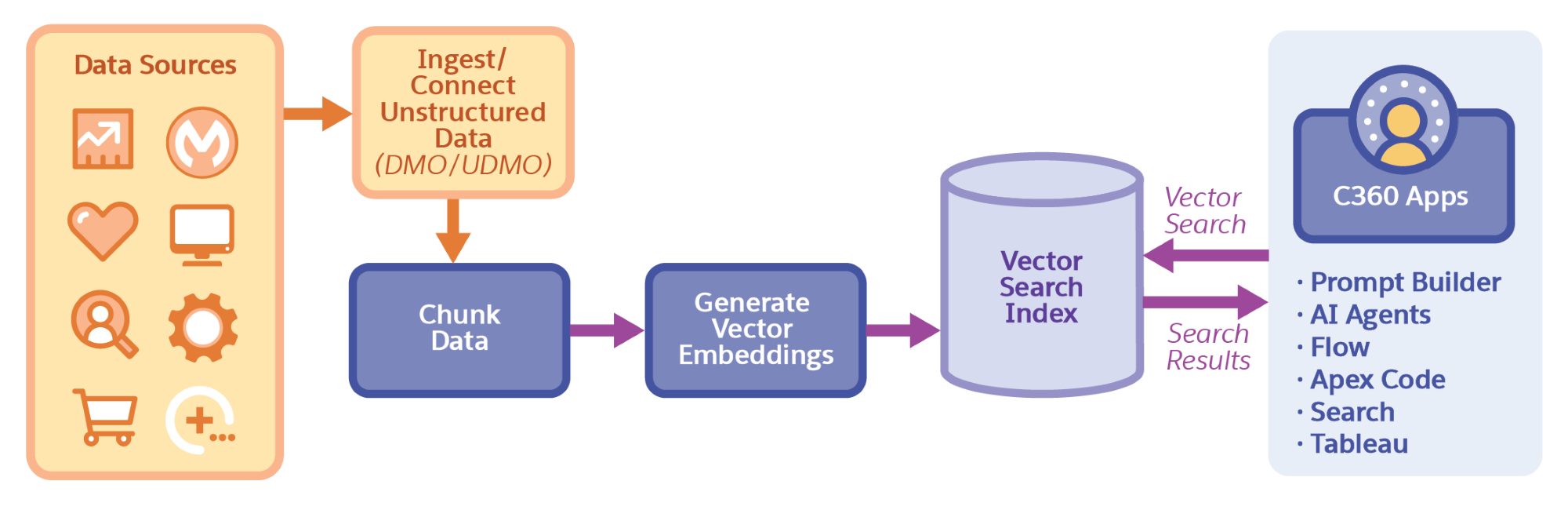
Data 360 indexes this data. When you create a vector search index using the Data 360
search index UI or Connect API, you first chunk the unstructured data stored in DMOs and
UDMOs. Chunking breaks the data into manageable, semantically meaningful units. Next Data
Cloud generates vector embeddings from those chunks. Chunks are stored in chunk data model
objects (CDMOs) and vector embeddings are stored in index daa model objects (IDMOs).
After the vector embeddings are added to the search index, you can perform vector searches on
that data from apps such as Prompt Builder, AI agents, or Tableau.
Create a Vector Search Index with Advanced Setup When you create a vector search index configuration for a data model object, Data 360 breaks up the referenced data into semantically related chunks and generates searchable vectors. Your RAG and agent workflows use these vectors to find and return semantically similar items when they run queries. To get more granular control over your search index configuration, use the advanced setup, which guides you through each step of the process.
Retrieving Content with Vector Search With vector search and AI agent queries, you can capture queries, search across structured and unstructured data sources, and receive summarized responses that improve efficiency and accuracy.
Enhancing Data Analysis with Vector Search in Tableau Find and analyze data based on meanings, not just keywords, by using vector search in a Tableau query. Vector search broadens the scope of data exploration as well as enhances the accuracy and relevance of the insights by identifying semantic similarities rather than relying solely on exact keyword matches.
We use three kinds of cookies on our websites: required, functional, and advertising. You can choose whether functional and advertising cookies apply. Click on the different cookie categories to find out more about each category and to change the default settings.
Privacy Statement
Required Cookies
Always Active
Required cookies are necessary for basic website functionality. Some examples include: session cookies needed to transmit the website, authentication cookies, and security cookies.
Functional Cookies
Functional cookies enhance functions, performance, and services on the website. Some examples include: cookies used to analyze site traffic, cookies used for market research, and cookies used to display advertising that is not directed to a particular individual.
Advertising Cookies
Advertising cookies track activity across websites in order to understand a viewer’s interests, and direct them specific marketing. Some examples include: cookies used for remarketing, or interest-based advertising.