
You are here:
View Search Index Status and Process History
View details of search index configurations from the Search Index list view and the object record view to monitor the indexing process.
Required Editions
| Available in: All Editions supported by Data 360. See Data 360 edition availability. |
| User Permissions Needed | |
|---|---|
| To view a search index configuration: | Permission set:
|
Search Index Processing: Create search indexes on data model objects (DMOs) or unstructured data model objects (UDMOs) by using the easy setup or advanced setup. Data 360 automatically processes changes in the source DMO or UDMO and incrementally updates the search index. Data stream settings and refresh modes determine the schedule of updates to the source DMO or UDMO. With all refresh modes, including the full refresh mode, the search index processes only changed records. When you delete a record from the source object, incremental processing deletes all information derived from that record, such as transcripts, chunks, and vector embeddings.
Search Index Status States
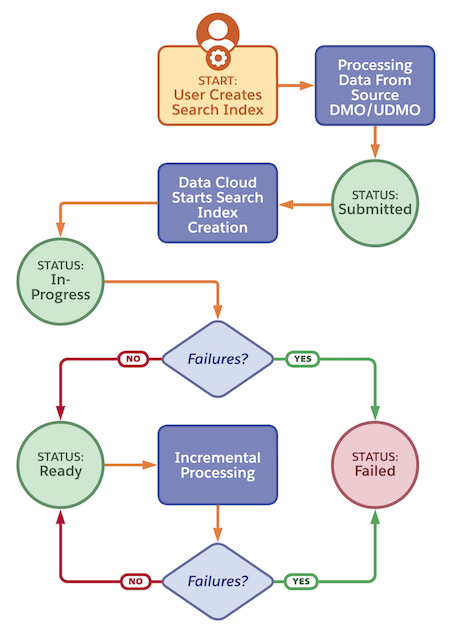
During creation and processing, a search index has these statuses.
| Status | Definition |
|---|---|
| Submitted | A user created a search index via the UI or API. |
| In-progress | Data 360 is running an indexing job to process data from the source DMO/UDMO. |
| Ready | The search index is ready to use. The indexing job runs incrementally to process any changes in data from the source DMO/UDMO. |
| Failed | Data 360 encountered failures while processing data from the source DMO/UDMO. |
Search Index Process History Details
The search index process history details include both vector and hybrid search. Data 360 stores process history details for the most recent 1000 search index job runs. These metrics are only shown after a job completes, not while a job is running.
The Process History tab captures these metrics.
| Detail | Description |
|---|---|
| Start Time | The timestamp when the job started. |
| End Time | The timestamp when the job ended. |
| Records Processed | The number of records processed from a DMO, or number of files processed from a UDMO. For search indexes that reference a file attachment UDMO, each file attachment is treated as a separate record. |
| Records Skipped | The number of files skipped. For example, files are skipped if the file type doesn't match the file type you configure in the search index, if authentication errors occur in the data source, if the file size exceeds the limit, or if you try to process an unsupported file format. All files that are skipped are reported both as processed records and skipped records. |
| Size Processed | The size, in bytes, of the content processed by the index refresh job. This metric doesn't report: 1) files that are skipped if you don’t select the file type in the search index or 2) files that are skipped due to a system error. Note: This metric doesn't always match what is reported to Digital Wallet for billing. For the size to be reported to Digital Wallet, records and files must be successfully processed. |
| Chunks Created | The number of chunks created. If the job fails, this metric reports 0. |
| Chunks Deleted | The number of chunks removed. If the job fails, this metric reports 0. |
| Job Status | The status of the job run, either Succeeded or Failed. |
