
You are here:
Shared Dimensions in Tableau Semantics
Analyze and compare data across multiple fact tables by connecting them through the same dimension tables. Build complex, business-relevant analysis in a clean and trustworthy way, avoiding duplicate relationships and eliminating cycles in your semantic model.
In most datasets, different business domains track their own events separately: Sales tracks transactions, Marketing tracks campaigns, Inventory tracks stock levels, and so on. Each of these business processes is represented as a fact table, which contains the core metrics and transactional data relevant to that domain.
To make this data meaningful, each fact table connects to one or more dimension tables, such as Products, Dates, Campaigns, Customers, or Suppliers. Dimensions describe the facts and allow users to group, filter, or aggregate them (e.g., by date, by product category, by customer segment).
Often, different fact tables share the same dimensions. For example, both Marketing and Sales are related to Products and Dates.
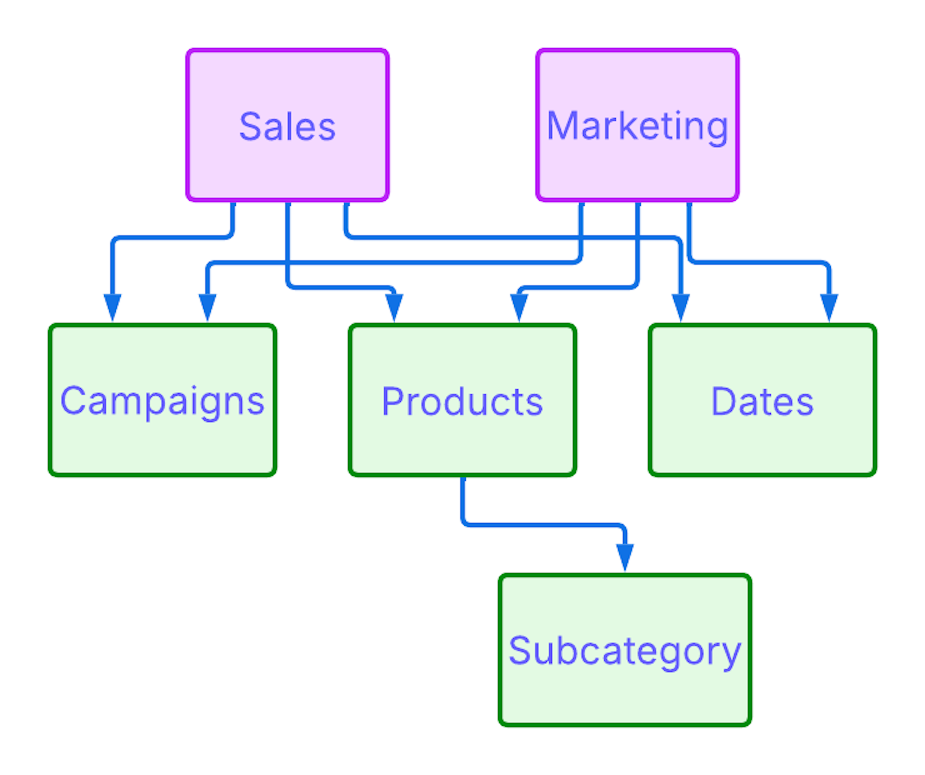
When fact tables are related to a shared dimension, your organization can align the data and analyze the values together,enabling you to:
- Compare campaign costs from Marketing and revenue from Sales by Product
- Break down inventory levels and sales performance by Supplier or Customer
- Analyze customer support activity alongside purchase and return behavior.
Such queries span different fact tables, while the shared dimensions provide the connection points that allow you to bring these facts together and explore them side by side.
To support this in the semantic model, we introduce the concept of shared tables. When a dimension table is marked as shared, the system knows it can be used to connect multiple fact tables safely. This enables clean, cycle-free multi-fact analysis and ensures the semantic model can interpret and execute queries across domains correctly.
Related vs. Non-Related Tables
An additional key concept in shared tables is the difference between related and non-related tables.
Two tables are considered related when they are directly connected by a defined relationship. Queries between related tables work as expected: the system uses the defined path to join them.
If two tables are completely unrelated -- meaning they have no direct or shared connection -- the system can't determine how to combine their data, and the query will fail.
In some cases, tables are connected only through a shared dimension. If you query fields from both fact tables without including a field from the shared table, and the fields are not aggregated, the system performs a cross-join. This means every row from one fact table is combined with every row from the other, since there’s no shared key to align them.
For example, if Sales and Marketing are both linked to a shared Products table, and you query [Sales].[Sales Quantity] and [Marketing].[Spend] without [Products].[Product Name], the system will simply combine all Sales rows with all Marketing rows.
To avoid this, the query must include a field from the shared table, such as Product or Date, which acts as the join key and provides a shared axis for grouping and aggregating values across the two facts.
Shared dimensions make it possible to analyze data from tables that would otherwise be isolated -- but only when used correctly within the query.
Fact Trees and Their Structure
A fact tree is a group of tables that belong to the same business area and are connected to each other. It usually includes one or more fact tables along with dimension tables.
This structure is not just a modeling concept -- it’s something the system builds automatically when you run a query. Fact trees are how the semantic layer internally organizes tables in order to evaluate shared dimensions correctly.
In the example diagram above, Marketing is a fact table connected to shared tables Products and Dates. This forms its fact tree. Sales is another fact table that connects to the same shared dimensions, forming a separate fact tree. This structure allows the system to understand how each tree works independently, while still enabling cross-tree analysis through shared dimensions.
Fact trees must remain cycle-free. Cycles introduce ambiguity: if the system can reach the same table through more than one path, it may not know which to follow, or how to apply filters and aggregations correctly. For this reason, creating a new relationship that introduces a cycle -- such as connecting Marketing directly to Subcategory (which is already reachable through Product) -- is not allowed.
How Shared Dimensions Affect Queries
Shared dimensions not only help structure your semantic model -- they also govern how queries behave at runtime, ensuring accurate results and consistent logic.
Let’s say you’re analyzing how Marketing Spend relates to Sales Quantity. These two measures come from different fact tables: Marketing and Sales. On their own, they can’t be aligned meaningfully because there’s no shared context to group them by. If you just drag both fields into a query without using a shared reference, the system can’t match up the rows and may return misleading results or even fail.
However, once you bring in two shared dimensions, such as Product and Date, the situation changes. With these in place, you can ask: “For each product and month, how much did we spend on marketing, and how many units were sold?”
Because Sales and Marketing are both connected to Products and Dates (shared tables), the system can now align both measures correctly -- by product, by month -- and return meaningful, aggregated results:
| Product | Month | Marketing Spend | Sales Quantity |
|---|---|---|---|
| Bike | Jan 2024 | 5,000 | 12 |
| Bike | Feb 2024 | null | 8 |
| Car | Jan 2024 | 10,320 | 22 |
| Car | Feb 2024 | 5,000 | 10 |
Filtering Behavior
Filters are applied in a way that avoids changing data from unrelated tables.
- When you apply a filter on a fact-specific field, like Marketing Type, it only filters that fact table -- not any other fact or shared dimension.
- When you apply a filter on a shared dimension, like Product Name or Date, it applies to all fact tables connected to it.
This behavior prevents filters from removing unrelated records. For example, if you select Online in the Marketing Type filter, only Marketing Spend gets updated -- Sales Quantity remains unaffected.
Fact trees must remain cycle-free. Cycles introduce ambiguity: if the system can reach the same table through more than one path, it may not know which to follow, or how to apply filters and aggregations correctly. For this reason, creating a new relationship that introduces a cycle -- such as connecting Marketing directly to Subcategory (which is already reachable through Product) -- is not allowed.
Calculated Fields and Fact Tree Containment
Calculated fields must respect fact tree boundaries. If you create a row-level calculated field, for example:
IF [Support].[Priority] <= 1 THEN "High" ELSE "Low"
-- that field is valid as long as it stays within the same fact tree (Support in this case). You can use it to analyze patterns or filter support-related activity against dimensions like Customer or Product (if those dimensions are shared), and everything will behave as expected.
However, if you try to create a calculated field that spans across multiple fact tables, such as:
[Inventory].[Quantity] + [Sales].[Sales Quantity]
-- the platform will raise an error. It attempts to combine row-level data from two different fact trees, and the system cannot resolve a common level of detail for that expression. Each fact tree has its own independent granularity and filtering context.
To achieve valid cross-fact calculations, you must aggregate each fact independently, and then combine those aggregates at the level of the view:
SUM([Inventory].[Quantity]) + SUM([Sales].[Sales Quantity])
This expression is allowed because both measures are aggregated before they are combined, and the aggregation is scoped to the product level or whatever dimension is in the view.
Limitations of Shared Dimensions and Fact Trees
- Fact tables must remain disconnected from each other. They can't be directly joined. Any connection between them must occur only through shared dimension tables.
- Row-level calculated fields -- whether dimensions or measures -- must be fully contained within a single fact tree.
- You can't connect a shared table to another shared table and then to a fact table. In other words, only one shared table can exist in the connection path between any fact table and its dimensions. For example, if Products is a shared table connected to Dates (another shared table), and then both connect to Sales, this structure is not supported.
- When you filter fields from multiple fact trees in the same query, those filters must be combined using an AND condition, not OR.
- Create a New Shared Table
Use shared tables to link multiple fact tables through a common dimension, to compare records across different tables. This keeps your data model clean and unambiguous and ensures that filters behave correctly across different datasets.
