
You are here:
Considerations for Working with Streaming Data Transforms
Considerations for working with streaming data transforms can significantly affect the performance, reliability, and success of your data processing pipeline.
Creating Data Transforms
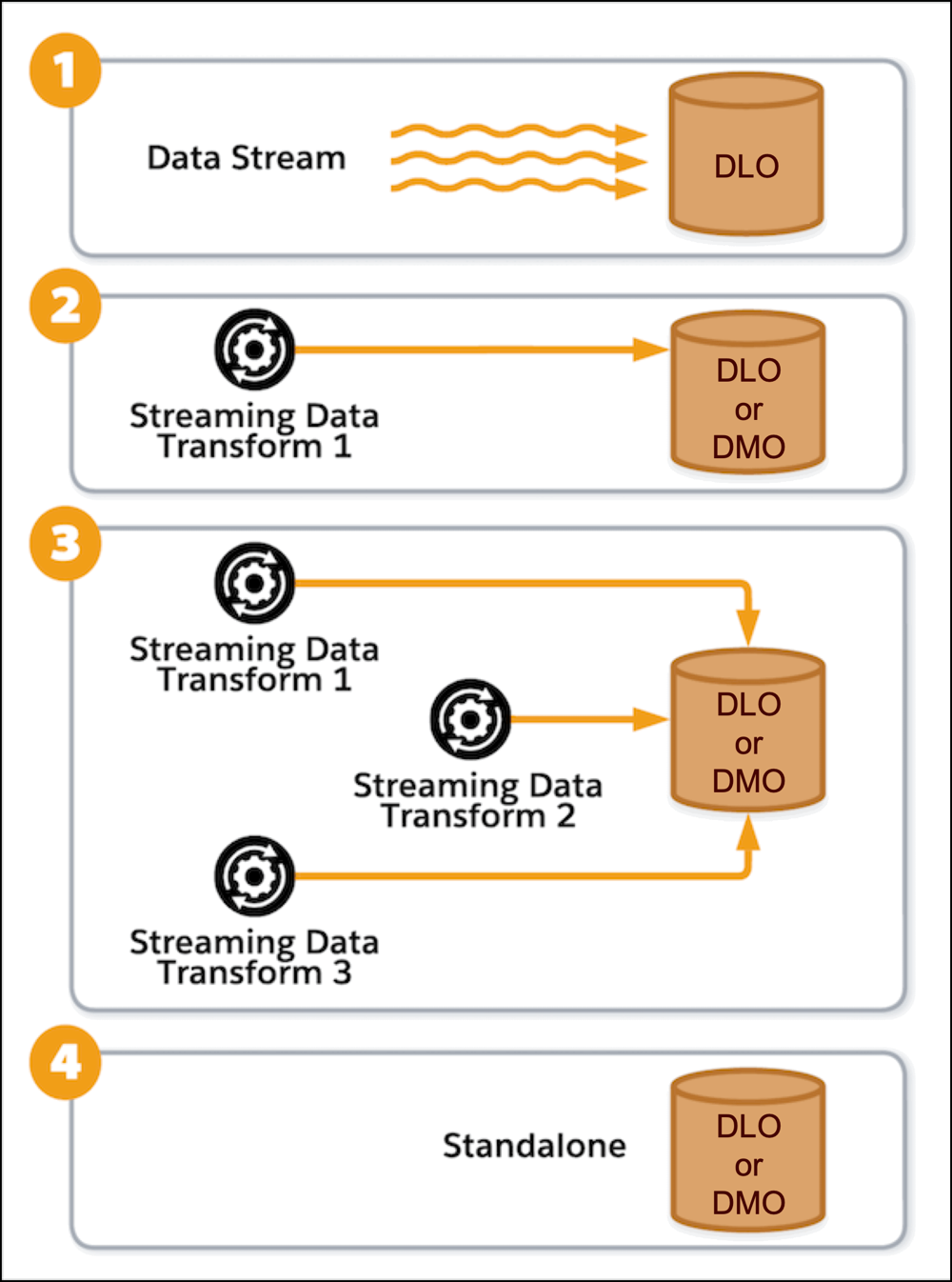
This diagram demonstrates four possible scenarios for working with data lake objects, data streams, and streaming data transforms.
- At any given time:
- A DLO can receive data from at most, one data stream (1).
- A DLO or DMO can receive data from one or more data transforms (2, 3).
- A DLO or DMO can be standalone (4).
A standalone DLO can occur when a data stream is created and then detached from the DLO. It can happen when the data stream is deleted, but the data lake object is retained.
A standalone DMO can occur when a data transform is created and then deleted. The DMO remains, even though the transform that previously wrote to it no longer exists.
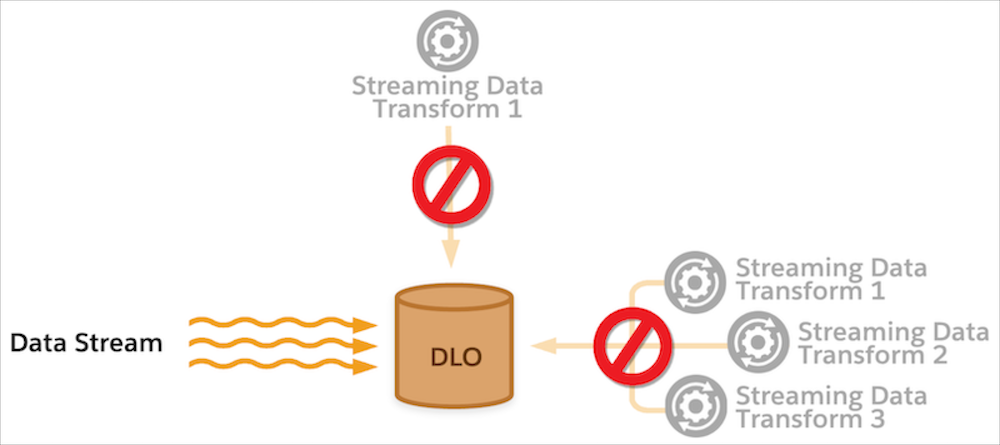
This diagram shows the case of a data stream writing to a DLO. While the data stream is connected to the DLO, you can't create streaming data transforms that write to it.
- You can’t change a streaming data transform after saving it. If you must change your streaming data transform, delete it and create another one.
- When you write the results of a streaming data transform to a data lake object, you can’t map the system fields, Data Source and Data Source Object.
- If a streaming data transform contains SQL syntax or other validation errors, you can’t save it. Syntax errors appear on the left side of the editor. Entering incorrect API names for the source object and target objects creates a validation error.
- Your streaming data transform SQL defines the field mappings for the primary key and
other fields in the target objects. All SQL statements require a primary key. If the
target object is categorized as Engagement, include a mapping for the
Event
            DateTime
field. - To determine whether you’re using supported functions, review the Support Functions section.
- You aren’t required to use a
WHEREclause in your streaming data transform statement. Using aWHEREstatement is helpful if you must select specific records from the source object. - Subqueries are not supported for streaming data transforms.
Using Fully Qualified Keys
Use fully qualified keys to connect multiple data sources in Data 360 and avoid key conflicts when records from one or more sources use the same primary or foreign keys. You can’t use a key qualifier field in a data transform as a data source or as a destination. If a data transform references a key qualifier field, the streaming data transform fails validation and an error is displayed.
Processing Data Transforms
- When a streaming data transform is created, it can take up to 30 minutes to read records from the source object, process, and begin writing to the target object. After the initial sync, streaming data transforms pick up new or updated records from the source object within a few minutes. Simultaneously active streaming data transform jobs can affect processing time.
- The Last Run Time field shows when the streaming data transform finished processing data records from the source object.
- To stop a streaming data transform, delete it.
- A DLO is available for selection as a target DLO only when its status is Active. If you don’t see the DLO that you want to use, check its status.
- You can use only DLOs created through the UI as target DLOs for streaming data transforms. You can’t use a DLO created by data stream as a target.
- A DMO is available for selection as targets only after you've created them using the "Create New" option during the setup of a new transform.
- If the streaming data transform status is Error, click Retry.
Sharing Target Objects
More than one streaming data transform can read from the same source object or write to the same target object. When multiple streaming data transforms write to the same target object, avoid unintentional overwrites in the target object.
If streaming data transforms write to the same target object and generate the same primary key, these situations can occur.
- If the transforms write to different fields without any overlap, the state of the record in the target object is the same no matter which order the transforms run in.
- If the streaming data transforms write to the same fields, the state of the record in the target object is indeterminate. Transforms that run later overwrite the data written by the previous transforms. After all streaming data transforms run, the target object contains the data written by the last streaming data transform to run.
Tracking and Preserving Record Lineages and Values
- DLOs and DMOs contain these lineage fields to track and preserve record lineage: Data Source, Data Source Object, and Internal Organization. When a streaming data transform updates a target object, it copies the lineage field values from the source object to the target object.
- When multiple streaming data transforms write to the same target object, the lineage fields are updated each time a transform runs with the field values from that streaming data transform’s source object.
