
You are here:
Data 360 Standard Permission Sets
A permission set defines the level of access and visibility that Salesforce users have to data and features in Data 360. Depending on your license, there several standard permission sets provided for Data 360. The Salesforce admin assigns permission sets to users. We don’t recommend creating a custom permission set for Data 360 access, however you can combine the permissions sets with other Salesforce permission sets.

About Permissions
In Salesforce, profile, permissions, and permission sets are fundamental aspects of user access. The best practice is to set up a user with the minimum level of permissions that the user needs to do their job.
- Profiles: Every Salesforce user is assigned to one profile. In addition to permissions, profiles control tab visibility, page layout assignments, record type access, and IP ranges.
- Permissions: Permissions determine whether a user can perform a particular action, such as read, create, or edit for a specific object or feature.
- Permission Sets: A permission set is a collection of permissions that grants additional access to users. Users can have multiple permission sets assigned to them.
Admins can create custom permissions. However, Data Cloud standard permission sets are automatically updated with each release as new features become available. By using a custom permission set could result in users not having access to new features or functionality.
System Administrator Profile
To manage and assign users in Setup and access Data Cloud Setup, you can have a System Administrator user profile or the permissions that grant access to Salesforce Setup, for example, customize applicaton.
You don't need a Data Cloud standard permission set to access Data Cloud Setup if you have a system admin profile.
Data Cloud Standard Permission Sets
You can combine these Data 360 permission sets with other Salesforce permission sets for users who need additional access.
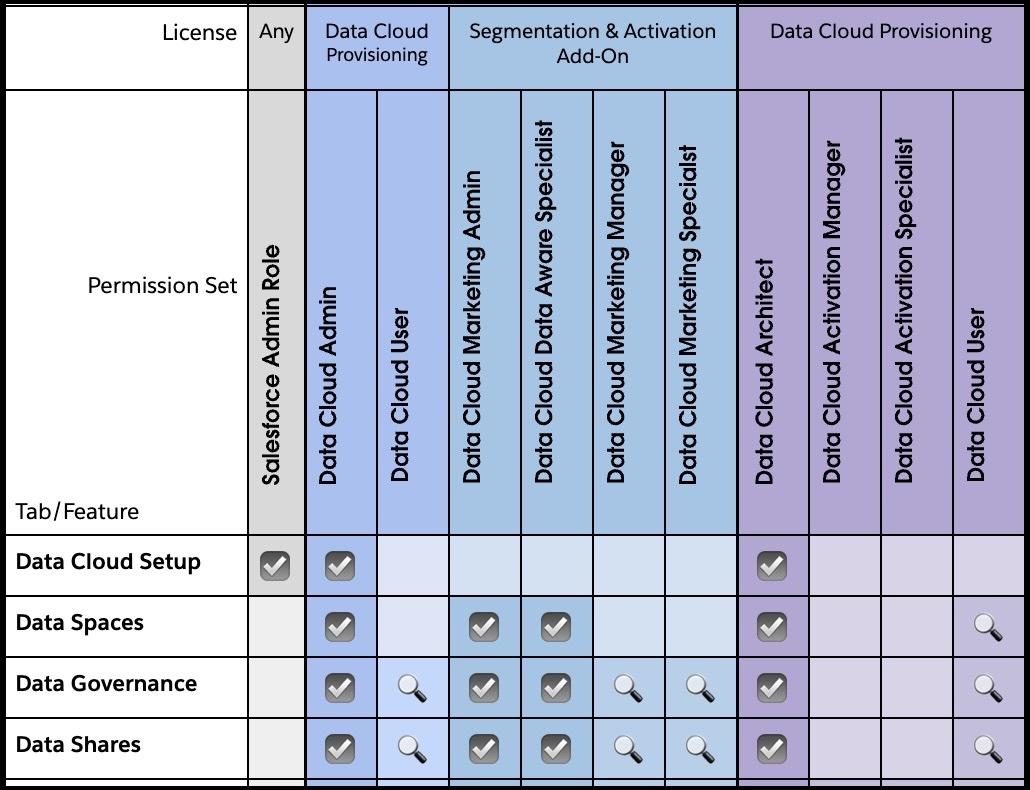
Data Cloud Architect (formerly known as Data Cloud Admin)—Users with this permission set can access all functionality within Data 360, including Data Cloud Setup, mapping data to the data model, creating data streams, identity resolution rulesets, and insights.
Feature Access:
- Full Access: Data Spaces, Data Governance, Data Shares, Data Streams, DLOs, DMOs, Data Transforms, Data Graphs, Query Editor, Identity Resolution, Insights, Data Actions, Data Action Targets, Communication Capping, Segments, Activations, Activation Targets, AI Models, Unstructured Data Hub, Search Index, Semantic Layer
- View Only Access: Data Explorer, Profile Explorer

Data Cloud Activation Manager (formerly known as Data Cloud Marketing Manager)—Users with this permission set can manage an overall segmentation strategy, including creating activation targets and activations.
Feature Access:
- Full Access: Query Editor, Data Actions, Data Action Targets, Data Transforms, Communication Capping, Segment, Activations, Activation Targets
- View Only Access: Data Streams, DLOs, DMOs, Data Graphs, Data Explorer, Identity Resolution, Insights, Profile Explorer, Unstructured Data Hub, Search Index
- No Access: Data Cloud Setup, Data Spaces, Data Governance, Data Shares, AI Models, Semantic Layer
Data Cloud Activation Specialist (formerly known as Data Cloud Marketing Specialist)—Users with this permission set can create segments.
Feature Access:
- Full Access: Query Editor, Data Actions, Data Transforms, Segment, Activations
- View Only Access: Data Streams, DLOs, DMOs, Data Graphs, Data Explorer, Identity Resolution, Insights, Profile Explorer, Data Actions Targets, Communication Capping, Activation Targets
- No Access: Data Cloud Setup, Data Spaces, Data Governance, Data Shares, AI Models, Unstructured Data Hub, Search Index, Semantic Layer
Data Cloud User—Users with this permission set can view Data 360 features.
Feature Access:
- Full Access: None
- View Only Access: Data Spaces, Data Governance, Data Shares, Data Streams, DLOs, DMOs, Data Transforms, Data Graphs, Query Editor, Identity Resolution, Profile Explorer, Insights, Data Actions, Data Action Targets, Communication Capping, Segment, Activations, Activation Targets, AI Models, Unstructured Data Hub, Search Index, Semantic Layer
- No Access: Data Cloud Setup
Legacy Permission Sets
The following permissions are now legacy permissions. While still available, we recommend transitioning to new permissions sets to gain access to new features and enhancements.
- Legacy Data Cloud Marketing Admin—Users with this permission set can manage day-to-day configuration needs, support, maintenance, and perform regular internal system audits.
- Legacy Data Cloud Data Aware Specialist—Users with this permission set can map data to the data model and create data streams, identity resolution rulesets, and calculated insights.
Additional Permission Sets
Several features use permission sets to manage access. Review information regarding how permission sets are used across Data 360.
- Data Cloud Salesforce Connector—When you connect to an org, the Data Cloud Salesforce Connector permission set is created to allow access to Data 360 objects and fields. See Salesforce CRM Permissions and Enable Object and Field Permissions for CRM Connections.
- Data-Space Aware—For data-space aware features, access granted by permission sets only applies to associated data spaces. See Manage Feature Access for Data Space-Aware Data Cloud Features and Associate a Permission Set with a Data Space.
- Data Cloud One—Data Cloud One companion orgs don't use standard Data 360 permission sets. To grant access to the Data Cloud One app on companion orgs, assign the Data Cloud One User permission set. To refine access to features offered within the app, clone and edit the permission set.
- Customer Data Platform Standard Permission Sets in Data 360
A permission set defines the level of access and visibility that Salesforce users have to data and features in Data 360. Four standard permission sets are provided for orgs contracted under a Customer Data Platform license. The Salesforce admin assigns permission sets to users.
