
You are here:
Feed Post and Comments Editing Overview
With feed post editing, users can edit their own feed posts. Record owners can also edit any post on records they own, no matter who created the post.
A Chatter Settings option and user permissions control the availability of the feed post editing feature.

The Allow users to edit posts and comments option in Chatter Settings enables or disables the Edit Feed Post feature for your organization. This option is enabled by default in existing organizations before Summer ’26 and in new orgs when you enable Chatter. All users who are assigned a standard profile can edit their own posts and comments immediately, except for Chatter Free, Chatter External, and Customer Portal users. For users who are assigned custom profiles, admins must specifically enable the permissions in the users’ custom profiles or permission sets.
The “Edit My Own Posts” permission lets users edit their own posts. In orgs where Chatter is enabled, this permission is automatically enabled on standard profiles, except Chatter External, Chatter Free, and Customer Portal User profiles. To allow Chatter External, Chatter Free, or Custom Portal users to edit their own posts, clone the profiles. Enable the “Edit My Own Posts” permission in the cloned profiles. Then assign the cloned profiles to the users.
The “Edit Posts on Records I Own” permission lets users edit all posts and comments on the records they own—both their own and other users’. For example, a group owner or manager can edit all posts on the group’s feed. A manager for a particular record type can edit all posts on the record. This permission is available on standard and custom profiles, but it’s disabled by default.
The “Can Approve Feed Post and Comment” permission is a powerful option to consider when assigning editorial capability. Users with this permission can edit and delete the posts and comments of any person in the Chatter feeds that they have access to. Consider whether it’s useful to have a few users with this capability. But also consider that assigning this permission places whoever has it in a position of trust. Be thoughtful about whom you assign it to.
This table summarizes the permissions and their default settings.
| User Permission | Description | Available in | Default Setting |
|---|---|---|---|
| Edit My Own Posts | Allows users to edit their own posts | Standard profiles, except
|
Disabled in all new orgs after Summer ’26. Enabled in all orgs before Summer ’26. |
| Custom profiles | Disabled in all new and existing organizations | ||
| Edit Posts on Records I Own | Allows record owners to modify their own posts and posts other users made on groups and record detail pages. | Custom profiles | Disabled in all new and existing organizations. However, Chatter moderators, Experience Cloud site moderators, and users with “Modify All Data” permission can always edit all posts and comments. |
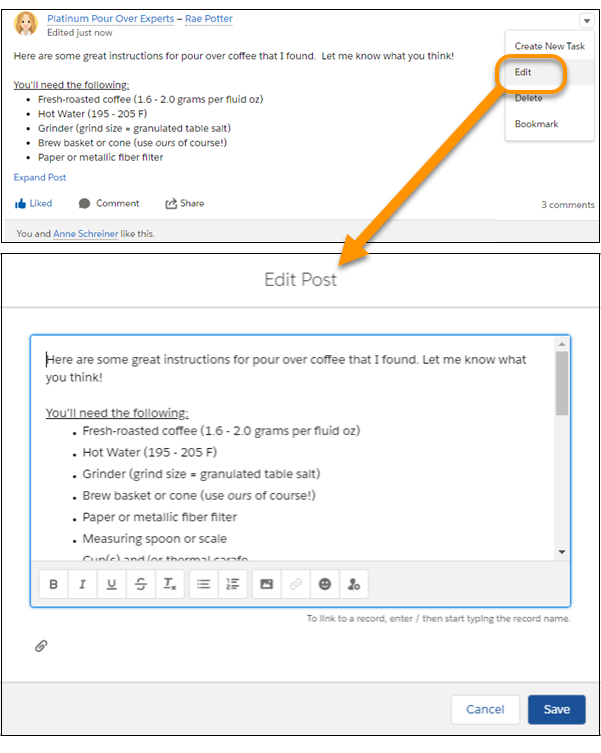
For users who have the required permissions, the Edit option is available from the menu on posts, comments, questions, and answers. It opens a separate Edit window, where users can modify the text.
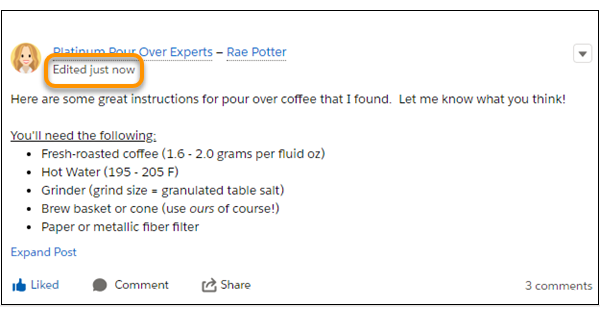
After users save their edited version of the post, it shows an Edited timestamp to indicate that the original post was modified.
If users edit a post or comment and mention new people or groups, those people and groups receive email notifications. But the people and groups who were mentioned in the original post or comment don’t receive a new email notification. Email notifications for edited posts or comments show the Edited timestamp.
For Experience Cloud site users, feed post editing is available only if the site was created using either Salesforce Tabs + Visualforce or the Customer Service template.
The Edit option isn’t available on system-generated posts like feed tracked record updates.
- Enable Edit Feed Post in User Profiles or Permission Sets
By default, feed post editing is disabled on all custom profiles. To make the feature available to your users, you can either modify your user profiles or assign the permissions to users via a permission set. - Disable Edit Feed Post for All Users
You can disable feed post in Chatter settings.
