
You are here:
Search for Files
There are a few ways to find the file you’re looking for. You can search from the global header at the top of your browser. You can use a feed search. And you can use the files-specific search field on Files home.
Required Editions
| Available in: Salesforce Classic and Lightning Experience |
| Available in: Group, Essentials, Professional, Enterprise, Performance, Unlimited, Developer, and Contact Manager Editions |
In Salesforce Classic and Lightning Experience, you can search for files from the header search field. Use feed search to find files posted in a specific Chatter feed, such as on a profile, on a record, or in a group.
Files home lists both the files you own and the ones that you have access to. The list includes files that are posted to feeds. Click a filter in the sidebar to see and search within that selection of files.
- Recent
- Owned by Me
- Shared with Me
- Following
In Salesforce Classic, you can also search for files using the Files search:
- Optionally, on the Files tab click a filter on the sidebar to restrict your search to a specific set of files.
- Enter your terms in the Search field. You can search by file name, description, owner, type, or content.
- To see a filtered list of all relevant files based on your search terms, click Search.
- To clear your search terms, click
 .
.
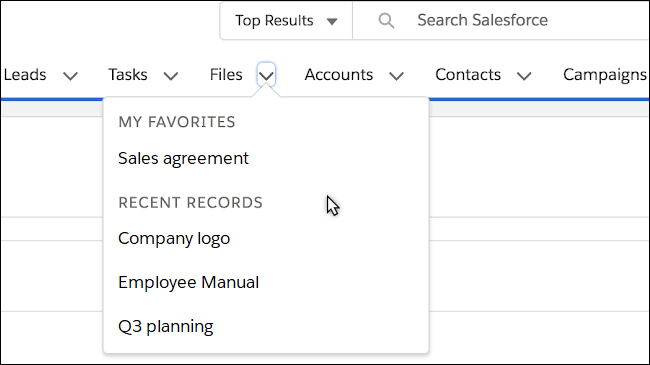
In Lightning Experience, you can use the Files dropdown to see favorite and recent files.

- Documents from the Documents tab in Salesforce Classic.
- Attachments from Notes and Attachments related lists.
- Attachments that aren’t the first attachment. For example: if you attach
file1.pdf,file2.pdf, andfile3.pdfto a post, wherefile1.pdfis the first file you attach, onlyfile1.pdfis included in the search results. - Files within a .zip archive. Search can’t unzip and index a .zip archive.
- Scanned PDF files register as images and aren’t included in search results.
- Tables in a PDF file aren’t indexed and may not appear in search results.
Search supports several file types and has file size limits. If a file exceeds the maximum size, the file’s content isn't searched, but the file's name, description, type, and owner are.
| File Type | File Extensions | Maximum File Size for Search |
|---|---|---|
| HTML | .htm, .html, .xhtml | 5 MB |
| 25 MB | ||
| PPT | .ppt, .pptx, .pptm | 25 MB |
| RTF | .rtf | 5 MB |
| Text | .c, .cpp, .css, .csv, .ini, .java, .log, .sql, .txt | 5 MB |
| Word | .doc, .docx, .docm | 25 MB |
| XLS | .xls, .xlsx, .xlsm | 5 MB |
| XML | .xml | 5 MB |
