
You are here:
Set an Out of Office Message in Chatter
Taking some time off? It’s easy to set up an out-of-office message in Chatter. Schedule your message, and decide what it says. Out of Office is available only in Lightning Experience.
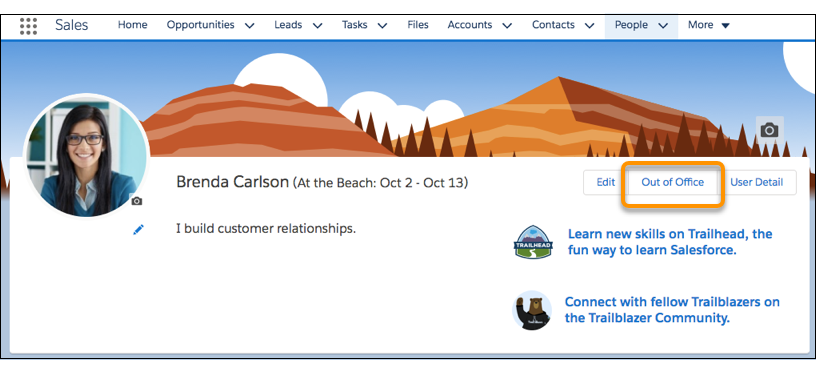
- On your profile, click Out of Office.
- Enable Set Out of Office message.
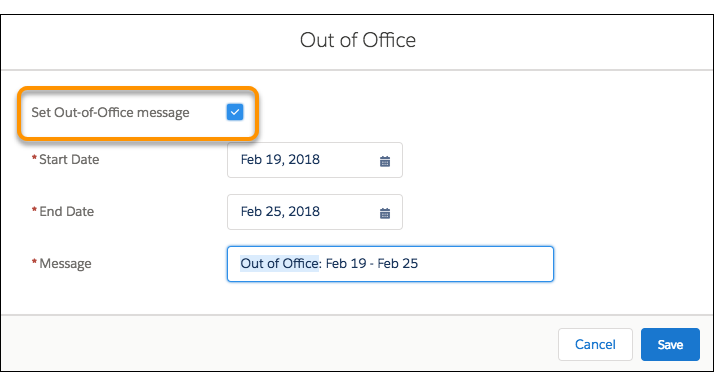
- Select the start date for the time you’re out of the office. The start date is just to let people know when you’re out. The message appears next to your name when you save it. It doesn’t wait for the start date.
- Select the end date. Your message expires after the end date.
- Leave the message as it is, or customize it.
- Click Save.
- Enjoy seeing your custom (or not so custom) message appearing nearly everywhere your name appears in Chatter.
Did this article solve your issue?
Let us know so we can improve!
