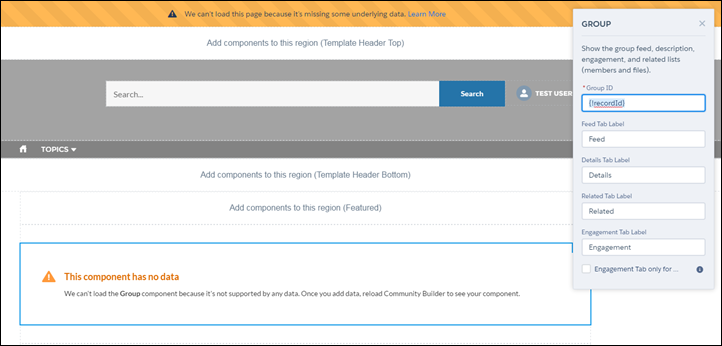
Error Messages for Pages Without Data in Experience
Builder
When you use Lightning components to build a template-based
page in Experience Builder, sometimes the page doesn’t load correctly on your site. Find out why
this error happens, and how you can fix it. Make sure that the component has underlying data.
Required Editions
Available in: both Salesforce Classic
and Lightning Experience
Available in: Enterprise, Performance, Unlimited, and
Developer Editions
An error occurs on site pages in one of the following three instances:
The page has no components
The page has one or more components, and one or more have no underlying data
Your org has SEO-friendly URLs enabled, but there’s no URL slug specified for the object
type
You see this error when components rely on dynamic data, and they don’t find any underlying
data to draw upon. For example, a Group component that doesn’t find a group ID, or a record
that can’t find a record ID would both give you an error.
Why do I see this error?
In most situations, the page is trying to draw information when information doesn’t exist.
Let’s say you make a record detail page for the Account object. If you don’t have any accounts
set up in Salesforce, you see an error. Or let’s say you set up a group detail page, but your
new site doesn’t have any groups. Once again, you see an error.
To fix the errors that involve SEO-friendly URLs, add a URL slug to the object that you’re
referencing in the component. That way, the component loads the correct data. You can add the
URL slug programmatically, such as using Apex, on the ObjectRelatedUrl object.
Any gotchas?
The Customer Service template uses topics to organize content in a site. To see topic detail
pages, first set up Navigational Topics in Site Management.
The following default pages in the Customer Service template can show this error. Here are
some tips on how to fix it.
Article Detail: Create at least one Salesforce Knowledge article in your org.
Topic Detail: Create a Navigational Topic.
Question Detail: Create a Navigational Topic. Use the Ask a Question button to create a
question.
Feed Detail: Use the Post Publisher or Ask a Question button to create a post or
question.
Group Detail: Create a group in the site.
Did this article solve your issue?
Let us know so we can improve!
Loading
Salesforce Help | Article
Cookie Consent Manager
General Information
Required Cookies
Functional Cookies
Advertising Cookies
General Information
We use three kinds of cookies on our websites: required, functional, and advertising. You can choose whether functional and advertising cookies apply. Click on the different cookie categories to find out more about each category and to change the default settings.
Privacy Statement
Required Cookies
Always Active
Required cookies are necessary for basic website functionality. Some examples include: session cookies needed to transmit the website, authentication cookies, and security cookies.
Functional Cookies
Functional cookies enhance functions, performance, and services on the website. Some examples include: cookies used to analyze site traffic, cookies used for market research, and cookies used to display advertising that is not directed to a particular individual.
Advertising Cookies
Advertising cookies track activity across websites in order to understand a viewer’s interests, and direct them specific marketing. Some examples include: cookies used for remarketing, or interest-based advertising.