
You are here:
Salesforce CMS Collections for Aura Sites
Collections help you organize and display multiple pieces of content from your Salesforce CMS workspace on your Aura site. View, create, and edit collections in the Collections tab in the Content Management tile of your Aura site’s workspace. Create collections manually or use conditions for collections that update automatically.
Required Editions
| Available in: Salesforce Classic and Lightning Experience |
| Available in: Enterprise, Performance, Unlimited, and Developer Editions |
| Applies to: Aura sites |

- If you're working with an Aura site, create manual or conditional collections from the Content Management area of the Experience Workspace.
- If you’re working with an enhanced LWR site, you can create and edit CMS collections manually in the enhanced CMS workspace where your CMS content lives. For more information see Collections in Enhanced CMS Workspaces. You can't use this type of collection from an enhanced CMS workspace on an Aura site.
Before you can create collections, ensure that your Aura site is added as a channel to your CMS workspace or enhanced CMS workspace.
Managing and curating content isn’t always done in a straight line. For instance, you can publish several news articles in your Salesforce CMS workspace and create a complete collection containing those articles. Or you can create a CMS collection before you write content in your CMS workspace.
- Create a manual collection by adding individual CMS content items one at a time. You can add the manual collection to your Aura site, and the collection doesn’t change unless you add or remove content.
- Create conditional collections to automatically show updated CMS content on your Aura site. With conditional collections, you can create and apply filters to collect content that meets your defined criteria. For instance, you can create a collection that automatically selects new products for the month, rather than manually creating collections each month.
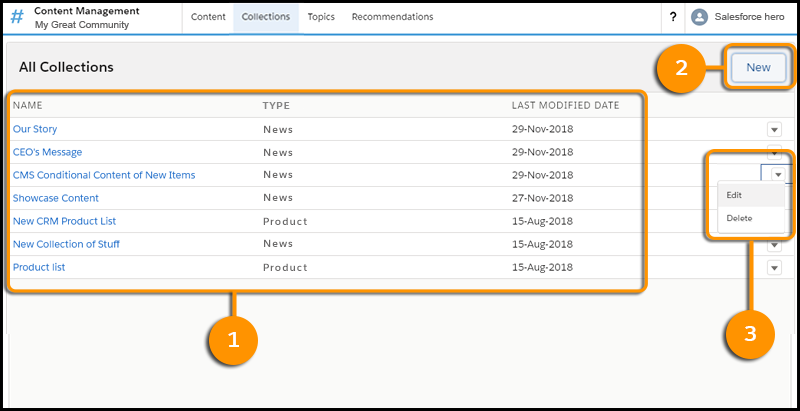
In your Aura site's Content Management workspace, the Collections page lists your existing collections by their title, type of content, and last modified date (1). On this page you can create a collection (2) and edit or delete collections from the row-level menu (3).
After you create collections, you can populate your Aura site with content by using CMS Collection components in Experience Builder. Any new or updated content that meets your criteria displays automatically.
- Create a Manual CMS Collection for Your Aura Site
Create hand-picked static collections of Salesforce CMS content. Select and add specific content in a few clicks, and edit the collection at any time from the Content Management workspace. Create manual collections to gather CMS content items of a single content type. - Edit a Manual CMS Collection in Your Aura Site
Edit manual CMS Collections in Content Management to keep the content in your Aura site up to date. - Create a Conditional CMS Collection for Your Aura Site
Make collections by creating filters that automatically include content that meets your defined criteria. To achieve complex and targeted results in your collection, combine several layers of filters.
