
You are here:
Configuring Apex Data Providers in Experience Builder (Beta)
A data provider is a reference to a source of data. An Apex data provider is implemented as a function within an Apex class. A Salesforce Apex controller is an Apex class that stores information and logic related to a group of UI components. You can perform actions such as querying data, updating records, or invoking another Apex code using this logic.
Required Editions
| Available in: Lightning Experience |
| Available in: Professional, Enterprise, Unlimited, and Developer Editions |
| Applies to: LWR sites |

Prerequisites
Verify that you meet these prerequisites:
- Ensure that your org has the Enable enhanced features permission turned on in Experience Sites.
- Ensure that your org has the Use advance data binding in Lightning Web Runtime permission turned on in LWR Sites.
- Create a simple website using the Experience Site Builder UI.
Data Provider Addition and Data Binding
Create an Apex Class and Apex Method that you want to add as a data provider to a textbox component.
- The Apex class should be the valid name of the publicly available Apex class that contains
at least one method annotated with
@AuraEnabled (cacheable=true
      scope='global')
. If you assign a namespace, you must prefix or qualify the Apex class withNamespace_public class ApexDataProviderDemo { @AuraEnabled(cacheable=true scope = 'global') public static Account getAccount(String name){ Account account = [SELECT FIELDS(STANDARD) FROM Account where Name =:name ]; return account; }} - An Apex controller method is only eligible to qualify for Apex data provider if that is
annotated with
@AuraEnabled(cacheable=true scope='global')and contains supported input parameters and return type. - Render the site in the builder and add the bindings.
Configuration of an Apex Data Provider
In the Add Data Provider window, enter a unique name for the data provider you want to add and select the type as Apex Data Provider. Provide the Apex class name, Apex method name, and Apex method parameters (is any).
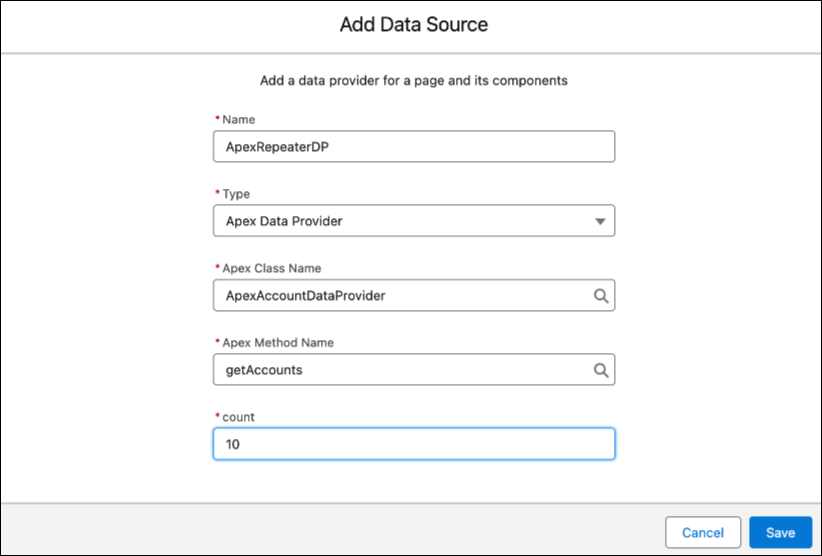
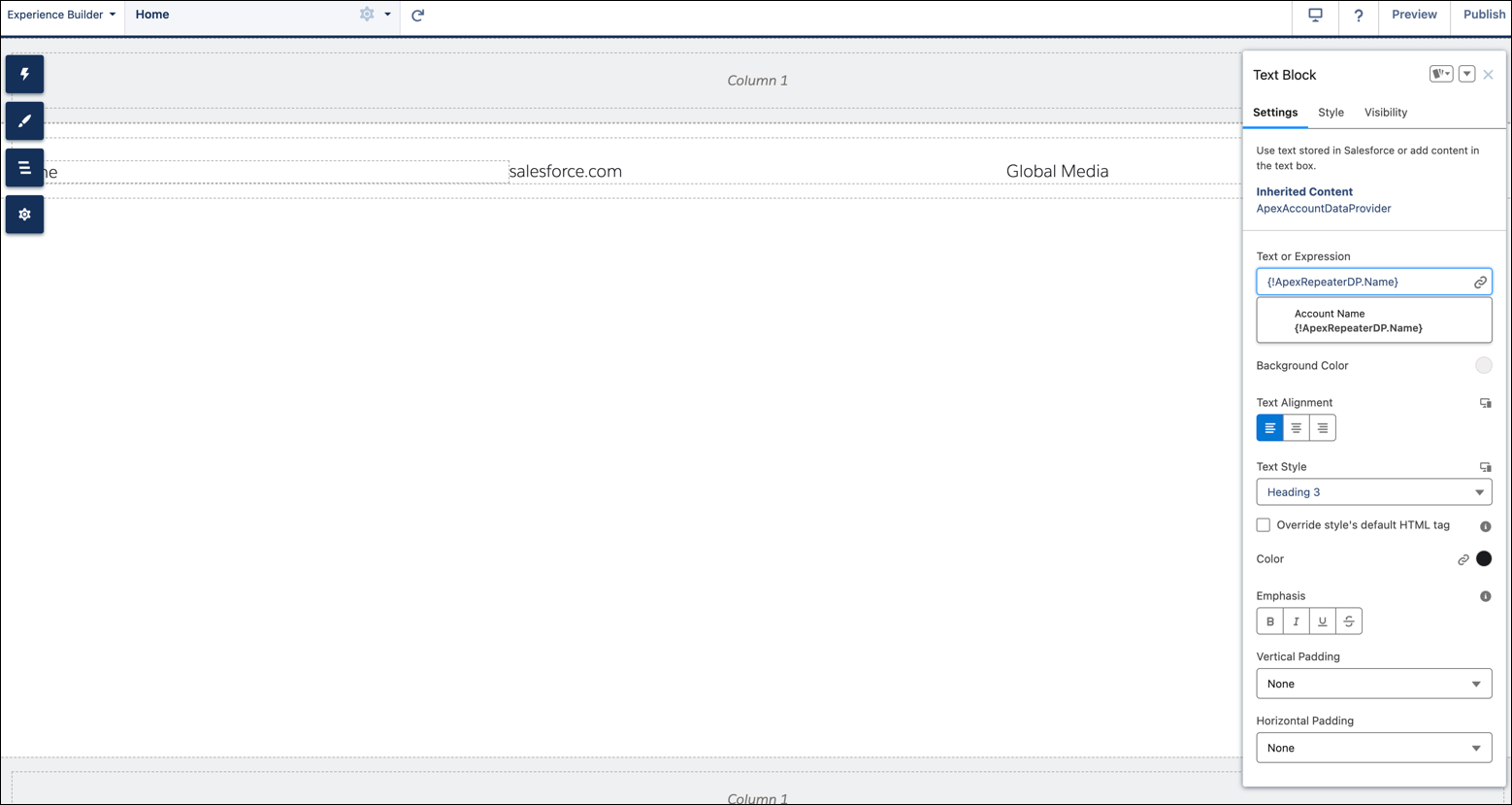
Apex Data Provider Metadata
The metadata contains key blocks of information such as Expression key, Input Schema and Output Schema.
Expression Key:
- The format for the Apex data provider expression key should follow a developer name pattern and should not contain any predefined expression keys. Predefined expression keys include Product, Item, Order, Cart, Checkout, SplitShipment, User, Search, Wishlists, PurchasedProduct, MyProfile, Subscription, _layout, _metadata, $form, and $page.
- Expression keys have to be unique in the component hierarchy. For example, if there is a Grid present on the page which is associated with a data provider, and a Text block inside its repeater slot is also associated with a data provider, then the two data providers cannot have the same expression key. This avoids any conflicts when there are nested data providers in the hierarchy.
Input Schema: Consists of Apex class, Apex method, Apex method parameters, if required by the Apex method.
- Apex Class: The Apex class should be the valid name of the publicly available Apex class that contains at least one method. The Apex class should also be prefixed with namespace__ if there is any 7 namespace required to access the Apex class.
- Apex Method: An Apex method is only eligible to qualify for Apex data provider if that is
annotated with
@AuraEnabled(cacheable=true scope='global')and contains supported input parameters and return type. - Apex Method Parameters
| INPUT DATA TYPES | SUPPORTED FORMAT EXAMPLES |
|---|---|
| String | Any string. For example, "Lorem Ipsum" |
| Boolean | TrueFalse |
| Integer | 3744"3744" |
| Double | 3744.0"3744.0" |
| ID | 0D5B000001DVM9tkAh |
Output Schema: Output schema for Apex Data Provider is the data type. The fields
consist of complex data types, returned by the associated Apex method. The output schema is used
in data binding on the component having the Apex data provider configured. The component uses
expressions to use data binding in this form: {!<sfdcExpressionKey>.<fieldName>}.
The field name can vary for describable and non-describable data types.
- Describable Data Type: The members of the describable data type are predefined and thus
there is a definitive way to refer to them in the expression.
For example, if the return type is Account sobject, the data binding expression is
{!<sfdcExpressionKey>. Name} or {!<sfdcExpressionKey>.Id} or {!<sfdcExpressionKey. customField__c} - Non-Describable Data Type: There is no definite way to refer to a non-describable data type
in a data binding expression. For this, we use a pre-defined literal call value. For example,
while referring a primitive data type in data binding, the expression is
{!<sfdcExpressionKey>.value}
| DATA TYPE | DATA BINDING EXPRESSION FORMAT |
|---|---|
| Boolean |
{<!sfdcExpressionKey>.value}
|
| Date |
{<!sfdcExpressionKey>.value}
|
| DateTime |
{<!sfdcExpressionKey>.value}
|
| Decimal |
{<!sfdcExpressionKey>.value}
|
| Double |
{<!sfdcExpressionKey>.value}
|
| ID |
{<!sfdcExpressionKey>.value}
|
| Integer |
{<!sfdcExpressionKey>.value}
|
| Long |
{<!sfdcExpressionKey>.value}
|
| Object |
{<!sfdcExpressionKey>.<objectMemberName>}
|
| String |
{<!sfdcExpressionKey>.value}
|
| Time |
{<!sfdcExpressionKey>.value}
|
| sObject-Known |
{<!sfdcExpressionKey>.<fieldName>}
|
| Generic sObject |
{<!sfdcExpressionKey>.<fieldName>}
|
| POJO/Apex Class |
{<!sfdcExpressionKey>.<fieldName>}
|
| Map |
Map's key with only boolean and string data types are supported. |
| List |
Can be bound to a repeater item within a repeater component like Grid, List, etc. |
