
You are here:
What Is the Enhanced Sites and Content Platform?
The enhanced sites and content platform is a flexible new system that brings together Salesforce CMS and Lightning Web Runtime (LWR) sites. From Winter ’23, enhanced LWR sites and enhanced CMS workspaces that you create are hosted together on this redesigned platform, which offers partial deployment, improved content management, and expression-based visibility.
Required Editions
| Available in: Salesforce Classic and Lightning Experience |
| Available in: Enterprise, Performance, Unlimited, and Developer Editions |
| Applies to: LWR sites |

What Are Enhanced LWR Sites?
Enhanced LWR sites include several features that are available only on the enhanced platform.
- Partial deployment: Use change sets to move individual site components and content between related orgs that have a deployment connection, such as your sandbox and production orgs. Or programmatically deploy partial site content with the DigitalExperienceBundle and DigitalExperienceConfig Metadata API types.
- Expression-based visibility and variations: Create several versions of the same component, and then use visibility rules to determine who sees what.
- Component-specific Style tab: Apply custom CSS from a component’s Style tab. The CSS Class property, available on all Lightning web components in enhanced LWR sites, gives CSS-savvy site builders more granular control over the style of each component.
- Site content search: Use the Search Bar and Results Layout components to add search functionality to your site. Site visitors can find content contained in Rich Content Editor and HTML Editor components, as well as within page title metadata. And because everything runs together on our consolidated platform, site search results can include content that you share from an enhanced CMS workspace.
- Data Cloud integration: Connect enhanced LWR sites to Data Cloud for a complete understanding of who’s visiting your site and how you can best engage with them.
- Google Analytics 4: Gain insights into page visits and user engagement.
What Are Enhanced CMS Workspaces and Channels?
Create and publish content more easily in a simplified user interface, and take advantage of several features that are available only with enhanced CMS workspaces and channels, including:
- Workspace sharing: Save time and space when you share content across enhanced CMS workspaces, and reuse content between workspaces without duplicating records.
- Workflows and approvals: With role-based workflows, content creators can request an approval, translation, or review directly from relevant users.
- Content variants and collections: Create translated content variants and manual collections to help put the right content in front of the right audience.
- Sidebar extensions: Add extensions for spell checkers and other productivity-enhancing tools to the sidebar in the CMS content editor.
- New APIs: Use APIs to create new content and retrieve published content.
How Do I Start Using the New Platform?
From Winter ’23, the enhanced sites and content platform is automatically enabled. So any new sites that you create by using LWR templates are hosted on this new platform. Similarly, any CMS workspaces that you create run on the redesigned system and are enhanced workspaces by default.
Older LWR sites can’t take advantage of the platform’s new features and capabilities. But as part of the move to the enhanced platform, you can upgrade your existing LWR sites to enhanced LWR sites and gain access to those features. You can also publish content from an enhanced CMS workspace or a non-enhanced workspace to any LWR, enhanced LWR, or Aura site, making it easier than ever to transition to the new platform.
How Can I Tell When a Site or Workspace Is Enhanced?
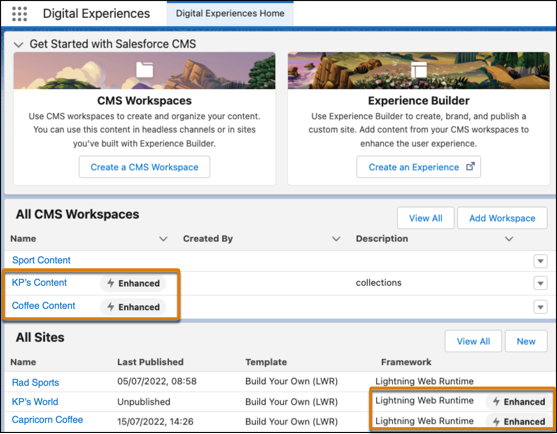
In the Digital Experiences app, you can see an  badge beside workspaces and sites that are hosted on the new platform.
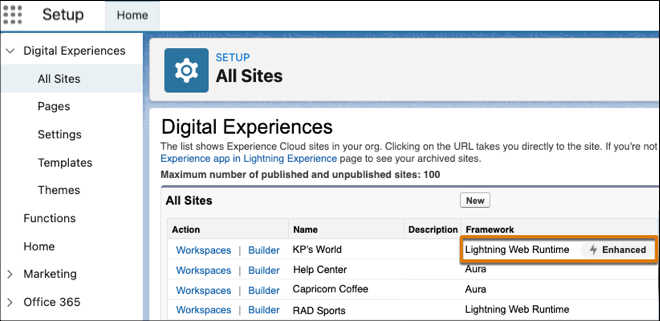
Similarly, we added this information to the list of sites in Setup under Digital Experiences.
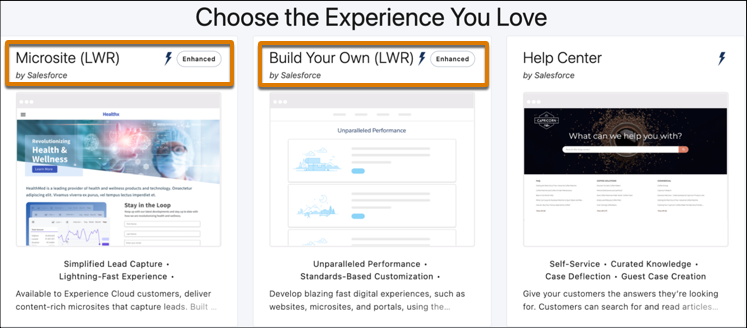
And when you create an LWR site, you can see that it’s being created on the enhanced sites and content platform.
- Upgrade to Enhanced LWR Sites
Upgrade existing LWR sites to enhanced LWR sites to take advantage of the latest platform features, including partial deployment, site content search, and expression-based visibility. - Update Your LWR Site URL to Remove /s
Some older, non-enhanced LWR sites include /s at the end of the site’s base URL, making it difficult to achieve a completely custom site URL. You can remove this unwanted element and switch from https://mycustomdomain.com/s to https://mycustomdomain.com. Removing /s is also a prerequisite when you upgrade to an enhanced LWR site.
