
You are here:
Close a Conversation, Poll, or Question in an Aura Site
The question is answered, the topic discussed, the poll decided. What do you do now? You end the conversation. Admins, moderators, and permitted members can close a question, poll, or post in an Aura site. And, if needed, they can reopen it. It’s a nice way to stop the churning on a settled matter.
Required Editions
| Available in: Salesforce Classic and Lightning Experience |
| Available in: Enterprise, Performance, Unlimited, and Developer Editions |
| Applies to: Aura sites |
| User Permissions Needed | |
|---|---|
| To assign close conversation permission to a user in a site: | Enable Chatter AND Create and Set Up Experiences |
| To close a conversation, in a site: | Close Conversation Threads |
Closing conversations is available in group, topic, discussion, and user profile feeds in your Experience Builder sites. Admins and moderators can close posts, polls, and questions without any special configuration. Admins can assign the Close Conversation Threads permission to site members.

After a thread is closed, some actions are available to all and some actions are available only to admins and authorized members. This table outlines who can do what after a feed item is closed.
| Action | Availability on a Closed Conversation |
|---|---|
| Add a comment | Blocked |
| Answer a question | Blocked |
| Vote on a poll | Blocked |
| Edit a feed item or its comments or answers | Blocked to author; available to admins, moderators, and people with the Close Conversation Threads permission |
| Edit a topic | Available |
| Delete a feed item or its comments or answers | Blocked to author; available to admins, moderators, and people with the Close Conversation Threads permission If a user has the Close Conversation Threads permission, they can delete feed items whether the conversation is open or closed. |
| Publish a pending review comment (site moderation) | Available to admins and moderators |
| Like or unlike; upvote or downvote | Available |
| Select or remove a best answer | Blocked to author; available to admins, moderators, and people with the Close Conversation Threads permission |
| Company verify; remove verification | Available only to people with the Verify Answers to Chatter Questions permission |
| Flag | Available |
| Share | Available |
| Bookmark | Available |
| Mute and unmute | Available |
| Escalate to case | Available only to people permitted to escalate a feed item to a case |
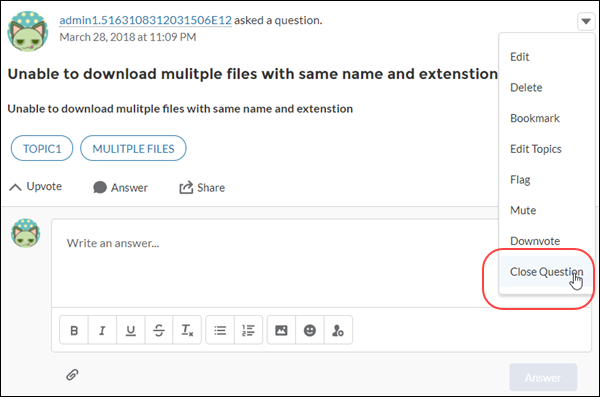
- Go to the feed item, for example, a question, poll, or post, and open its overflow menu.
-
To close a question, select Close Question; to close a post,
Close Post; to close a poll Close
Poll.
The feed item is closed to most new actions.Note When a feed item is closed, the overflow menu shows open options, for example, Open Question, Open Post, and Open Poll.
