
You are here:
Threaded Discussions in an Aura Site
When you talk to people, it’s rarely like a feed, where one person asks a question and everyone else answers. In real life, when one person asks a question, someone answers, and then there's a reply to that answer, and a reply to that reply. With threaded discussions, you can participate in this lively flow in your sites.
Required Editions
| Available in: Salesforce Classic and Lightning Experience |
| Available in: Enterprise, Performance, Unlimited, and Developer Editions |
| Applies to: Aura and Visualforce sites |
| User Permissions Needed | |
|---|---|
| To enable threaded discussions in a site: | Enable Chatter AND Create and Set Up Experiences |
| To delete a discussion thread in a community: | Modify All Data OR Moderate Site Feeds OR Salesforce disabled block-delete at your org’s request AND You’re the author of the post, question, comment, or reply |
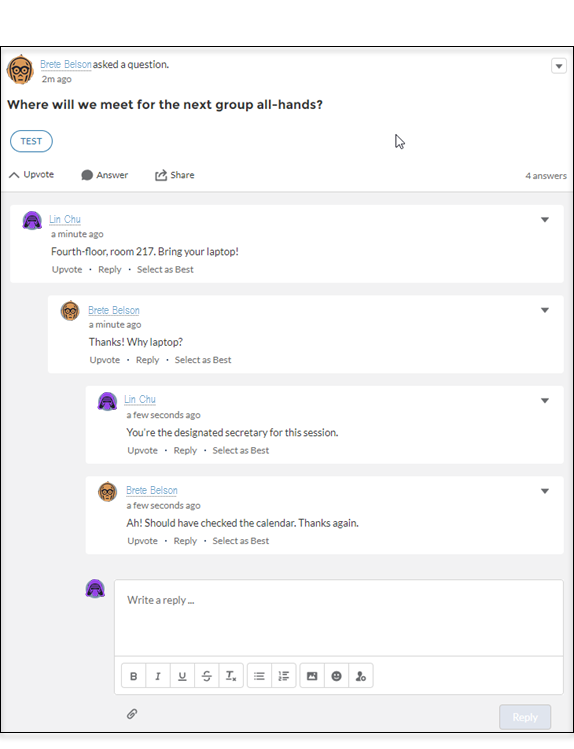
A thread is any feed item that has one or more levels nested under it. For example, a question with an answer or a comment with a reply is a thread. When you enable threaded discussions in your site, all discussions convert to threaded discussions: Members can comment on a post, answer a question, and reply to those comments and answers. Discussions are indented up to three levels to clarify who is responding to what.
The notification emails you receive for threaded discussions link more deeply into the discussion. All notification links used to go to the top of the thread; now they land you on new thread content.
To prevent the loss of important content, in orgs created after Winter ’19 most site members are blocked from deleting discussion threads.
For orgs created after Winter ’19, blocking is the default behavior. Orgs that existed before Winter ’19 can call Salesforce Customer Support to enable blocking. When blocking is enabled, only feed moderators and users with the Modify All Data permission can delete threads.
We recommend blocking deletions because, when deletion isn’t blocked:
- A user who creates a feed item can delete any response nested under it.
- A user who deletes a feed item also deletes all responses nested under it.
If nothing is nested under a feed item, the author can always delete the item.
Enable Threaded Discussions
Enable a preference in the Administration Workspace to change all site discussions to threaded discussions. Threaded discussions add the Reply feature to feeds. In addition to commenting on a post or poll or answering a question, you can reply to an answer or a comment. Threaded discussions are indented up to three levels to clarify who is replying to what.
Enable threaded discussions in your site in the Administration Workspace.
- Open Experience Workspaces for your site, and click the Administration Workspace.
- Go to the Preferences page, and select Allow discussion threads.
-
Click Save.
All discussions in your site convert to threaded discussions: In addition to comments and answers, members can reply to comments and answers. Discussions are indented up to three levels to clarify who is responding to what.
Delete a Discussion Thread
Deleting a discussion thread is the same as deleting any feed item with something nested under it. The thing to consider is whether deletion is blocked in your Experience Cloud site. To prevent loss of important content, orgs created after Winter ’19 block most site members from deleting feed items that have something nested under it. For example, when a question has an answer, deletion of the question is blocked.
- Open the actions menu on a feed item.
-
Select Delete, and then confirm the deletion.
When delete isn’t blocked, the feed item and everything nested under it are deleted. When delete is blocked, the item is deleted only under these conditions: The item has nothing nested under it and you are its author, or you have the right role or permission.
