Add Salesforce CMS Content to Your Experience Builder Site
Use the Digital Experiences App to create, manage, and publish engaging content for
your Experience Builder site. Then display your Salesforce CMS content on your Aura or LWR site
using Experience Builder tools. When you use Experience Builder sites together with Salesforce
CMS, you can keep your brand and content consistent everywhere the content is
published.
Required Editions
Available in: Salesforce Classic and Lightning Experience
Available in: Enterprise, Performance, Unlimited,
and Developer Editions
Experience Builder and site templates help you create, brand, and publish a custom site. You
can choose from several templates, all of which come with components that you can use to add
CMS content to your Aura and LWR site pages.
Salesforce CMS is a hybrid
content management system where you can create, manage, and publish content from CMS
workspaces to multiple channels, including Experience Builder sites.
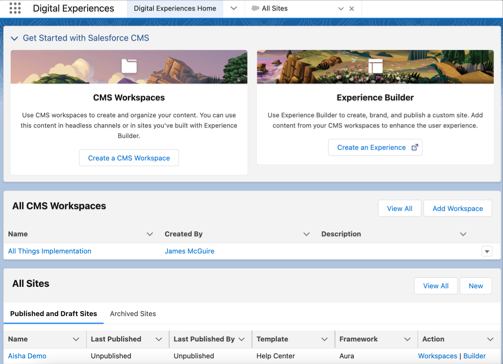
You can access your sites and Salesforce CMS workspaces from the Digital Experiences app,
which is available through the App Launcher. View and manage your CMS workspaces and your Aura
or LWR sites right from the Digital Experiences Home tab.
Tip Experience Cloud and Salesforce CMS have workspaces. In Experience Cloud, you
use a site’s workspace to configure settings and find information about your site’s metrics
and user engagement. In CMS workspaces, you create and manage CMS content and publish it to
multiple channels.
Before you can use Salesforce CMS content on your Experience Builder site, ensure that your
site is based on the most up-to-date Lightning template.
Connect Salesforce CMS to your Experience Builder site by adding the site as a channel to
your Salesforce CMS workspace. Next, ensure that all content that you want to display on your
site is published in your workspace. Content must be published before you can use it on your
Aura or LWR sites.
Note Although the Digital Experiences app is available in sandboxes, you can't migrate CMS
content to production. We recommend that you use the Digital Experiences app in production to
create content that you plan to use beyond testing.
Already have a CMS? You can use content from another CMS in your Experience Builder site for
consistent branding, reuse of material, and ease of maintenance. See Connect Your External CMS to Your
Experience Builder Site in CMS Developer Guide to learn more.
Display Salesforce CMS Content in Your LWR Site Create content in Salesforce CMS that matches your branding and messaging, and then use the content on any Lightning Web Runtime (LWR) site. Dynamically display Salesforce CMS content in your LWR site with data binding components in Experience Builder. You can nest one component within another, add unique images, and create engaging pages with CMS content.
Display Salesforce CMS Content in Your Aura Site Deliver and organize CMS content with Experience Builder and Content Management. Use Experience Builder to configure the content formatting and layout on your site pages. And use Content Management to organize your CMS content into collections and topics.
We use three kinds of cookies on our websites: required, functional, and advertising. You can choose whether functional and advertising cookies apply. Click on the different cookie categories to find out more about each category and to change the default settings.
Privacy Statement
Required Cookies
Always Active
Required cookies are necessary for basic website functionality. Some examples include: session cookies needed to transmit the website, authentication cookies, and security cookies.
Functional Cookies
Functional cookies enhance functions, performance, and services on the website. Some examples include: cookies used to analyze site traffic, cookies used for market research, and cookies used to display advertising that is not directed to a particular individual.
Advertising Cookies
Advertising cookies track activity across websites in order to understand a viewer’s interests, and direct them specific marketing. Some examples include: cookies used for remarketing, or interest-based advertising.