
You are here:
Set Up Customer Insights
Enable Customer Insights in your org and then set it up for each Experience Builder site you have.
Required Editions
| Available in: both Salesforce Classic and Lightning Experience |
| Available in: Enterprise, Performance, Unlimited, and Developer Editions |
| User Permissions Needed | |
|---|---|
| To enable Customer Insights in a site: | Access Experience Management OR Manage Experiences AND Is a member of the site |
| To edit profiles: | Manage Profiles and Permission Sets AND Customize Application |
| To create and save Lightning pages in Lightning App Builder: | Customize Application |
- Open Experience Workspaces.
- Select Administration | Preferences.
- Select Gather Customer Insights data.
- Click Save.
- Assign the View Customer Insights profile permission to the customer support profiles that require it.
- If you’re using Salesforce console in Lightning Experience, open Lightning App Builder and simply drag the Customer Insights component to any case or contact page layout.
-
If you’re using Salesforce console in Salesforce Classic, add the Customer Insights
component by placing its Custom Console Component on the contact or case page layout. We
recommend placing the component in the left sidebar, stacked, with a 400 pixel width.
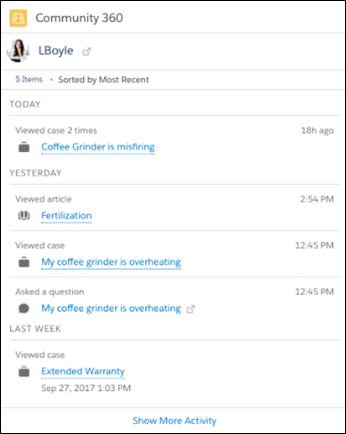
Your support agents see if the customer has opened a case, and which articles have been viewed in a site directly in the Service Console app.
 Note
Note- Customer Insights checks the following: assets, contracts, cases viewed, articles viewed, article votes, posts made, posts viewed, custom objects, orders, products, and tasks.
- Customer Insights data is stored in the NetworkUserHistoryRecent object. API access to the object is limited to users with the “Modify All Data” permission.
- Customer Insights isn’t available in sandbox environments.
- Articles viewed through the Case Deflection component aren’t listed on the Community 360 component that can be added to the contact layout.
Did this article solve your issue?
Let us know so we can improve!
