
Loading
Experience Cloud
Table of Contents
Select Filters

          No results
          No results
          Here are some search tips

          Check the spelling of your keywords.
          Use more general search terms.
          Select fewer filters to broaden your search.

          Search all of Salesforce Help
          Data Model for Peer-to-Peer Conversations in Experience Cloud Sites

          Data Model for Peer-to-Peer Conversations in Experience Cloud Sites

          Experience Cloud uses Chatter behind the scenes for peer-to-peer conversations in Experience Cloud sites. To keep conversations in your internal org separate from the ones in an external-facing site, each Chatter post or conversation is tied to the Experience Cloud site that it belongs to. If you have more than one external-facing site, the same is true for conversations in each site—each one is tied to the site that it belongs to.
          Required Editions

          Available in: Salesforce Classic and Lightning Experience
          Available in: Enterprise, Performance, Unlimited, and Developer Editions
          Applies to: Aura and Visualforce sites

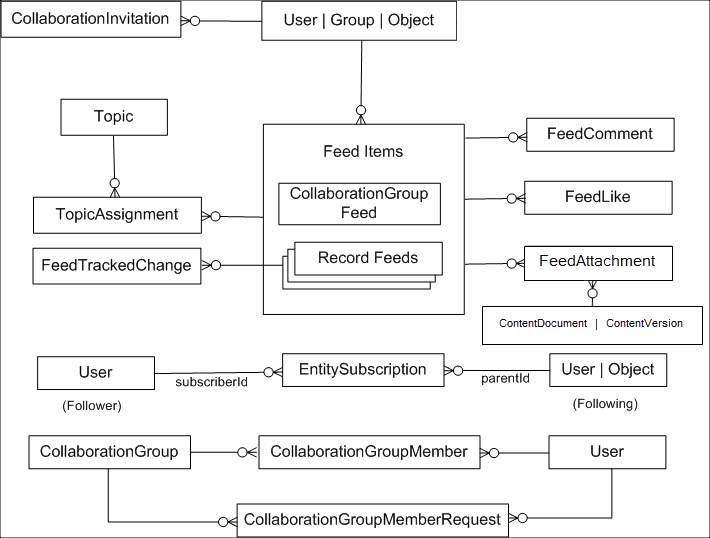
          You don’t have to worry about your Experience Cloud site users seeing your internal Chatter conversations, or vice versa. Here are the primary objects behind Chatter.

          Flow chart showing the data model of conversations

          Here’s what the key objects represent in terms of your peer-to-peer conversations.

          Here are a few other important objects to be aware of.

          • Contact—All external site users (people who don’t work for your company) must first be created as contacts before they can be enabled as a user of your Experience Cloud site.
          • Account—The company that a contact works for. If you sell B2C and use person accounts, you load the person’s info as a person account and not a contact. A person account creates a hybrid of an account and contact behind the scenes.
          • Network—The site the forum posts map into.
          • NetworkMember—Tracks the Chatter preferences for a user in a given site and the reputation points that they’ve earned. These records are created during your user load. To migrate users’ reputation points, update them at the end of your migration.
           
          Loading
          Salesforce Help | Article