Generate a Manual Sitemap Refresh for Your Experience Builder
Site
When you go live with a new Experience Builder site or make significant updates to an
existing one, you can generate a manual sitemap one time every 24 hours outside of the weekly
automatic sitemap refresh.
Required Editions
Available in: Salesforce Classic and
Lightning Experience
Available in: Enterprise, Performance, and Unlimited
Editions
Create and Set Up Experiences AND View Setup and Configuration AND be a member
of the site
OR
View Setup and Configuration AND be a member of the site AND have appropriate
role-based site access
To initiate a manual refresh of your sitemap one time every 24 hours:
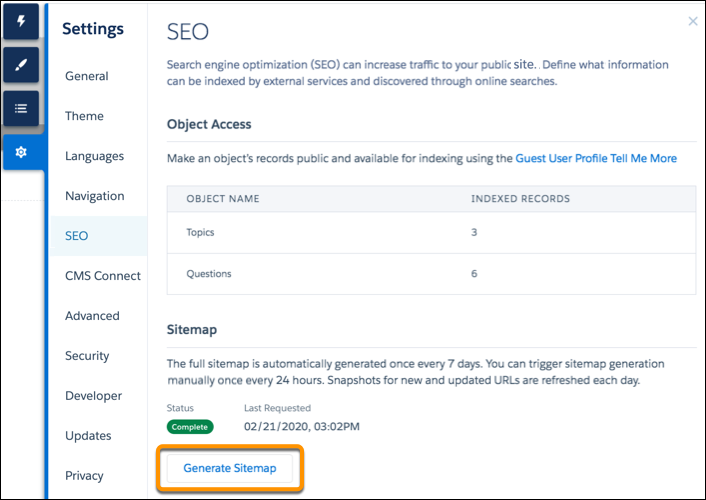
In Experience Builder, navigate to the SEO tab in settings.
Click the Generate Sitemap button to manually generate a sitemap for
your site.
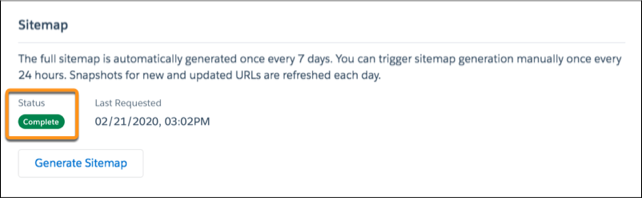
Track the status of the sitemap as it processes.
The status bar shows In Progress while the sitemap generates. After your sitemap is
generated, the status updates to read Complete.
Tip For the best experience, generate a manual sitemap during off-peak
hours.
When you add new pages to your site, these links are included in an automatic partial sitemap
refresh every 24 hours. If you add new pages after you manually generate a sitemap, they’re
added to the sitemap automatically.
We use three kinds of cookies on our websites: required, functional, and advertising. You can choose whether functional and advertising cookies apply. Click on the different cookie categories to find out more about each category and to change the default settings.
Privacy Statement
Required Cookies
Always Active
Required cookies are necessary for basic website functionality. Some examples include: session cookies needed to transmit the website, authentication cookies, and security cookies.
Functional Cookies
Functional cookies enhance functions, performance, and services on the website. Some examples include: cookies used to analyze site traffic, cookies used for market research, and cookies used to display advertising that is not directed to a particular individual.
Advertising Cookies
Advertising cookies track activity across websites in order to understand a viewer’s interests, and direct them specific marketing. Some examples include: cookies used for remarketing, or interest-based advertising.