
Loading
Experience Cloud
Table of Contents
Select Filters

          No results
          No results
          Here are some search tips

          Check the spelling of your keywords.
          Use more general search terms.
          Select fewer filters to broaden your search.

          Search all of Salesforce Help
          How Do Experience Cloud Forms Connect to Marketing Cloud Engagement?

          How Do Experience Cloud Forms Connect to Marketing Cloud Engagement?

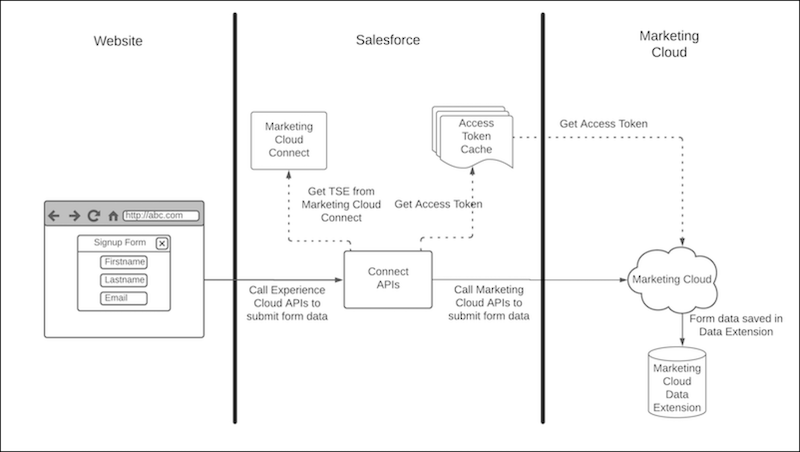
          You can connect a microsite to a Marketing Cloud Engagement data extension using the Marketing Cloud Form component. Contact information is gathered from your Experience Cloud sites and then sent to Engagement. The data that is collected from your site is momentarily stored in the Salesforce Core infrastructure and then sent to your data extension. The data transferred this way is only stored in Salesforce Core infrastructure for as long as it takes to call Marketing Cloud Engagement API.
          Required Editions

          Available in: Enterprise, Performance, Unlimited, and Developer Editions.

          Your microsite runs on Experience Cloud, but the data is stored and resides in Marketing Cloud Engagement. In order to access, manage, or delete this data, you must follow the Marketing Cloud Engagement Deletion process. For more information, see the Salesforce Trust and Compliance Documentation for both Salesforce Services and Marketing Cloud Engagement.

          Marketing Cloud data transfer diagram
           
          Loading
          Salesforce Help | Article