You are here:
Einstein Scoring
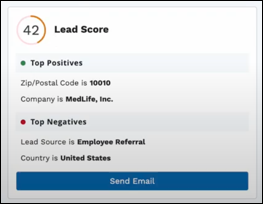
Partners can see how well their leads score according to your company’s conversion patterns. Get Einstein Lead Scoring by adding the Einstein Scoring component to the detail pages of partners’ leads in Experience Cloud sites.
Required Editions
| Available for partners in Experience Cloud Aura sites, accessed through Lightning Experience in Enterprise, Performance, and Unlimited Editions with Sales Cloud or Service Cloud. A PRM add-on license is required for each partner user. |
| User Permissions Needed | |
|---|---|
| To customize an Experience Cloud site: | Create and Set Up Experiences AND Be a member of the site OR View Setup and Configuration AND Be a member of the site AND Be an experience admin, publisher, or builder in that site |
To give partners access to these features, you must also set up Einstein Lead Scoring. Then, verify the required steps for adding the Einstein Scoring component in your Experience Cloud site. Not all steps are required for all templates.
-
If Einstein Scoring isn’t preconfigured in your Experience Cloud template, add
it.
Einstein Scoring is only available for the Lead object detail page.
- Either Create Object Pages for Leads or Edit Object Pages for Leads that you’re already using.
-
From the Component menu, drag the Einstein
Scoring component to the Lead detail page.
The component displays best in a narrow page column.
- If navigation for Einstein Scoring isn’t preconfigured in your Experience Cloud template, add the Einstein Scoring detail page to the site’s navigation menu. From the Settings menu, click Navigation and edit the navigation menu where you want partners to locate the page.
- Publish the changes to your site.

Einstein Scoring component: