
You are here:
The Customer Service Template
The Customer Service template provides a rich self-service experience for your customers, where they can get answers to their questions at any time, on any device. With integrated knowledge articles and case management, customers can search for and view articles, post questions, or contact a support agent. To use the Customer Service template, Chatter must be turned on in your org.

What You Get Out-of-the-Box
- Experience Builder pages and components
- Self-resolution of cases through knowledge and case creation
- Collaboration features such as groups, feeds, topics
- Global search with a customizable list of searchable objects
- Moderation rules to weed out trolls and bots
- Dashboards and reports
- Recommendations
- Customizable branding, design, and navigation
- Rich, responsive look and feel across multiple devices
Advanced Features That You Can Configure
- Audience-targeting: Deliver custom content to partners by geography, tier, or other criteria.
- Google Analytics™: Track site activity with Google Analytics.
- Prebuilt and custom components: Check out the full list of compatible components you can use to build out your site.
Customer Support in Action
Customer Service Home Page
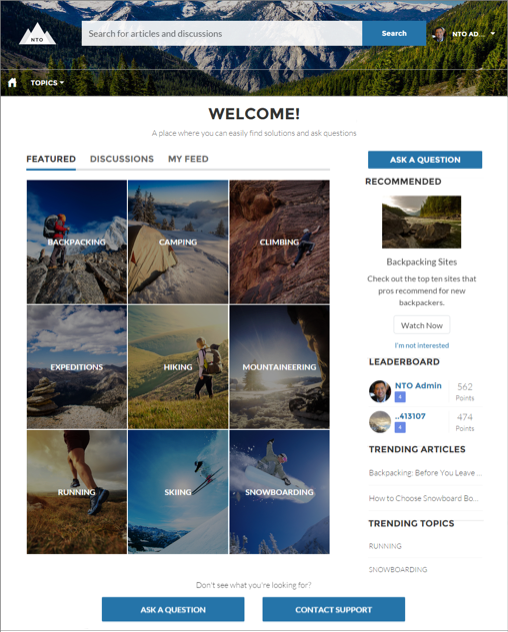
The Customer Service Home page includes featured topics and feeds, a leaderboard, recommendations, trending articles and topics, and support options. In addition, every page in the Customer Service template includes the template header, which provides global search, a profile menu, and navigation.
Customers Can Find the Help They Need
The Customer Service template adds discussions and suggested articles to your support community. When customers type a question in the search text box, the results include articles and similar questions that are based on matches with the typed text. If the answer isn’t in the results, they can get help by asking a question in the community. Experts discuss the issue and provide a solution. And if they decide to contact customer support, they’re shown a list of suggested articles based on keywords from the case subject and description. So there’s an excellent chance they can find an answer without needing to create a support case.
Both guest users and logged-in users can access articles, search and view discussions, and contact agents through official support channels. When they log in to the site, they’re also able to ask questions and participate in discussions in the feed. Members can answer questions in the community, just like commenting on a post in Chatter. And when a best answer is found, it’s prominently displayed in the feed, allowing other users to quickly and easily find the answer.
Enhanced Profile and Navigation Experience
The Customer Service template has an enhanced profile and navigation experience for logged-in users. From the profile menu, users can quickly access their profile details, Chatter feed and list of cases, and contact customer support. Users with permissions to create or manage the site can also access management and setup pages directly from the profile menu. Users can edit their contact information and profile photo directly from their profile details. They can view statistics, such as how many posts and comments they’ve made and how many people they’re following and are following them. User profiles also show user nicknames and reputation levels if they’re enabled in the site.
Improved Organization with Topics
Topics help you structure a site to quickly guide members to the information that matters most. Choose navigational topics to provide an easy way for customers to explore, and featured topics to highlight current conversations and issues. Trending topics and related topics let members find active discussions and popular content. Member-created topics, meanwhile, let users organize information for each other, creating a personalized experience that boosts engagement. When setting up a site, you associate topics with existing data categories, so your articles appear in the appropriate topics.
Included Pages
The Customer Service template includes the following pages.
- Home
- Account Management
- Article Detail
- Case
- Contact Support
- Create Record
- Dashboard
- Error
- Feed Detail
- File
- Flow
- Generic
- Group
- Login
- Messages
- My Account
- Question Detail
- Quip Doc Related List
- Report
- Report Builder
- Search
- Stream
- Top Articles
- Topic Catalog
- Topic Detail
- User Settings
- User
