You are here:
Paused Flows
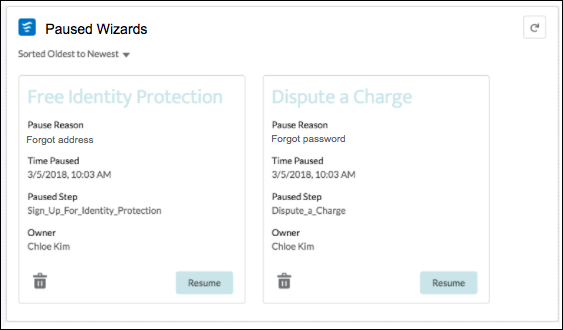
Add the Paused Flows component to let your Experience Builder site members view all the paused flows they own, resume them at a more convenient time without losing their work, or delete them. When setting up a flow in Salesforce Setup, you must choose pause points in order to allow site users to pause and resume flows.
To pause a flow, your site members must have the Run Flows permission.
For example, your financial company has a flow to help folks apply for a credit card. Your customer gets stuck on one of the steps (what was my address 12 years ago?). Rather than lose the previous screens of information, the customer can press Pause to find the needed information. Or, your customer pauses a step and needs help with continuing with the forms. The customer can contact your company, and a service agent can continue the flow for them.
In , select Let users pause flows. When you set up a pause point in your flows, you can use the Paused Flows component in Experience Builder.

- Select the Paused Flows component in the page you’re configuring.
-
In the property editor, configure the properties
for the component.
Property Details Title Add a title that is easily understood by your site members. Default text is Paused Flows. Show number of flows in title Select to show the number of paused flows in the title, in parentheses. Maximum Paused Flows Displayed The maximum number of flows shown in the component is 10. Show pause reason Shows the reason the flow was paused. Show pause time Displays the time the flow was paused. Show pause step Displays the name of the step that the flow was paused. Show owner Displays the flow’s owner. Delete button Displays a delete button to delete the flow. Resume Button Label The button text to resume a flow. Default text is Resume. Button Alignment Choose the button alignment. Default is Center.