
You are here:
Global Search Results
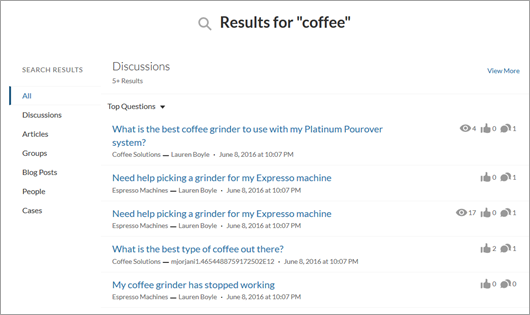
The Global Search Results component displays search results from across the site. The results shown are based on search terms entered in the Search Publisher and can be displayed in one list or in multiple tabs.
- Select the Global Search component.
-
In the property editor, configure the properties
for the component.
Property Details Search Term The system supplies this search term to search across the site. Show the All results tab To show search results in one list under All, check the box. Allow search results filtering To allow search result filtering, check the box. Object Add or remove tabs to customize which lists search results are displayed in. Publically Available To make the object publicly available for all users, including Guest users, check the box. Show search results from all feeds, including questions, posts, and comments For Discussions objects only. To show expanded search results from all Chatter feeds, check the box. Search results from all feeds use the expanded feed, rather than the compact feed.  Important
To allow your users to find a custom object’s records when they search, in Salesforce setup create a custom tab set to Default On or Default Off. Creating a custom tab enables the custom object's Allow Search setting.


With global search from your internal org, you can get uneven results when searching for a site User record. Here’s why and what you can do about it. Each site has a unique network ID. When you create a site user through , the new User record is assigned to a site's network ID.
Global search looks for records in the internal org, which has a different network ID than the site. A global search doesn't search inside sites. Since the User record is associated with a site network ID, global search doesn't return results for that record.
The workaround is to create User records in the internal org, and then associate the records to a site. You can associate an internal User record to a site by linking the internal record to a Contact record. After you forge the link, you can find the User record through global search. The User record's network ID is now associated with the internal org.
