Assign permission sets to internal users and partners based on their required level of
access to Advanced Account Forecasting and related features. Control access to the Mass Update
and Import CSV buttons for Advanced Account Forecasting for your users by using permission sets.
Before you assign permission sets, ensure that Advanced Account Forecasting and Data Pipelines
are enabled.
Required Editions
Available in: Lightning Experience
Available in: Enterprise, Unlimited, and Developer
Editions
Permission Sets
Assign these permission sets to the appropriate users.
Permission Set
Description
Data Pipelines Base User
Gives users access to Data Processing Engine.
Manufacturing Advanced Account Forecasting
Gives users access to the advanced account forecasting objects and
features.
Manufacturing Advanced Account Forecast For Community
Gives Experience Cloud users access to the advanced account forecasting objects
and features.
Note Advanced Account Forecasting is available only for Partner
Community users. This feature does not support Customer Community Plus (CCP) licenses. To
ensure users can access advanced forecasting data and functionality, verify that they are
assigned the appropriate Partner Community license.
Configure Forecast Update Access
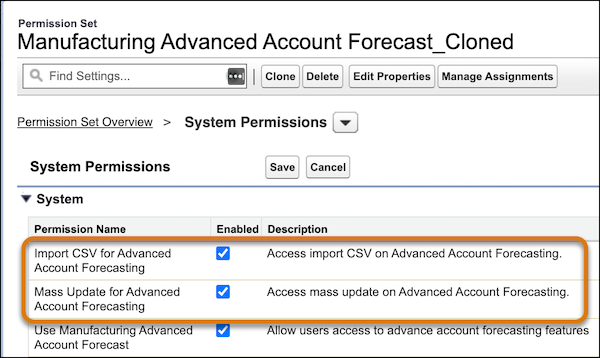
To determine which users can mass update forecasts and import forecasts from CSV files, you
can clone a standard permission set, and then enable or disable these system
permissions.
Mass Update for Advanced Account Forecasting
Import CSV for Advanced Account Forecasting
Considerations for Data Processing Engine Permissions
For data processing engine (DPE), review these additional permission considerations.
If you added custom objects as data sources for data processing engine definitions,
enable all settings for that object. For example, to use Quotes as a data source, enable
Quotes in Setup.
Users with the Analytics Cloud Integration User profile need Read access on all the
objects and fields selected in the Data Source node.
Ensure that field-level security is correctly assigned to users for all the fields used
in a DPE definition.
To define target objects and fields in a writeback node, and define the related field
mapping, specify the writeback user in the writeback node. The writeback user must have
Create access on all the target objects, fields, and related objects.
We use three kinds of cookies on our websites: required, functional, and advertising. You can choose whether functional and advertising cookies apply. Click on the different cookie categories to find out more about each category and to change the default settings.
Privacy Statement
Required Cookies
Always Active
Required cookies are necessary for basic website functionality. Some examples include: session cookies needed to transmit the website, authentication cookies, and security cookies.
Functional Cookies
Functional cookies enhance functions, performance, and services on the website. Some examples include: cookies used to analyze site traffic, cookies used for market research, and cookies used to display advertising that is not directed to a particular individual.
Advertising Cookies
Advertising cookies track activity across websites in order to understand a viewer’s interests, and direct them specific marketing. Some examples include: cookies used for remarketing, or interest-based advertising.