
Creating Actionable Lists by Using Actionable Segmentation
Actionable Segmentation enables you to segment similar client profiles, curate them, and design timely and personalized client outreach programs. Actionable list definitions and actionable lists are the key elements of the Actionable Segmentation feature.
Required Editions
| Available in: Lightning Experience |
| Available in: Clouds that have Industry Sales Excellence and Query for Data Pipelines User licenses |
You can create actionable lists for various outreach initiatives. For example, as a wealth manager, create an actionable list of high net worth individuals for a wealth plan outreach initiative, or as an auto dealer, create a list of leads for a test drive and follow up on store visit outreach initiatives, or as an admissions director, create a list of prospects for an admissions initiative.
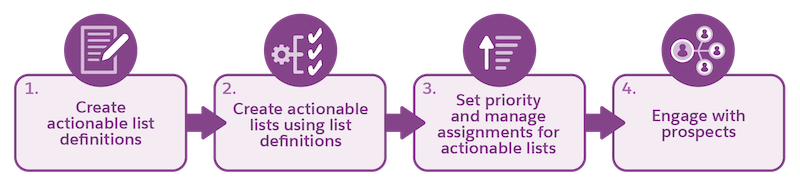
Before you get started, understand the end-to-end workflow and the key steps involved.
| Step | Action | Who | Where | Result |
|---|---|---|---|---|
| 1 | Create and activate an actionable list definition | Admin | Actionable Segmentation Settings page | Curated dataset saved in CRM Analytics |
| 2 | Create an actionable list using the list definition | Sales executives or managers | Actionable Lists or Actionable List Builder page | Actionable List |
| 3 | Set priority and manage assignments | Sales executives or managers | Actionable List Members component on an Actionable List record page | Actionable list is configured and assigned to sales or service agents |
| 4 | Engage with prospects (list members) | Sales or service agents | Actionable List Engagement component on an Outreach List Member page | Client engagement activities |
Explore and Learn
Watch this video to learn about Actionable Segmentation and its end-to-end workflow.
If you aren’t able to watch the video in full screen, open the
video on a new tab:  Overview of Actionable
Segmentation.
Overview of Actionable
Segmentation.
- Actionable Segmentation Basics
Get to know actionable list definitions and actionable lists, which are the key elements of the Actionable Segmentation feature. - Set Up Actionable List Definitions
Assign users the necessary permission sets, and enable Actionable Segmentation in your Salesforce org. Create actionable list definitions and configure them, and activate actionable list definitions. - Create and Manage Actionable Lists
Create actionable lists using actionable list definitions. Customize column preferences when creating lists according to business needs. Edit actionable lists to update name, description, priority, and list status. Refresh lists by adding latest dataset records to existing actionable lists. Add more members to existing actionable lists. - Work with Actionable Lists
Set priority, assign OmniScripts for guided interactions, and assign actionable lists to sales or service agents to engage with prospects including existing customers. - Actionable Segmentation Limits and Considerations
While creating actionable list definitions and actionable lists, keep the limits and limitations in mind.
