
Actionable Segmentation Basics
Get to know actionable list definitions and actionable lists, which are the key elements of the Actionable Segmentation feature.
Required Editions
| Available in: Lightning Experience |
| Available in: Clouds that have Industry Sales Excellence and Query for Datapipelines User licenses |
Actionable List Definitions and Datasets
Create actionable list definitions that enable you to build datasets containing records joining information across multiple objects according to your business requirements. For example, if a business requirement is to sell a wealth plan designed for high net worth individuals or households whose net worth is greater than US$1 million, then your org admin can create a dataset containing such records by performing cross-object joins of Account, Contact, Lead, Financial Account, and other related objects.
You can create an actionable list definition either by creating a Data Processing Engine definition from scratch or by using a predefined Data Processing Engine definition.
In the Data Processing Engine definition, you can specify cross-object join criteria to transform the data in the format you want. After you save, activate, and run a Data Processing Engine definition, a dataset is created. The dataset is saved in a shared space in Salesforce, which is associated with the actionable list definition.
After the actionable list definition is created, you can configure the columns and list member statuses, and then activate the actionable list definition. After an actionable list definition is activated, it’s available for your sales managers or executives to create actionable lists easily and quickly.
Admins create and activate actionable list definitions.
Understand the end-to-end workflow and the key steps involved in creating and activating an actionable list definition by creating a Data Processing Engine definition from scratch:
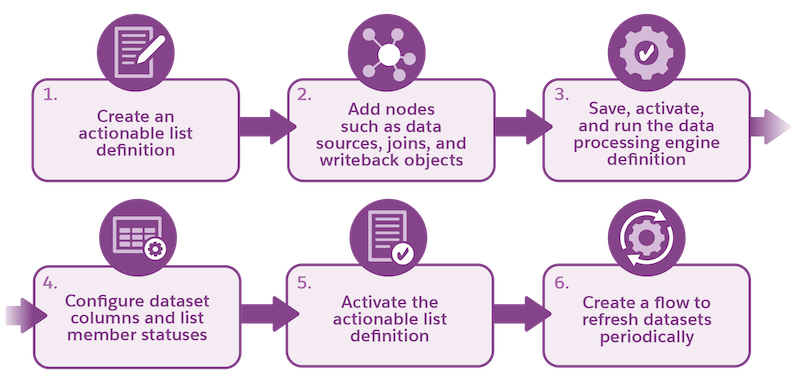
| Step | Action | Where | Result |
|---|---|---|---|
| 1 | Create an actionable list definition | Actionable Segmentation Settings page | Data Processing Engine Builder is launched |
| 2 | Add nodes such as data sources, joins, and writeback objects | Data Processing Engine Builder | A data processing engine definition ready for activation |
| 3 | Save, activate, and run the data processing engine definition | Data Processing Engine Builder | A dataset is created and saved in CRM Analytics |
| 4 | Configure dataset columns and list member statuses | Actionable Segmentation Settings page | Actionable list definition ready for activation |
| 5 | Activate the actionable list definition | Actionable Segmentation Settings page | Actionable list definition is available to create an actionable list |
| 6 | Create a flow to refresh datasets periodically | Salesforce Flows | Dataset with latest records |
Actionable Lists
Actionable lists help you to create and curate meaningful client segments using actionable list definitions. When creating an actionable list, you must specify the actionable list definition that is created by your org admin. The dataset associated with the actionable list definition is used as a data source for creating an actionable list. You can fetch records from the dataset by specifying filter criteria to shortlist the records and select them to add to the list.
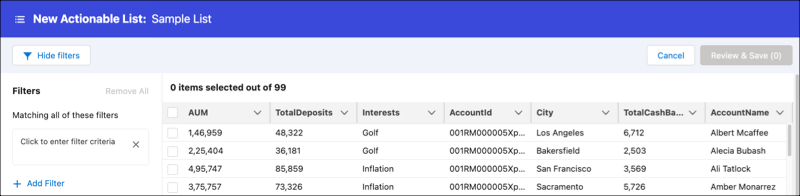
For example, for the high net worth business requirement example, you create and activate an actionable list definition that has an associated dataset of 1000 such records. Sales executives can create smaller and effective actionable lists from this dataset so that the outreach programs are implemented more effectively. For example, you can create an actionable list of high net worth individuals (net worth greater than US$1 million) from New York.
After actionable lists are created, list creators can set priority, assign OmniScripts for guided interactions, and assign list members to relevant agents or executives to perform outreach initiatives.
