Use the Patient Segmentation dashboard in the Enhanced Analytics for Healthcare app to
gain insights into patients’ demographics, risk scores, and health conditions. Identify
high-risk patients and assess their priorities to strategically allocate resources to improve
patient care and optimize resource utilization.
Required Editions
Available in: Lightning Experience
Available in: Enterprise and Unlimited Editions of Health Cloud
with the Revenue Intelligence for Health or CRM Analytics for Health Cloud add-on
license.
Care managers can effectively analyze patient data by filtering the charts based on
specific criteria such as year, patient enrollment type, health conditions, gender, age, and
risk band. The dashboard consists of the Patient Outreach page and the Overview page.
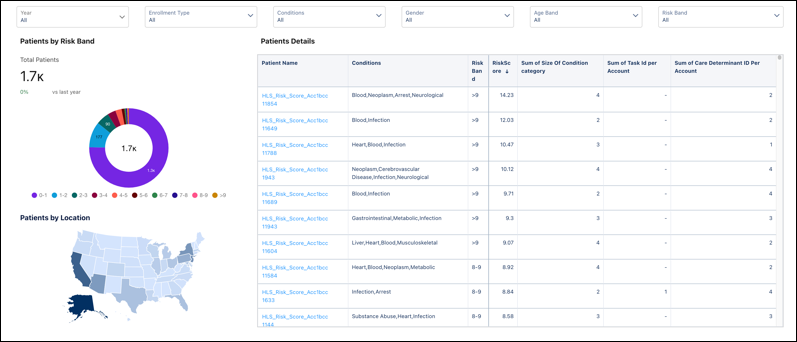
On the Patient Outreach page, care managers can easily access the total number of
patients, view the distribution of patients across different risk bands, and analyze
patient demographics based on location. They can also examine the details of individual
patients to better understand their specific needs and requirements.
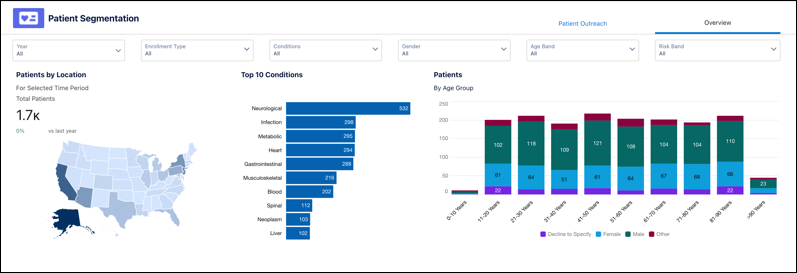
The Overview page provides a quick summary of patient-related data, including the
distribution of patients across different locations and the distribution of patients
across various age groups. Use the insights to quickly analyze the patients based on
location and health conditions for better decision-making and resource planning.
Patient Segmentation KPIs
Patient Segmentation KPI
Description
Total Patients
The total count of active account Ids.
Risk Score
The sum of HCC RiskScores, Disease Interaction RiskScores, Disabled
InteractionRiskScores, AgeBandRiskScores, ORECRiskScores, and
MedicaidRiskScores.
No of Conditions
The count of health conditions for a patient for the selected year.
Tasks Overdue
The number of open tasks with activity dates before the current date.
Social Determinants
The number of care determinants identified for each patient. This KPI provides
insights into the broader context of patients' lives so healthcare providers can
make more informed decisions about their care plans.
Did this article solve your issue?
Let us know so we can improve!
Loading
Salesforce Help | Article
Cookie Consent Manager
General Information
Required Cookies
Functional Cookies
Advertising Cookies
General Information
We use three kinds of cookies on our websites: required, functional, and advertising. You can choose whether functional and advertising cookies apply. Click on the different cookie categories to find out more about each category and to change the default settings.
Privacy Statement
Required Cookies
Always Active
Required cookies are necessary for basic website functionality. Some examples include: session cookies needed to transmit the website, authentication cookies, and security cookies.
Functional Cookies
Functional cookies enhance functions, performance, and services on the website. Some examples include: cookies used to analyze site traffic, cookies used for market research, and cookies used to display advertising that is not directed to a particular individual.
Advertising Cookies
Advertising cookies track activity across websites in order to understand a viewer’s interests, and direct them specific marketing. Some examples include: cookies used for remarketing, or interest-based advertising.