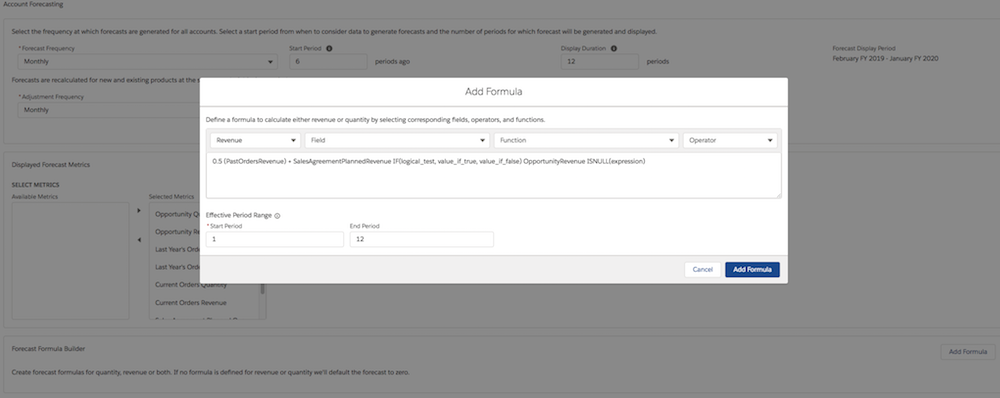
Use the Formula Builder on the Account Forecasting page in Setup to create formulas for
forecast calculations. You can define your own formulas for quantity and revenue based on sales
agreements, orders, opportunities, and account metrics.
Required Editions
Note
There’s a newer version of forecasting available called Advanced Account Forecasting. To
learn about how the features are different, review this comparison. For new implementations, use Advanced Account Forecasting. For existing implementations, plan your
migration.
Available in: Lightning Experience
Available in: Enterprise, Unlimited, and Developer
Editions
User Permissions Needed
To create formulas
Customize Application
You can create complex and sophisticated formulas in the Formula Builder for your unique
requirements.. At least one formula for quantity, or revenue is required to cover all periods.
If you create formulas for both quantity and revenue for even one period, follow the same
pattern for all periods.
In Setup, search for Account Forecasting in the Quick Find
box.
In Feature Settings, under Manufacturing, select Account Forecasting.
In the Forecast Formula Builder section, click Add Formula.
Select Type as Quantity or Revenue.
For a particular period, if you only create a formula of only one type, the formula for
the other type is defaulted to zero.
To create a formula, use fields, functions, and operators. Pick a field, an operator, and a
function in any combination to create a formula in the Compose Formula text box.
Enter the start and end period in the Effective Period Range section. For example, if the
formula is applicable for the first three periods, enter 1 as the start period, and 3 as the
end period.
Click Add Formula.
Based on the forecast display duration, you can create either a single formula for all
periods, or multiple formulas for different period ranges. If the forecast display period is 12
months, you can create up to 12 formulas.
We use three kinds of cookies on our websites: required, functional, and advertising. You can choose whether functional and advertising cookies apply. Click on the different cookie categories to find out more about each category and to change the default settings.
Privacy Statement
Required Cookies
Always Active
Required cookies are necessary for basic website functionality. Some examples include: session cookies needed to transmit the website, authentication cookies, and security cookies.
Functional Cookies
Functional cookies enhance functions, performance, and services on the website. Some examples include: cookies used to analyze site traffic, cookies used for market research, and cookies used to display advertising that is not directed to a particular individual.
Advertising Cookies
Advertising cookies track activity across websites in order to understand a viewer’s interests, and direct them specific marketing. Some examples include: cookies used for remarketing, or interest-based advertising.