Serial and approval workflows can easily get stuck in a “waiting” state if the Stage
element's exit condition isn't configured properly. The problem occurs when the stage is set to
wait for all steps to finish, as it can't account for conditional steps that were never
triggered. This creates a deadlock.
Required Editions
Available in: Lightning Experience
Available in: Enterprise, Performance, Unlimited, and
Developer Editions where Advanced Approvals is enabled
For example, let's consider a discount approval stage with two steps:
Step 1
Required if the discount is greater than 10%
Step 2
Required if the discount is greater than 20%
If a sales rep submits a quote with a 15% discount, Step 1 will
trigger and complete. However, Step 2 will never start. Since the stage
is configured to wait for all steps to finish, it will get stuck waiting for Step
2, and the workflow can't move on.
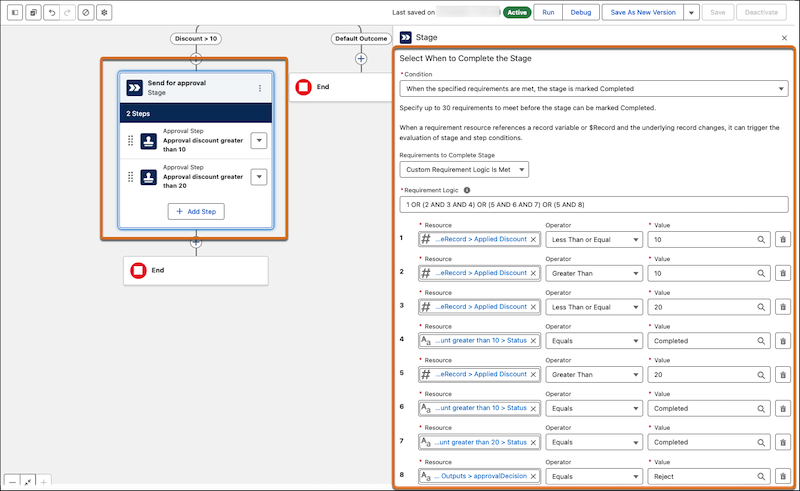
To resolve this, you must define a smarter exit condition. In the Stage element, change the
condition to When the specified requirements are met, the stage is marked
Complete. This allows you to define the exact logic for when the stage should be
considered complete by accounting for every possible scenario.
You can apply this logic by following steps as detailed in the Example: Configure an Approval Workflow topic with the
values from this example. But, when you’re creating an approval stage, combine these three
cases into a single custom requirement. The stage is marked complete when ANY of the following
logic blocks is true:
Discount <= 10%. No approvals are necessary.
(OR)
(Discount > 10% AND Discount <= 20% AND Step 1 review is approved) Step 2 approvals
aren’t necessary here.
(OR)
(Discount > 20% AND Step 1 AND Step 2 reviews are complete)
(OR)
(Discount > 20% AND Step 1 review has been rejected) Step 2 approvals aren’t necessary
here.
The logic should look like this.
Did this article solve your issue?
Let us know so we can improve!
Loading
Salesforce Help | Article
Cookie Consent Manager
General Information
Required Cookies
Functional Cookies
Advertising Cookies
General Information
We use three kinds of cookies on our websites: required, functional, and advertising. You can choose whether functional and advertising cookies apply. Click on the different cookie categories to find out more about each category and to change the default settings.
Privacy Statement
Required Cookies
Always Active
Required cookies are necessary for basic website functionality. Some examples include: session cookies needed to transmit the website, authentication cookies, and security cookies.
Functional Cookies
Functional cookies enhance functions, performance, and services on the website. Some examples include: cookies used to analyze site traffic, cookies used for market research, and cookies used to display advertising that is not directed to a particular individual.
Advertising Cookies
Advertising cookies track activity across websites in order to understand a viewer’s interests, and direct them specific marketing. Some examples include: cookies used for remarketing, or interest-based advertising.