
You are here:
Milestone Billing Example
Explore an example that shows how milestone billing ties invoices to project progress. Structured invoicing at key delivery points improves revenue accuracy, builds customer trust, and supports financial planning.
Required Editions
| Available in: Lightning Experience |
| Available in: Enterprise, Performance, Unlimited, and Developer Editions with the Revenue Cloud Billing license. Contact your Salesforce account executive for more information. |
ABC Corp has engaged TechBuild Solutions to design a customized software platform within 6 months. The project consists of four phases, each with clear deliverables and timelines. ABC Corp started billing for the order on January 1, 2025. To meet the billing requirements, TechBuild has adopted milestone-based billing, invoicing ABC Corp only after completing each milestone.
- Milestone 1 - Requirement Gathering and Planning: 25% of total project fee, invoiced after planning is completed. The date of this milestone completion isn’t known in advance.
- Milestone 2 - Design and Prototype: 20% of total project fee, invoiced after client approval of design. The date of this milestone completion isn’t known in advance.
- Milestone 3 - Development: 30% of total project fee, invoiced after delivery of the functional prototype. The date of this delivery is scheduled as 4 months after the billing schedule start date.
- Milestone 4 - Testing and Deployment: 20% of total project fee, invoiced after successful deployment and sign-off. The date of this milestone completion is 6 months after the billing schedule start date.
- The remaining 5% is billed when all the milestones are invoiced.
Method 1: Create a Billing Treatment and Specify Billing Treatment Items for Each Milestone
You can edit the billing milestone plans for individual order products without impacting the billing treatment.
- Billing Treatment: Default Milestone Treatment
- Status: Draft
- Enable milestone billing: Selected
Then, create the billing treatment items for the billing treatment.
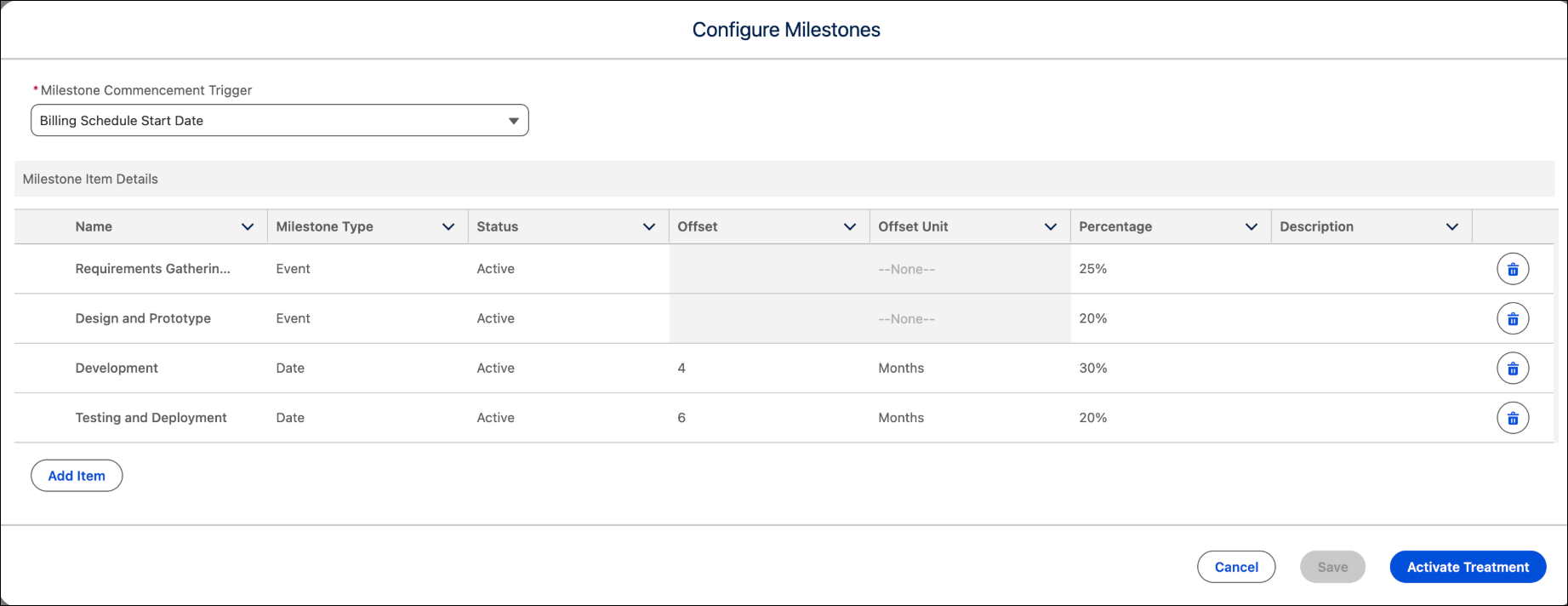
After you activate the associated order, a billing milestone plan is automatically created and linked to the order product's billing schedule. To modify the created milestone plan, change its status from active to draft. You can then modify the Milestone Type, Milestone Commencement Trigger, Milestone Commencement Offset, Milestone Commencement Offset Unit, Percentage, Flat Amount, and Milestone accomplished fields on the milestone plan items. When the milestone plan is active, you can only update the Milestone accomplished field to mark the successful completion of an event.
Method 2: Create a Billing Milestone Plan and Define Milestone Plan Items for the Order Product
The total price of the order product is US$10000, with each milestone amount calculated based on its percentage value. Using the same attributes that you used in method 1 to create billing treatment items, create the billing milestone plan items. After you create them, set the status of the billing milestone plan items to draft and save them. The milestone amount is automatically distributed based on the distribution method value.
- Requirement Gathering and Planning milestone amount: $2500
- Design and Prototype milestone amount: $2000
- Development milestone amount: $3000
- Testing and Deployment milestone amount: $2000
A fifth billing milestone plan item with the remainder of the 5% with milestone amount of $500 is automatically generated after you activate the associated billing milestone plan. The status of the billing milestone plan items is automatically changed to the Waiting for Milestone Accomplishment status.
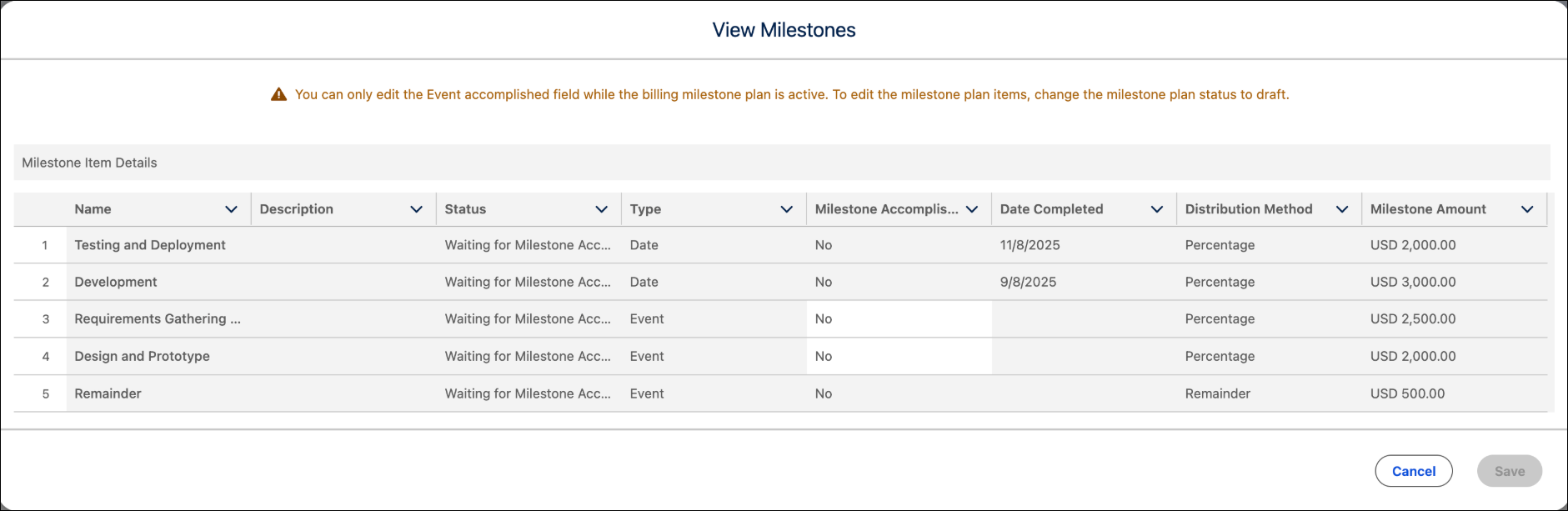
For example, the requirement gathering and planning milestone is finalized 2 months after the billing schedule start date. At this stage, the billing admin can manually mark the milestone as completed. When you save the milestone plan item, its status changes from Waiting for Milestone Accomplishment to Ready for Invoicing, and the milestone completion date is recorded. When the billing schedule is processed for invoicing, an invoice line is generated for the first milestone plan item, charging 25% of the total billable amount. At this point, the status of the milestone changes to Invoiced.
The remainder billing milestone plan item is always invoiced with the final milestone. If the final milestone is an event billing milestone plan item, the milestone type for the remainder line is updated to event.
