
You are here:
How to Bring External Data into Business Rules Engine
Review the methods and processes to bring data from your external systems into Business Rules Engine, and choose the method that best suits your business requirements.
Role of Business Rules Engine
Business Rules Engine doesn't inherently provide processes or methods to fetch external data. Instead, it offers components such as lookup tables and expression sets that you can use to perform complex lookups and calculations, and create business rules. Before you invoke Business Rules Engine components, use other Salesforce products and services to extract data from external sources.

Based on the architecture that you've designed for your digital processes, choose one of these methods to bring external data into Salesforce and run rules by using Business Rules Engine.
Method 1: Use Salesforce Flow
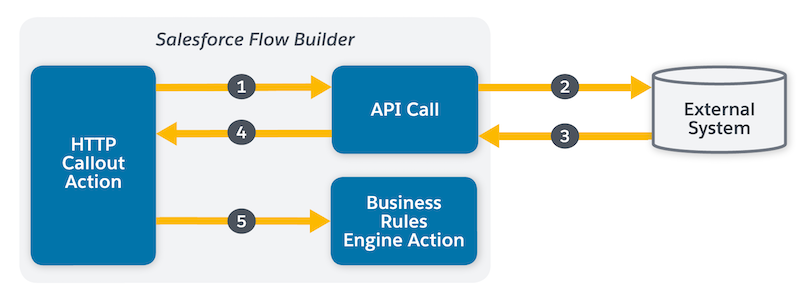
If you want to use Salesforce Flow to automate your business processes and need external data to run rules by using Business Rule Engine, create an HTTP callout action that calls a web-based service API. You can do this in Flow Builder without code. After you add the API details, Flow Builder generates a reusable callout action that you can use right away in Flow Builder. You can also edit an HTTP callout action declaratively and configure the inferred data structure. The API call fetches the data from your external system and makes it available in flow. Then, use an action element in flow to invoke Business Rules Engine components such as expression sets and lookup tables, and pass the data to these components. See HTTP Callout.
Method 2: Use Salesforce Custom Object
Create a Salesforce custom object and fields, and upload your external data as CSV files. You can also use any of the other data import methods available to sync data between your external systems and Salesforce custom object. Then, use the data from the custom object to run rules in Business Rules Engine. See Salesforce Data Import.
Method 3: Use Omnistudio Integration Procedures
Omnistudio Integration Procedures can read and write data from external systems via REST calls. Both Omniscripts and Integration Procedures can invoke Business Rules Engine components and pass external data to them, but the process differs slightly for each.
- Integration Procedures: Fetch external data via REST calls, then invoke Business Rules Engine components and pass the data to these components.
- Omniscripts: Call an Integration Procedure to fetch external data, then invoke the Business Rules Engine components and pass the data to these components.
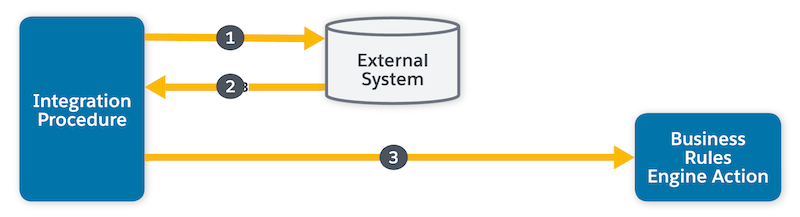
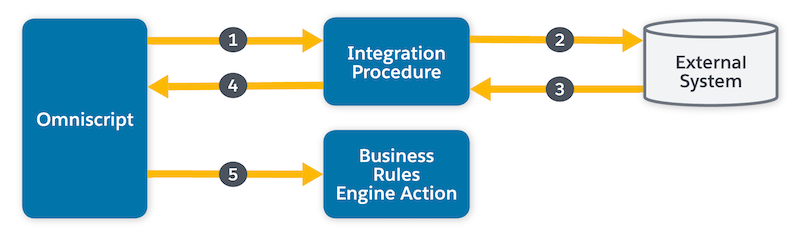
There are prebuilt integrations with Business Rules Engine components that you can call from an Omniscript or Integration Procedure with invocable actions. See Omnistudio Integration Procedures.
Method 4: Use MuleSoft Integration
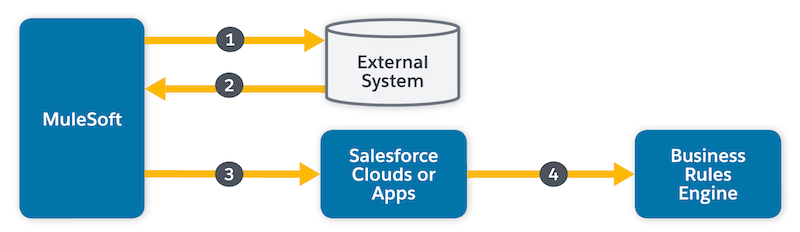
You can use MuleSoft Integration to bring data from outside Salesforce into the Business Rules Engine. Create a flow in your MuleSoft application that connects to the external system and retrieves the necessary data. Then, use any of the Salesforce Cloud processes or apps to call the external data from MuleSoft and pass it to Business Rules Engine. With MuleSoft, you can automate data flow from external systems into Business Rules Engine and create business rules to process the data according to your business logic. See MuleSoft Documentation.
Method 5: Use Apex
If you have a custom integration scenario that requires precise control over how you fetch, transform, and insert data into Salesforce, use Apex to create custom integrations with external systems. You can use Apex to call external APIs, retrieve data, and insert or update records in Salesforce. In Apex, you can use the Invocable namespace feature to invoke expression set and lookup table actions. Invocable Namespace contains the required classes and methods to invoke actions from Apex. To know more about invoking Business Rules Engine components in Apex, see Invocable Actions.
Method 6: Use Data Cloud and Context Service
Data Cloud is an integrated platform to bring together data from disparate sources. Use connectors to ingest external data into Data Cloud. Then, use Context Service to map the xml data from Data Cloud to Business Rules Engine at run time and run business rules. To explore how external data is ingested into Data Cloud, see Connect an External Data Source to Salesforce Data Cloud.

