
You are here:
How Business Rules Engine and Salesforce Flow Enhance Digital Process Automation
Discover how Business Rules Engine and Salesforce Flow work together to enhance decision-making and reduce the complexity of your automation workflow. Salesforce Flow is a powerful tool for automating processes and defining business logic. Business Rules Engine offers distinct advantages for handling complex, dynamic rule-based decision-making at scale. Business Rules Engine complements Salesforce Flow for managing advanced rule-based logic.
Required Editions
| Available in: Lightning Experience |
| Available in: Enterprise, Unlimited, and Developer Editions for clouds that have Business Rules Engine enabled |
Business Rules Engine offers specialized and scalable solution for managing complex business rules. It helps increase performance, flexibility, and governance of your workflow process, which is difficult to achieve through Salesforce Flow alone. Learn more about how Business Rules Engine features work with Salesforce Flow to increase efficiency of your digital workflows.
Simplistic and Declarative Approach
Business Rules Engine is specifically designed to simplify the complex decisioning process and create business rules declaratively. Business Rules Engine is a prebuilt extension to Salesforce Flow for creating and maintaining business rules. Move all your decisioning steps to Business Rules Engine and call them in Salesforce Flow by using an action element. This integration reduces the steps in Salesforce Flow, thereby simplifying your workflow. Business users can use Business Rules Engine to easily define complex rules by using the no-code interface.
Business Rules Engine provides a simple and intuitive visual builder tool called expression sets to set up rules. It also includes compact and user-friendly lookup tables, for example, a decision matrix and decision table that you can use to create conditions and actions in a tabular format. These lookup tables are easy to maintain and update. A decision table can contain thousands of rules in a single object. In Salesforce Flow, to achieve the same result, you need to create several decision nodes. You can also simulate your rules in the visual builder tool to test your decisions and verify the results.
Reusability Across Multiple Processes
Create reusable rules in Business Rules Engine that you can apply to different objects and applications. Instead of creating the same rule multiple times for all the different processes, define it once in Business Rules Engine and then use it wherever you need it.
Business Rules Engine enables you to create and maintain rules in a dedicated workspace without interfering with the Salesforce Flow logic.
Example: An energy company uses a Business Rules Engine rule to manage clean energy discount calculations that apply to multiple processes. When they modify a rule, the changes are automatically updated in all the processes where the rule is used.
Design Agility
Business Rules Engine can easily adapt to changes. To give you more flexibility, it separates the change management process of business rules from that of your workflow. With Business Rules Engine, you can quickly create, modify, and deploy rules to automate decision-making without the need for coding or lengthy development cycles. Your workflow design becomes more challenging and time-consuming when the complexity of the rules grows if you’re creating it entirely in Salesforce Flow.
With Business Rules Engine, you can quickly test and deploy any changes to rules. You can roll out new rules or updates based on shifting market conditions, competition, or customer feedback in a matter of hours or even minutes. This flexibility means businesses can reduce longer implementation timelines, and stay agile and competitive in dynamic environments.
Centralized Management of Business Rules
Business Rules Engine centralizes rule management so that you can create, update, or delete rules from a single location instead of doing it individually for each process. You can also govern the rules centrally with specific user access control, which enhances security and consistency. This centralized rule management helps you to use the same rules across different departments or processes. To call the rules in a flow, use an invocable action.
In Salesforce Flow, business rules are often embedded within individual flow frameworks, which makes it time-consuming to keep workflows consistent when you use the same rule across multiple flows. The rule data and framework are separate in Business Rules Engine. With Business Rules Engine, you can refer to and maintain rules more easily from a centralized repository.
User Roles and Permissions Management
Business Rules Engine gives you control over user permissions and profiles for designing and running business rules. It provides access management that lets you specify who can view, create, or update expression sets and decision tables. You can also govern access to Business Rules Engine objects through permission sets and criteria-based sharing. This access control ensures that only selected users have view or edit access to a particular component.
Simplify Decision-Making in Salesforce Flow Example
Review an example to see how Business Rules Engine handles the decision-making process and helps simplify Salesforce Flow.
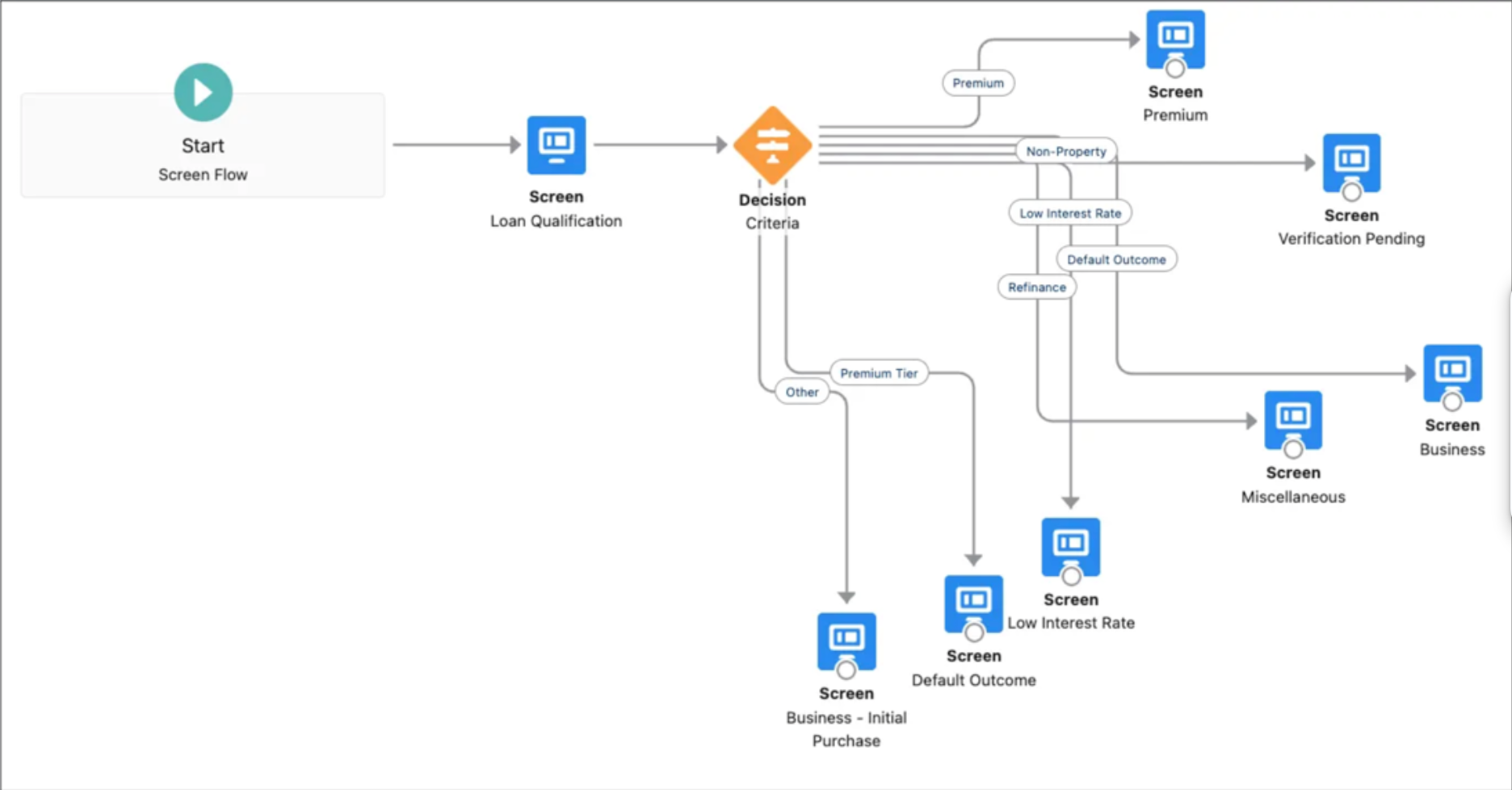
First, let's look at the scenario where you build complex decisions in Salesforce Flow without Business Rules Engine. When you create business rules in Salesforce Flow, it often involves adding multiple elements and branches that make the flow quite detailed. For larger workflows, building rules in Salesforce Flow can become intricate, making it challenging to add new processes or make edits to existing ones. While Flow provides powerful capabilities, managing complex rule configurations in Business Rules Engine ensures ease of design and maintenance.
Next, let's look at the scenario where you build complex decisions in Salesforce Flow with Business Rules Engine. To simplify your flow and make it efficient, create your rules in Business Rules Engine. Use the lookup tables and expression set components in Business Rules Engine to create your rules declaratively by using an intuitive UI. Then invoke the rules in Salesforce Flow by using an action element. When you transfer your decisioning steps to Business Rules Engine, you reduce the overall number of workflow steps in the flow. This makes your flow simpler and lighter. You can then use Salesforce Flow efficiently for larger workflow processes.
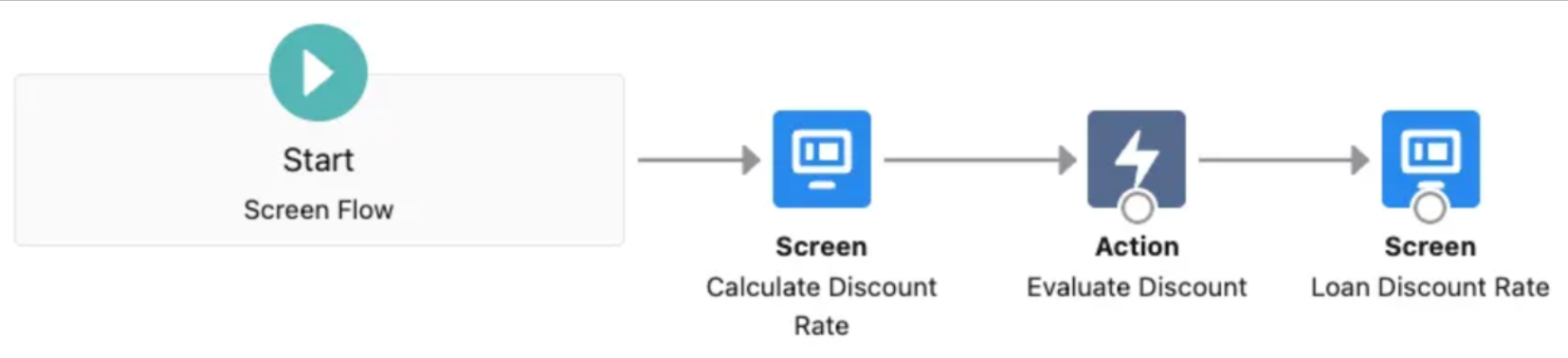
In conclusion, use Salesforce Flow to create your primary workflow processes and Business Rules Engine to configure your business rules to efficiently manage your overall workflow automation.
