
You are here:
Lookup Table
A lookup table step element matches your input values with the input rows in a decision matrix or a decision table. The table then returns the matching row’s output to the expression set version that the table is used in.
Required Editions
| Available in: Lightning Experience |
| Available in: Enterprise, Unlimited, and Developer Editions for clouds that have Business Rules Engine enabled |
A lookup table element can look up a decision matrix or a decision table. Only active decision tables and active decision matrices with at least one active version can be selected for lookup. If you select a decision matrix that has multiple active versions, the active version with the highest rank is considered.

The discount eligibility criteria are defined in a decision matrix. The matrix’s input columns capture the age range and family income level, and the output column captures the discount eligibility based on the age and family income.
Based on the outcome of the decision matrix lookup, the designer further calculates the discounted base fare for eligible citizens.
Here’s how the rule designer uses the lookup table element and the conditional group element in the expression set version.
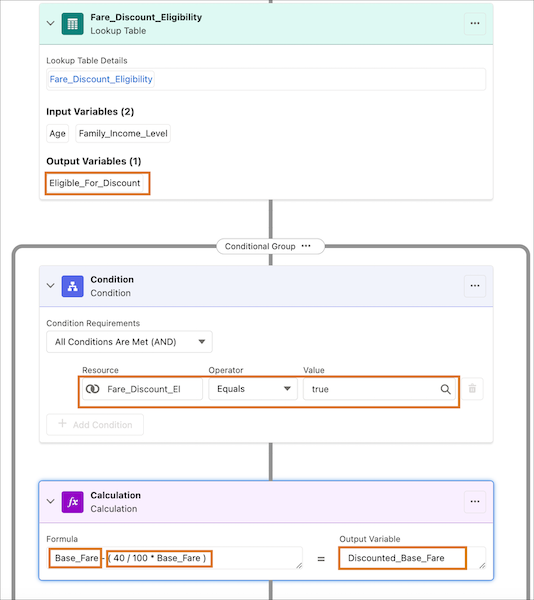
Here, the expression set version looks up the decision matrix, and updates the value of the Eligible_For_Discount variable as true or false based on the input values. The conditional group uses the Eligible_For_Discount variable to define the condition that determines whether a discounted base fare is to be calculated. The calculation step calculates the discount if the value of the Eligible_For_Discount variable is true.
- Variable Mapping in Lookup Tables
When you add a lookup table element step in an expression set version, the input and output variables in the table are imported into the version. You can then map the table’s variables to the resources from the expression set version. When you map the lookup table’s resources to the resources from the expression set version that the table is used in, a clear alignment between the two types of resources is established. This alignment simplifies the process of building an expression set. For example, you can map the output variable of a step that precedes a lookup table step to the input variable in the lookup table. With this mapping, the output of the previous step is automatically passed to the subsequent lookup table as the input. - Lookup of Multiple Input Values
When you add a lookup table to an expression set version that is associated with a context definition, you can map the table’s input variables to list variables from the definition. With this mapping, you can look up multiple values in the list variable at the same time and get their corresponding output values.
