Loading
Business Rules Engine
Table of Contents
Select Filters

          No results
          No results
          Here are some search tips

          Check the spelling of your keywords.
          Use more general search terms.
          Select fewer filters to broaden your search.

          Search all of Salesforce Help
          Variable Mapping in Lookup Tables

          Variable Mapping in Lookup Tables

          When you add a lookup table element step in an expression set version, the input and output variables in the table are imported into the version. You can then map the table’s variables to the resources from the expression set version. When you map the lookup table’s resources to the resources from the expression set version that the table is used in, a clear alignment between the two types of resources is established. This alignment simplifies the process of building an expression set. For example, you can map the output variable of a step that precedes a lookup table step to the input variable in the lookup table. With this mapping, the output of the previous step is automatically passed to the subsequent lookup table as the input.

          Required Editions

          Available in: Lightning Experience
          Available in: Enterprise, Unlimited, and Developer Editions for clouds that have Business Rules Engine enabled
          Note
          Note An expression set can read only one result even if an object-based decision table provides multiple results. So, if you plan to use the decision table in an expression set, while creating the decision table, set Filter Result By to First Match or Any Value, which are both specific to single values.

          After you select a lookup table in an expression set version, and the table’s variables are imported into the version, here’s how the mapping works:

          Scenario Mapping Behavior
          A lookup table is used in one lookup table step in the expression set version and one or more table variables are mapped to the version resources

          The table variables that are mapped to the version resources are removed from the resources list.

          If the mapping is removed, the imported variables reappear in the resources list.

          A lookup table is used in more than one lookup table step in the expression set version, but the table variables are mapped to the version resources in only one of the steps The resource list shows both the imported variables and the expression set version resources that the variables are mapped to.
          Example
          Example Anne, a rule designer, creates an expression set version to determine the eligibility of citizens for a discount on the base fare for public transport, based on their age and family income level. She defines Citizen_Birthdate and Citizen_Age as the local resources in the version. Anne uses a calculation step element to get the citizen’s age from their birth date. She then uses a lookup table step to determine a citizen’s discount eligibility based on certain parameters. Here’s how she configured the decision matrix that she uses in the lookup table step.
          Column Name Column Type Data Type
          Age Input Number range
          Family_Income_Level Input Text
          Eligible_For_Discount Output Boolean
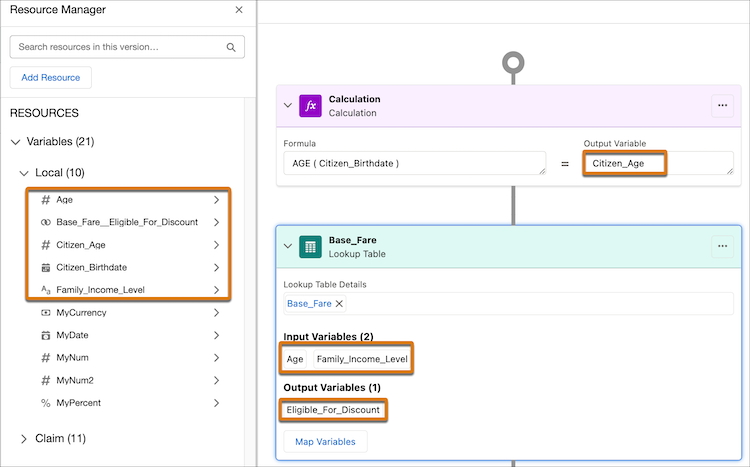
          Resource list before mapping lookup table variables

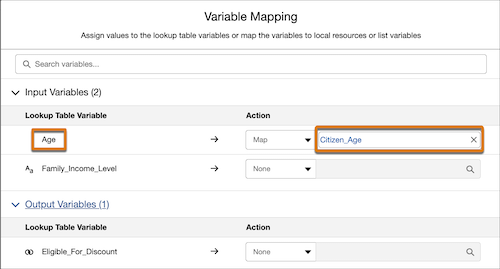
          In this example, the table’s input variables Age and Family_Income_Level, and the output variable Base_Fare_Eligible_For_Discount are imported in the version and appear as local resources in Resource Manager. To pass the value of the Citizen_Age variable from the calculation step to the Age column in the lookup table, Anne clicks Map Variables in the lookup table step. She then maps the imported input variable Age to Citizen_Age.

          Variable mapping window

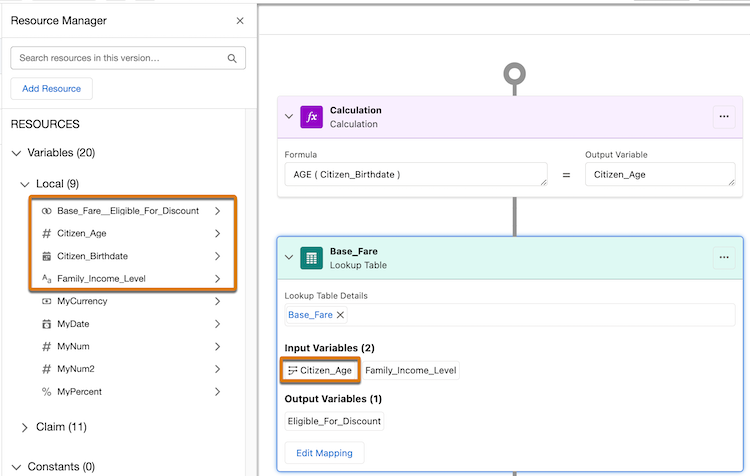
          Because of the mapping, the imported lookup table variable Age is removed from the resource list, and the lookup table step replaces the table’s input variable Age with the mapped resource Citizen_Age.

          Resource list after variable mapping

          Considerations for decision tables that return multiple outputs

          When configuring an expression set to handle multiple outcomes from a decision table, ensure your variable mapping adheres to these architectural requirements to avoid errors during activation or execution:

          • Map at least one input parameter to a context tag.
          • Input parameters must be mapped to attributes at the same hierarchical level or different levels within the same node.
          • If any input parameter is mapped to a context tag, then all output parameters must also be mapped to context tags.

          If the lookup step is placed inside a List Filter, additional rules apply:

          • At least one input must be mapped to a tag at the same level as the List Filter's current level.

          • All outputs must be mapped to local list variables from the immediate child node of the List Filter's level, and all selected output tags must belong to that same node.

          Output Parameter Validations

          • Output parameters must be mapped to tags that are immediate children of the node used for the lowest-level input tag.

          • All mapped output parameters must belong to the same hierarchical level and the same record type to ensure data integrity across the multiple outcomes.

           
          Loading
          Salesforce Help | Article