
You are here:
Business Rules Engine
Simplify determining eligibility or qualification and automate complex decision-making to find solutions faster using Business Rules Engine. The key components of Business Rules Engine are expression sets and lookup tables. Decision matrices and decision tables together constitute lookup tables.
Required Editions
| Available in: Lightning Experience |
| Available in: Enterprise, Unlimited, and Developer Editions for clouds that have Business Rules Engine enabled |
Use a Business Rules Engine component or a combination of components to design business rules to provide automated business solutions in a workflow created using any tool. Business Rules Engine is a suite of services, components, and objects that can be used to create business rules that perform complex lookups and calculations.
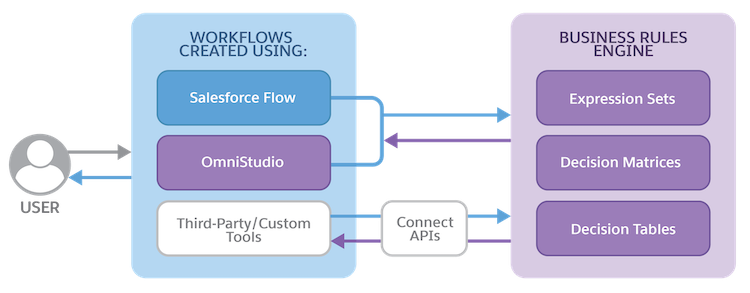
Business Rules Engine components are available as part of Flows and Omnistudio. Also, you can use Connect APIs to integrate Business Rules Engine with any workflow created using custom or third-party tools. The workflow that you use to gather inputs passes the inputs to Business Rules Engine, which then returns the outcome to the workflow that called the Business Rules Engine component.
How Business Rules Engine Components Integrate with Workflow Tools
Here's how the components in Business Rules Engine integrate and interact with workflows that are created using various tools and processes.
| Workflow Tool or Process | Business Rules Engine Integration |
|---|---|
| Flow | Expression sets, decision matrices, and decision tables, which are components of Business Rules Engine, are available as actions in Flow. Invoke decision matrices and decision tables as part of an expression set that you invoke in a flow, or independently in flows. |
| Omnistudio | Expression sets and decision matrices are available as actions in Omnistudio. If Business Rules Engine is available for your cloud and you also have Omnistudio enabled, you can call Expression Set Action and Decision Matrix Action from Integration Procedures and OmniScripts. |
| Custom or third-party tools | Use the Connect APIs in Business Rules Engine to invoke expression sets and lookup tables in workflows that you create in custom or third-party tools. |
- Get Started with Business Rules Engine
Business Rules Engine lets you build powerful, scalable lookups and calculations to automate complex decisions. Rules created with Business Rule Engine are easy to maintain, and integrate directly with Flow, Omnistudio, and third-party workflow tools using connect APIs. - Learn and Explore
Learn how Business Rules Engine can help your business and customers. Understand its core functionality, create a trial org, and learn how to get started. - Plan and Prepare for Your Business Rules Engine Implementation
Explore some key concepts and considerations before you implement Business Rules Engine in your org. - Business Rules Engine Setup
Configure your users to use Business Rules Engine and assign permission sets so that the users can access expression sets and lookup tables. - Decision Matrices
A decision matrix matches input values to a table row and returns the row's output values. Expression sets and various digital procedures can call decision matrices. Decision matrices accept JSON input from, and return JSON output to the digital processes that call the matrices. Decision matrices are useful for implementing complex rules in a systematic, readable manner. - Decision Tables for Business Rules Engine
Decision tables are complex lookup tables that read business rules with multiple inputs, and return multiple outputs for records in your Salesforce org, or for the values that you specify. Rules are records in a standard object, custom object, or a custom metadata type. - Expression Sets
Expression sets—the calculation engine of business rules—consist of a series of steps connected in a logical flow built from variables, constants, conditions, calculations, lookups, and aggregations. Expression sets accept JSON input from and return JSON output to the digital processes that call the sets. - Decision Explainer
Decision Explainer is a service that provides insights into why a business rule generated a specific result. - Business Rules Engine Integrations
Expression sets and lookup tables—the Business Rules Engine components—can be called from Flow and Omnistudio. You can also use Business Rules Engine Business APIs to call these components from workflows that are created by using third-party tools. - Calculation Matrix and Procedure Migration to Business Rules Engine
To use calculation procedures and calculation matrices from Omnistudio as Business Rules Engine components, migrate these Omnistudio components as expression sets and decision matrices. - Business Rules Engine Use Cases
Explore various use cases that shows how Business Rules Engine is used across different clouds. - Business Rules Engine Default Limits
Review the default limits for Business Rules Engine components and their usage. To raise any default limits, contact Salesforce Customer Support.
